
Which CPU offers the best performance for POS machines?
Jan 09, 2026If you’ve ever stood at a checkout counter watching a cashier tap a frozen screen while a line of customers grows restless, you know that POS performance isn’t just a technical spec—it’s a business lifeline. When it comes to the "brain" of your terminal, choosing the right CPU is a balancing act between raw speed, heat management, and long-term reliability.
So, which CPU actually offers the best performance for a POS machine in today's market? The answer isn't "the fastest one available." It’s the one that matches your specific workflow.
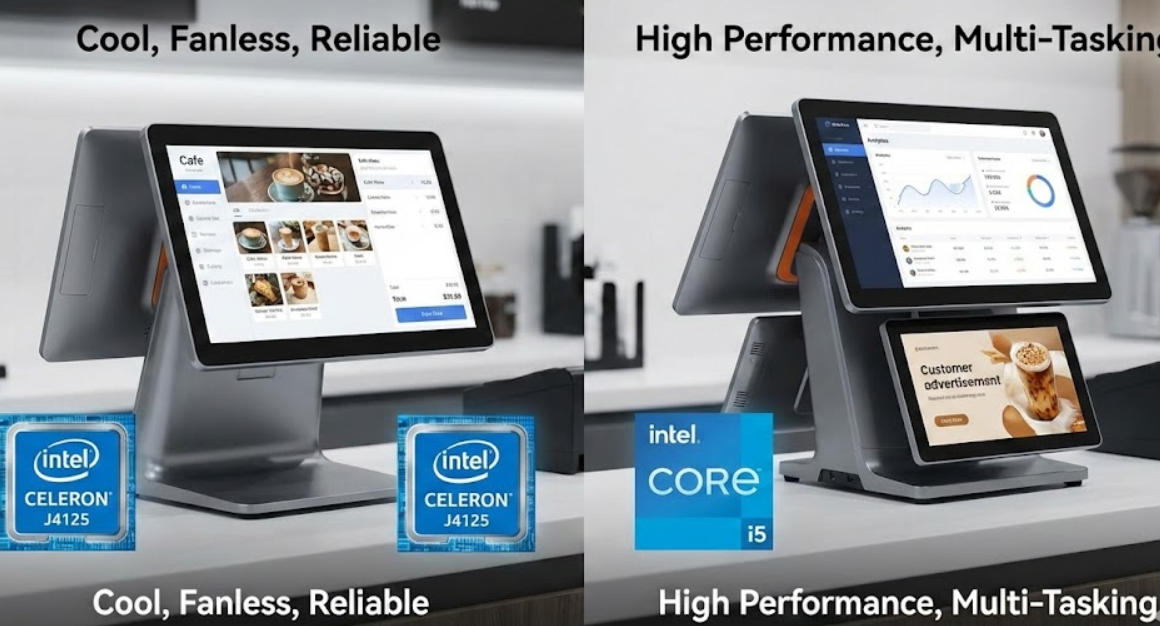
For 80% of retail and restaurant businesses, the Intel J4125 is the undisputed champion. If you look at the Aonpostech product lineup, you’ll see this chip featured frequently, and for good reason.
It’s a quad-core processor that handles Windows 10 and 11 with ease. It doesn't draw much power, which is the "secret sauce" for POS longevity. Because it stays cool, manufacturers can build fanless systems. In a busy kitchen or a retail shop with dust and fabric fibers, a fanless design means there are no moving parts to clog up and fail. You get a silent, stable machine that can run for years without an internal cleaning.
If your business does more than just "ring up items," you need to step up to the Core i3 or i5 series. Here’s when the extra horsepower actually matters:
Multi-Tasking: Are you running a local database, a loyalty program, and third-party delivery apps (like UberEats or DoorDash) all on one screen?
Dual Displays: If you use a high-resolution 15-inch customer-facing screen to show advertisements or videos (like the Aonpostech AP15D), a Celeron might stutter. An i5 ensures those videos play smoothly while the cashier continues to work.
AI and Analytics: Modern POS software often uses real-time analytics to suggest upsells. This requires a bit more "muscle" to keep the interface snappy.
In the world of POS, we care more about "Total Cost of Ownership" than benchmark scores. A CPU might be fast, but if it requires a massive cooling fan that sucks in flour or grease, it’s a liability.
Aonpostech terminals use industrial-grade motherboards and aluminum alloy housings. This isn't just for looks; the metal body acts as a giant heat sink for the CPU. This allows processors like the J4125 or even optimized i5 chips to perform at their peak without "thermal throttling"—the annoying slowdown that happens when a CPU gets too hot.
1. Is a faster CPU always better for my POS? Honestly? No. A high-end gaming-grade CPU would generate too much heat for a slim POS housing. The "best" performance comes from "Embedded" or "Mobile" class chips (like the J series or U series) because they are designed to stay on 24/7 without overheating.
2. How much RAM should I pair with my CPU? A great CPU is wasted if it doesn’t have enough memory. For a J4125 system, we recommend at least 8GB of RAM. This allows the CPU to swap between your sales software and your inventory backend without the dreaded "spinning wheel" of lag.
3. Does the CPU affect payment processing speed? Not directly. Payment processing is usually limited by your internet speed or the encryption hardware in your card reader. However, a slow CPU will make the app feel sluggish, making it seem like the payment is taking longer than it actually is.
4. Why do many POS systems still use "older" Celeron chips? It's about stability. In the POS world, we value Long-Term Support (LTS). These chips are guaranteed to be manufactured for 7 to 10 years, ensuring that if you buy 10 machines today and need one more in three years, the hardware and software drivers will be identical.
If you want the best performance for a standard retail or cafe environment, go with the Intel J4125. It’s the most cost-effective, reliable, and "cool-running" option. However, if you are running a high-end restaurant with dual screens and integrated AI tools, investing in an Intel Core i5 system is a smart way to future-proof your business.
Tel / Whatsapp : +86 -15999943922
Correo electrónico : nikki@aonpostech.com


© 2026 Tecnología Co., Ltd de Shenzhen Aonpos .Reservados todos los derechos