Aonpos todo en una posición
  • POS for Fruit & Vegetable Markets: The Complete Hardware Buying Guide for Fresh Produce Retailers
    POS for Fruit & Vegetable Markets: The Complete Hardware Buying Guide for Fresh Produce Retailers Jul 27, 2026
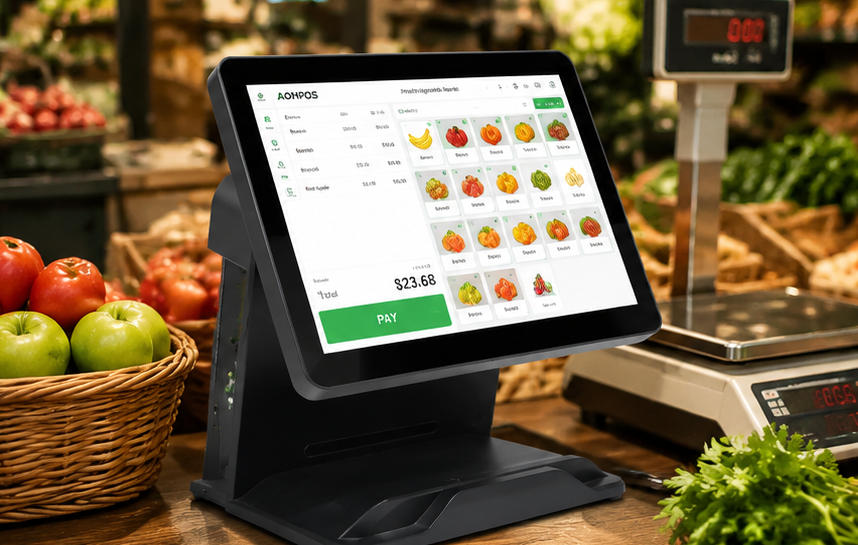
    Fruit and vegetable markets have very different checkout requirements from conventional retail stores. Many products are sold by weight rather than by unit, prices change frequently, and cashiers must process loose produce, packaged food, promotional bundles, and reusable bags within the same transaction. The checkout environment can also be demanding. Moisture, dust, leaves, labels, and continuous customer traffic are common around the counter. During busy periods, even a small delay in weighing produce, finding a product code, or entering a price can create long queues. A well-designed POS for Fruit & Vegetable Markets connects weighing, product identification, pricing, payment, and sales reporting in one efficient workflow. Whether the business is an independent greengrocer, farmers’ market stall, organic food shop, wholesale produce outlet, or multi-location fresh-food chain, choosing the right POS hardware can improve checkout speed and reduce avoidable errors. This guide explains the essential hardware, integration requirements, and purchasing considerations for building a reliable produce-market POS solution. Why Fruit and Vegetable Markets Need a Specialized POS Fresh-produce retail combines high transaction frequency with constantly changing products and prices. A cashier may process loose apples sold by weight, prepacked berries with a barcode, herbs sold by bunch, discounted ripe fruit, and bottled juice in one order. Each product can require a different identification or pricing method. Produce prices may also change according to season, supplier cost, origin, quality grade, ripeness, or remaining shelf life. Stores often need to update prices quickly or apply end-of-day markdowns to reduce waste. A suitable POS system should help the business: Enter weighed and unit-priced products quickly. Connect with electronic scales and label printers. Support PLU codes, barcodes, and touchscreen shortcuts. Apply discounts and price changes accurately. Accept cash, card, mobile, and contactless payments. Show weights, prices, discounts, and totals to customers. Record sales by product, category, time, and location. Operate reliably throughout long and busy trading periods. The objective is not simply to replace a traditional cash register. It is to create a complete checkout workstation designed around the practical realities of selling fresh food. Essential Features of a POS for Fruit & Vegetable Markets 1. Electronic Scale Integration Weight-based selling is one of the most important requirements in produce retail. The POS should connect to a compatible commercial scale so that the measured weight can be transferred directly into the transaction. Automatic weight transfer reduces manual input and lowers the risk of cashiers entering an incorrect quantity. It also makes the checkout process faster, particularly when customers purchase several types of loose produce. Depending on the store layout, scales may be installed: Directly beside the cashier. In a self-service weighing area. At a produce preparation counter. In a wholesale packing or dispatch area. Some stores weigh products and print barcoded labels before checkout. Others calculate the final price only when the customer reaches the cashier. Before purchasing POS hardware, buyers should confirm the scale protocol, interface, software compatibility, and local legal metrology requirements. Common connections include USB, serial, and network interfaces. A POS terminal with sufficient ports provides greater flexibility when integrating scales and other peripherals. 2. Fast Touchscreen Product Lookup Not every fruit or vegetable carries a barcode. Cashiers often identify loose produce through PLU codes, category menus, or visual product buttons. A responsive touchscreen can display commonly sold items as large, recognizable shortcuts. Products may be grouped into categories such as: Citrus fruit. Apples and pears. Berries. Leafy vegetables. Root vegetables. Herbs. Organic produce. Imported products. Prepacked goods. Seasonal bestsellers can be placed on the first screen, reducing the number of taps required to complete a transaction. A commercial AONPOS touch point-of-sale computer provides a responsive interface for product selection, quantity entry, discount application, and payment processing. In a high-volume produce shop, screen responsiveness and menu clarity are usually more valuable than unnecessary decorative features. 3. Barcode and Label Support Loose produce may rely on PLU codes, but fruit and vegetable markets often sell many barcoded products as well. These can include: Prepacked salads. Bottled juices. Dried fruit and nuts. Sauces and preserves. Packaged herbs. Prepared vegetable mixes. Organic or premium produce packs. A scanner should read standard retail barcodes quickly and reliably. Stores using QR codes for product traceability, promotions, loyalty programs, or mobile payments may benefit from a 2D barcode scanner. Label printing is equally important for businesses that weigh and package produce before checkout. A printed label can contain the product name, weight, unit price, total price, packing date, origin, and barcode. The POS workstation should provide stable connections for scanners and label printers without creating excessive cable clutter around the counter. 4. Flexible Pricing and Discount Management Fresh produce does not always follow a fixed-price retail model. Prices may change because of seasonality, supplier availability, quality, ripeness, or remaining shelf life. A suitable POS application should allow authorized staff to update prices and create temporary promotions without rebuilding the entire product database. Useful pricing functions may include: Percentage discounts. Fixed-amount reductions. Multibuy offers. End-of-day markdowns. Loyalty-member pricing. Manager-approved price overrides. Promotional bundles. Different prices for different quality grades. The hardware must support these workflows with a clear display, responsive input, and secure access to management functions. A customer-facing screen can show the product name, weight, price per kilogram, discount, and final total. Allowing customers to verify this information before payment can improve transparency and reduce disputes. 5. Multiple Payment Options Fruit and vegetable markets serve a broad range of customers, so payment flexibility is important. A complete checkout station may need to support: Cash. Credit and debit cards. Contactless cards. Mobile wallets. QR-code payments. Gift cards. Local payment methods. The POS terminal should offer enough connectivity for the payment terminal, cash drawer, receipt printer, scale, scanner, and optional customer display. A permanent retail store may benefit from a full-size dual-screen checkout. A farmers’ market stand or mobile produce seller may need a more portable configuration. For flexible selling environments, the AONPOS smart handheld POS terminal provides a compact option for mobile payments, outdoor stalls, delivery services, and temporary checkout points. Recommended POS Hardware Components All-in-One Touchscreen POS Terminal The all-in-one terminal is the central component of the checkout station. It combines the computer, display, and touchscreen in one enclosure, reducing counter clutter and simplifying installation. For a fixed fruit and vegetable shop, a 15-inch screen normally provides enough space for visual product buttons, transaction details, and management functions. The AONPOS POS system range includes configurable commercial terminals for different retail layouts and software environments. When evaluating an all-in-one terminal, buyers should consider: Processor compatibility with the POS software. Available memory and storage. SSD capacity. Operating-system support. Number and type of I/O ports. Touchscreen technology. Screen brightness and viewing angle. Stand stability. Maintenance accessibility. Customer-display options. The correct specification depends primarily on the software and peripheral requirements. Purchasing the most powerful processor is not always necessary, but choosing insufficient memory, storage, or connectivity can limit future expansion. Commercial Electronic Scale The scale should be approved for retail trade in the target market and compatible with the selected POS software. Important factors include accuracy, maximum capacity, readability, calibration support, communication protocol, and ease of cleaning. A removable weighing tray can make daily sanitation more convenient. The counter should position the scale where employees can place produce naturally. Staff should not need to repeatedly lift bags across the scanner, payment terminal, or other equipment. Barcode Scanner A presentation scanner is suitable for a busy fixed checkout because employees can pass products in front of it with minimal movement. A handheld scanner offers more flexibility when scanning large bags, crates, boxes, or products that are difficult to move across the counter. Some high-volume stores use both formats. Receipt and Label Printers Thermal receipt printers are widely used in retail because they print quickly, operate quietly, and do not require ink cartridges. Produce retailers should select a printer with easy paper loading and a cutter designed for frequent commercial use. Stores that weigh and package products before checkout may also require a separate label printer. Before deployment, confirm: Label size. Barcode readability. Print resolution. Driver compatibility. Interface type. Software template support. Cash Drawer and Customer Display Cash remains important in many produce markets. The cash drawer should fit securely under or beside the counter and connect correctly to the receipt printer or POS terminal. A customer display provides additional transparency during weighed transactions. It allows shoppers to see the selected product, measured weight, unit price, discount, and total. A second screen can also display seasonal offers, membership messages, product origins, or promotional content. Businesses comparing display options can review the AONPOS guide to dual-screen and single-screen POS systems. Recommended Configurations for Different Market Types Small Independent Greengrocer A small neighborhood produce shop may only require: One touchscreen POS terminal. One connected scale. Barcode scanner. Receipt printer. Cash drawer. Payment terminal. The main priorities are simple operation, easy staff training, fast product lookup, and minimal counter clutter. An AONPOS desktop all-in-one POS terminal can provide a practical foundation for a permanent checkout that requires a full-size touchscreen and configurable hardware. Farmers’ Market Stall Portability is the primary consideration for an outdoor or temporary market stall. The operator may need a handheld POS, mobile payment acceptance, wireless connectivity, and a battery-powered printer. Because outdoor conditions are less controlled, buyers should also consider protective cases, stable equipment stands, spare batteries, mobile network reliability, and offline transaction capabilities. Every component should be easy to transport and quick to install at the beginning of the trading day. Supermarket Produce Department In a supermarket, the produce department normally forms part of a broader retail system. Hardware must integrate with centralized inventory, pricing, promotions, loyalty programs, and reporting. Scales and label printers may be positioned inside the produce department, while final payment takes place at the main checkout. High-volume environments benefit from commercial-grade terminals, fast scanning, customer-facing displays, and standardized peripheral connections. The AONPOS guide to grocery store POS hardware provides additional information for larger food-retail deployments. Wholesale Produce Market Wholesale businesses may sell by kilogram, carton, crate, pallet, or negotiated price. Their POS requirements can include account-based transactions, invoice printing, industrial-scale integration, warehouse connectivity, and larger order screens. A dual-screen configuration allows the buyer to confirm products, quantities, and prices while the operator prepares the order. Additional USB, serial, and network ports may be necessary for scales, scanners, document printers, and warehouse equipment. Multi-Location Produce Chain A multi-location retailer needs standardized hardware that can be reproduced consistently across every store. Using the same terminal specification simplifies: Software installation. Employee training. Peripheral integration. Spare-parts management. Remote technical support. Future store expansion. Before a large rollout, the buyer should test a complete pilot workstation. The test should include the POS terminal, scale, barcode scanner, printer, cash drawer, payment device, customer display, software, and network configuration. Testing only the terminal does not confirm that the complete checkout system will operate reliably. Reliability, Hygiene, and Counter Design Fresh-food retail can expose POS equipment to moisture, soil, dust, leaves, packaging materials, and frequent cleaning. Terminals should be installed away from direct water exposure. The surrounding counter should be easy to clean without requiring staff to disconnect the entire workstation. Cable management is particularly important. Loose cables collect dirt, make sanitation more difficult, and can be accidentally pulled during busy periods. Power and data cables should be routed securely beneath or behind the counter. The terminal stand should remain stable during rapid touchscreen operation. Ports should be accessible for maintenance but protected from accidental contact. Solid-state storage is generally preferable for commercial POS terminals because it has no moving parts and supports faster startup. Buyers should also confirm the availability of replacement power adapters, storage devices, displays, touch panels, and other service components. Confirm Software Compatibility Before Ordering Hardware A POS terminal cannot be selected independently from the software. The application determines the required operating system, processor, memory, storage, screen resolution, drivers, and peripheral interfaces. Before ordering, prepare a compatibility checklist covering: Supported Windows or Android version. Minimum CPU and memory requirements. Screen resolution. Scale communication protocol. Scanner and printer drivers. Payment-terminal integration. Required USB and serial ports. LAN and wireless connectivity. Cash-drawer interface. Offline operating requirements. Remote maintenance tools. AONPOS focuses on configurable POS hardware rather than restricting buyers to one software platform. This flexibility is useful for distributors and system integrators, but it also makes technical validation before production essential. OEM and ODM Options for POS Solution Providers POS distributors, software developers, and retail system integrators may need more than a standard off-the-shelf terminal. Project requirements can include: Custom logos and branding. Selected processor and memory combinations. Specific storage capacity. Modified I/O port configurations. Integrated customer displays. Magnetic-stripe, NFC, or identification modules. Customized operating-system images. Regional power adapters. Branded packaging. Matching scanners, printers, and cash drawers. A reliable hardware partner should help confirm technical requirements before mass production. The development process should include specification approval, sample testing, software installation, peripheral validation, packaging confirmation, and quality-control planning. As a professional POS hardware manufacturer, AONPOS provides all-in-one touch terminals and OEM/ODM services for international distributors, software providers, and system integrators. This allows solution providers to combine AONPOS hardware with their own software, scale integration, payment ecosystem, accessories, and brand identity. Final Checklist for Selecting a Produce-Market POS Before purchasing a POS for fruit and vegetable markets, test the complete transaction process under realistic working conditions. The test should include: Loose products sold by weight. Products sold by unit or bunch. Prepacked barcoded goods. Scale-generated labels. Price changes and discounts. Returns and voids. Cash and card payments. Receipt and label printing. Customer-display information. End-of-day reporting. Network interruptions. Peripheral disconnection and recovery. The best POS is not necessarily the system with the longest feature list. It is the system that helps cashiers identify products quickly, record weight accurately, apply the correct price, and complete transactions without unnecessary steps. For a small greengrocer, the ideal solution may be one touchscreen terminal connected to a scale and receipt printer. For a chain or wholesale operation, it may include standardized dual-screen workstations, multiple weighing points, mobile terminals, label printers, and customized hardware. By treating the POS as a complete operational workstation rather than simply a computer on the counter, fruit and vegetable retailers can shorten queues, reduce pricing mistakes, improve customer confidence, and build a more scalable foundation for future growth.
  • Liquor Store POS: How to Choose the Right Hardware for Your Business
    Liquor Store POS: How to Choose the Right Hardware for Your Business Jul 25, 2026
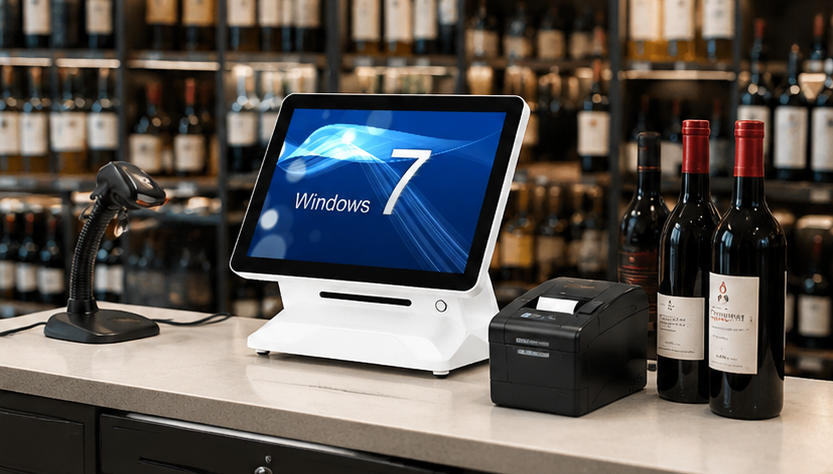
    Running a liquor store involves much more than accepting payments. Store operators must manage thousands of SKUs, scan bottles quickly, control inventory, process promotions, verify customer age, handle multiple payment methods, and keep checkout lines moving during busy evenings, weekends, and holidays. A reliable liquor store POS provides the hardware foundation for these daily operations. When combined with suitable retail software, the right POS configuration can help employees complete transactions faster, reduce input errors, improve stock visibility, and deliver a more professional customer experience. However, liquor retailers should not choose a terminal based only on appearance or price. Screen responsiveness, processor performance, peripheral compatibility, connectivity, durability, and expansion options all affect how well the system performs in a real retail environment. This guide explains the essential hardware components, important specifications, and purchasing considerations for building a dependable liquor store checkout system. What Is a Liquor Store POS? A liquor store POS is a combination of hardware and software used to process sales and support store operations. The hardware normally includes a touchscreen terminal, barcode scanner, receipt printer, cash drawer, payment terminal, and optional customer-facing display. The software manages functions such as: Product and price databases Inventory tracking Age-verification prompts Employee permissions Discounts and promotions Customer loyalty programs Purchase orders Sales reporting Multi-location management Although the software determines the available management features, the hardware determines how quickly and reliably employees can use those features. Retailers, software companies, distributors, and system integrators can explore the AONPOS POS system range when evaluating all-in-one touchscreen terminals for liquor store projects. Why Liquor Stores Need Specialized POS Hardware Liquor stores have several operational characteristics that make reliable POS hardware particularly important. Large Numbers of Barcoded Products A medium-sized liquor store may carry beer, wine, spirits, mixers, snacks, tobacco products, gift sets, and seasonal merchandise. Many categories include dozens or hundreds of variations based on brand, bottle size, vintage, flavor, package quantity, or alcohol content. Cashiers cannot search manually for every product. A fast barcode scanner is necessary to identify items immediately and add them to the transaction accurately. High Transaction Volume During Peak Periods Demand often increases during evenings, weekends, holidays, sporting events, and local celebrations. Slow terminals or unreliable scanners can quickly create long queues. The POS terminal must respond smoothly when cashiers scan multiple products, apply promotions, check identification, accept payment, and print receipts in rapid succession. Age-Restricted Sales Liquor retailers must follow the applicable age-verification rules in their market. The POS software may display age prompts, record confirmation, or integrate with an ID-reading device. The hardware therefore needs sufficient USB, serial, or other compatible connections for any verification equipment required by the store’s software and operating procedures. Complex Inventory Requirements Liquor retailers often purchase products by the case but sell them as individual bottles, packs, or full cases. Their POS software may need to recognize relationships between different package sizes and inventory units. Accurate barcode scanning and stable system performance help ensure each transaction is recorded correctly. This gives the inventory platform better data for reordering, stock counts, shrinkage analysis, and category management. Frequent Promotions Discounts may include mix-and-match offers, case pricing, member pricing, quantity discounts, seasonal packages, and supplier-funded promotions. A responsive touchscreen helps employees find promotions, verify conditions, and make corrections without delaying the customer. Essential Liquor Store POS Hardware A complete checkout station normally contains several connected components. Each device should be selected according to the store’s transaction volume, counter layout, software platform, and expansion plans. 1. All-in-One Touchscreen POS Terminal The terminal is the central component of the liquor store POS. It runs the retail application and connects to scanners, printers, displays, payment equipment, and other peripherals. An all-in-one terminal combines the computer, touchscreen, and mounting structure in one device. This arrangement uses less counter space and creates a cleaner installation than a traditional computer with a separate monitor and system unit. For most liquor stores, a 15-inch or 15.6-inch capacitive touchscreen provides a practical balance between visibility and counter-space efficiency. Cashiers can view product information, transaction totals, discount controls, and payment options without navigating an excessively crowded interface. When comparing terminals, evaluate: Processor options RAM capacity SSD storage Screen size and resolution Touch technology Operating-system compatibility Number and type of I/O ports Network connectivity Cooling design Stand stability Service accessibility AONPOS offers models with different processor, memory, storage, screen, and single- or dual-display configurations within its all-in-one POS terminal collection. Buyers should match these specifications to the requirements published by their POS software provider. 2. Barcode Scanner The barcode scanner is one of the most frequently used devices in a liquor store. It should read labels quickly even when bottles are curved, reflective, damaged, wet, or positioned at an awkward angle. A basic handheld scanner may be sufficient for a small specialty shop with moderate traffic. Higher-volume stores may benefit from an omnidirectional presentation scanner that allows employees to move bottles past the scanning window without carefully aligning each barcode. Important scanner considerations include: Support for common 1D and 2D barcode formats Scan speed Reading distance Ability to read damaged or low-contrast labels USB or serial connectivity Handheld and hands-free operating modes Stand design Drop resistance Compatibility with the POS software Retailers should test scanners with real products from their inventory. A demonstration using perfect labels on flat cartons may not accurately represent performance on glossy wine bottles or refrigerated products. 3. Thermal Receipt Printer A thermal printer produces customer receipts without ink cartridges or ribbons. It is widely used in retail because it is fast, compact, and relatively easy to maintain. For a liquor store POS, printer speed matters during busy periods. The printer should also include a reliable auto-cutter and support the paper width required by the software. Check the following before purchasing: Printing speed Paper width Auto-cutter service life USB, LAN, Bluetooth, or serial interface Driver availability Operating-system compatibility Cash-drawer port Paper-loading design Access for routine maintenance Because the printer is a mechanical device, it may require more maintenance than the touchscreen terminal. Keeping spare paper and, for busy locations, access to a backup printer can reduce the operational impact of a failure. The AONPOS article on thermal printer troubleshooting can also support a broader internal maintenance knowledge base. 4. Cash Drawer Although card and mobile payments continue to expand, many liquor stores still accept cash. A commercial cash drawer should provide enough compartments for the local currency and withstand repeated opening throughout the day. Most POS cash drawers connect to the receipt printer and open automatically when the software completes an eligible transaction. The drawer should also have a physical key for authorized manual access. Consider: Drawer dimensions Number of bill and coin compartments Metal construction Lock quality Printer compatibility Cable connection Under-counter mounting options Removable cash tray Emergency key operation Stores with limited counter space can mount the drawer beneath the counter, provided the installation remains comfortable and secure for employees. 5. Customer-Facing Display A customer display shows scanned items, prices, discounts, taxes, and transaction totals. This visibility allows customers to identify errors before payment and can improve trust at checkout. Liquor stores can choose between a compact numerical display and a larger second screen. A full customer-facing display may also present loyalty information, promotional content, or digital receipts, depending on the software. A dual-screen POS is especially useful when the retailer wants a modern checkout experience or additional space for marketing. However, a single-screen terminal may be more economical for a small store with limited counter space. The comparison between single-screen and dual-screen POS systems can help buyers determine which layout better fits their project. 6. Payment Terminal The payment terminal processes credit cards, debit cards, contactless cards, and mobile-wallet transactions. In many projects, payment devices are supplied or approved by the payment processor rather than the POS hardware manufacturer. Before deploying the checkout station, confirm how the payment terminal communicates with the POS software. The integration may use USB, Ethernet, Bluetooth, Wi-Fi, or a cloud-based connection. Important issues include: Payment-processor certification Software integration Contactless-payment support PIN entry Cable management Countertop or customer-facing placement Regional security requirements Network stability The POS computer and payment terminal should be treated as separate parts of the complete checkout environment. Selecting a powerful POS terminal does not automatically guarantee compatibility with every payment device. 7. Optional ID Scanner Depending on local regulations and the features of the liquor store software, an ID scanner may help employees read information from a driver’s license or other supported identification document. An ID scanner does not replace employee responsibility or applicable legal procedures. It is simply a tool that may support faster and more consistent verification. Before selecting one, verify: Which identification formats it reads Whether it is supported by the POS application How customer data is handled Which connection interface it requires Whether employee confirmation is still necessary Whether local privacy and retention rules apply Businesses should obtain appropriate legal and compliance guidance for their market rather than assuming that a hardware feature alone satisfies regulatory requirements. Important Features to Look for in a Liquor Store POS Beyond the individual devices, several technical characteristics influence the reliability of the overall system. Sufficient Connectivity The terminal may need to connect simultaneously to a scanner, printer, cash drawer, customer display, payment terminal, keyboard, scale, ID reader, or other accessories. Create a complete peripheral list before ordering hardware. Confirm the quantity of USB, serial, LAN, video, audio, and cash-drawer connections required. Using an external USB hub may be acceptable for low-priority devices, but critical peripherals should preferably connect directly to reliable terminal ports. Stable Network Access Cloud-based POS software requires dependable internet connectivity. Ethernet is usually the most stable option for a fixed checkout terminal, while Wi-Fi provides installation flexibility. A liquor store should also determine what happens when the internet connection fails. Some software platforms can continue processing limited transactions offline, while others depend heavily on continuous cloud access. The hardware configuration should support the store’s network design and software recovery procedures. Commercial-Grade Durability Consumer tablets and computers may appear economical, but they are not always designed for long operating hours, frequent touching, repeated peripheral connections, or a fixed retail counter. A commercial liquor store POS should have a stable stand, durable touchscreen, appropriate ventilation, reliable internal components, and accessible ports. Liquor stores also need sensible placement. The equipment should be protected from spills, direct heat, unstable surfaces, excessive dust, and areas where heavy bottles could strike the screen. Software and Operating-System Compatibility Before ordering terminals, obtain the software provider’s recommended hardware specifications. Confirm: Supported operating system Minimum processor performance Required RAM Storage requirement Display resolution Touchscreen support Required ports Printer drivers Scanner compatibility Payment integration Customer-display support The beginner’s guide to operating a POS system provides an overview of how the main hardware components work together during a retail transaction. Easy Cleaning and Maintenance Liquor store counters can collect dust, moisture, label residue, and packaging debris. A flat touchscreen surface is generally easier to clean than a design with deep bezels or unnecessary gaps. Cable routing should also allow technicians to identify and replace devices without dismantling the complete counter. Documenting port assignments, cable labels, driver versions, and device settings can make troubleshooting faster, especially for multi-location deployments. Single-Store and Multi-Store Requirements A single independent store may only need one or two checkout stations. Its priorities are usually affordability, simple installation, easy maintenance, and compatibility with the selected software. A growing chain has additional requirements: Standardized hardware configurations Consistent peripheral models Central device documentation Remote software support Replacement-unit availability Predictable imaging and deployment Branded enclosures or packaging Spare-parts planning Stable production across multiple orders Standardization reduces the number of drivers, cables, replacement components, and troubleshooting procedures that the operator must manage. For distributors, software vendors, and retail solution providers, OEM/ODM capability may also be important. A customized terminal can incorporate branding, selected components, interface requirements, packaging, and other project-specific details. AONPOS describes itself as an ODM/OEM manufacturer focused on touch POS terminals, printers, scanners, cash drawers, and related checkout equipment. Buyers can learn more through the AONPOS company page. Common Liquor Store POS Buying Mistakes Choosing Hardware Before Software The terminal, printer, scanner, and payment device must be compatible with the software. Selecting attractive hardware first can lead to costly integration problems later. Focusing Only on Purchase Price The lowest initial price may not provide the best total value. Consider downtime, replacement availability, warranty support, device lifespan, and employee productivity. Ignoring Peripheral Ports A terminal may appear suitable until the installer discovers that it cannot connect all required devices. Count every peripheral and confirm the exact interface type. Using Underpowered Specifications Retail software, reporting tools, customer displays, and background synchronization can place increasing demands on the terminal. Choose specifications that support current use and reasonable future growth. Skipping Real-World Testing A sample unit should be tested with the actual software, bottles, barcodes, receipt format, payment equipment, and network environment before a larger order is approved. Failing to Plan for Downtime Every store needs a response plan for terminal, printer, scanner, network, or power failure. Spare equipment and documented recovery procedures can prevent a minor technical issue from stopping sales. Why Consider AONPOS for Liquor Store Projects? AONPOS focuses on POS hardware rather than tying buyers to one proprietary liquor-store software platform. This approach can be useful for software developers, system integrators, distributors, and retailers that already have a preferred application. The product range includes single-screen and dual-screen all-in-one terminals with various processor, memory, storage, and display configurations. AONPOS also manufactures related checkout equipment and supports OEM/ODM requirements for commercial projects. Potential customization requirements may include: Brand logos Housing colors Processor selection RAM and storage configuration Customer-facing displays Port layouts Operating-system installation Packaging Peripheral bundles Deployment-specific testing Project buyers should provide a detailed requirement document that includes software specifications, expected transaction volume, peripheral list, network environment, target market, certifications, quantities, and delivery schedule. Final Liquor Store POS Checklist Before purchasing a liquor store POS, confirm that the proposed configuration provides: A responsive commercial touchscreen Adequate processor, memory, and storage Compatible operating-system support Enough ports for every peripheral Reliable barcode scanning Fast thermal receipt printing Secure cash handling Payment-terminal compatibility Optional customer display support Optional ID-scanner integration Stable Ethernet or Wi-Fi connectivity Easy maintenance and cable access Spare-unit and replacement planning Software compatibility verification OEM/ODM options when required Conclusion The right liquor store POS should support fast transactions, accurate scanning, dependable printing, clear customer communication, and stable operation throughout the business day. A successful project starts with the software requirements and builds the hardware configuration around them. Retailers should evaluate the touchscreen terminal, barcode scanner, printer, cash drawer, customer display, payment equipment, connectivity, and expansion needs as one complete system. For independent stores, dependable all-in-one hardware can simplify checkout and reduce counter clutter. For chains, distributors, and software providers, standardized configurations and OEM/ODM support can make deployment and long-term maintenance more manageable. By testing compatibility before rollout and choosing commercial equipment designed for retail use, businesses can build a liquor store POS environment that remains reliable as transaction volume, product range, and store locations grow.
  • POS for Pet Stores: How to Choose the Right System for Smarter Retail Operatio
    POS for Pet Stores: How to Choose the Right System for Smarter Retail Operatio Jul 24, 2026
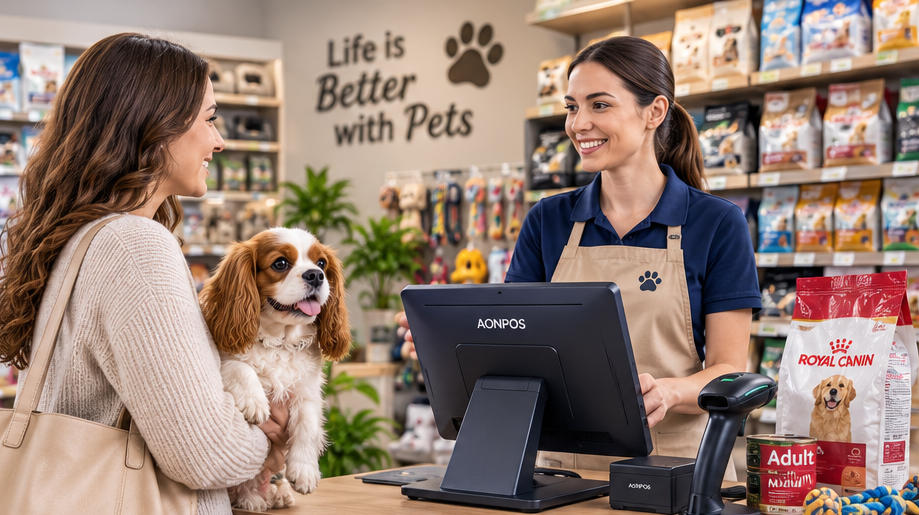
    Pet stores are no longer simple retail outlets selling bags of food and a few accessories. Modern pet retailers may carry thousands of products, including food, treats, toys, grooming supplies, health products, cages, aquariums, seasonal merchandise, and items for multiple animal categories. Some stores also provide grooming, boarding, training, veterinary, or delivery services. Managing such a diverse operation requires more than a basic cash register. A reliable POS for Pet Stores should help employees process transactions quickly, maintain accurate inventory records, manage customer relationships, and support the store’s future expansion. However, choosing the right system is not only about software. The reliability of the POS terminal, barcode scanner, receipt printer, customer display, and other peripherals can directly affect everyday operations. This guide explains what pet retailers should look for when selecting POS hardware and how the right configuration can create a faster, more organized checkout environment. Why Pet Stores Need a Specialized POS System Pet retailers face inventory and customer-service challenges that are different from those of restaurants or general service businesses. A single pet food brand may offer multiple formulas, animal types, package sizes, flavors, and life-stage options. Each variation normally has its own SKU, barcode, price, and stock quantity. The same complexity applies to collars, clothing, carriers, bedding, supplements, grooming products, and aquarium supplies. Without an efficient POS system, employees may struggle with: Locating products during checkout Tracking numerous product variations Monitoring expiration-sensitive inventory Applying promotions correctly Managing loyalty rewards Processing returns or exchanges Checking stock across multiple locations Recording grooming or service payments Reordering popular products on time An effective POS for Pet Stores connects the checkout process with the wider retail operation. Each completed sale updates inventory, records the payment, identifies the customer when applicable, and provides data that managers can use for purchasing and planning. The hardware supporting this workflow must therefore be responsive, dependable, and compatible with the retailer’s selected software platform. Essential Hardware for a Pet Store POS Setup A complete pet store checkout station generally includes a touchscreen terminal, barcode scanner, thermal printer, cash drawer, payment device, and optional customer-facing display. The exact configuration depends on the store’s size, product range, transaction volume, and service model. Retailers evaluating different configurations can begin by reviewing the AONPOS POS system range, which includes single-screen and dual-screen terminals designed for different commercial environments. 1. Touchscreen POS Terminal The POS terminal is the central component of the system. It runs the retail software and connects with the other checkout devices. Pet store employees repeatedly search for products, scan barcodes, adjust quantities, apply discounts, enroll customers in loyalty programs, and select payment methods. A responsive capacitive touchscreen can make these actions faster and easier to learn. For most fixed checkout counters, a 15-inch or 15.6-inch display provides a practical balance between visibility and counter-space efficiency. The screen should be large enough to display product information clearly without making the checkout station unnecessarily bulky. Important terminal specifications include: Responsive capacitive touch technology Commercial-grade construction Adequate processing power for the POS software SSD storage for faster performance Multiple USB ports LAN connectivity Wi-Fi or Bluetooth when required Compatible Windows or Android operating system Easy access to frequently serviced components Stable operation during long business hours An all-in-one terminal combines the computer and touchscreen in one housing, reducing cable clutter and simplifying installation. This can be especially useful in pet stores where the checkout counter may already contain product displays, impulse-purchase items, bags, and promotional materials. 2. Barcode Scanner A barcode scanner is one of the most frequently used devices in a pet store. Employees may scan hundreds of differently shaped products, from small medicine packages and treat pouches to large bags of food and oversized pet carriers. The scanner must read labels quickly, even when barcodes are curved, slightly damaged, poorly printed, or displayed on a mobile phone. A 2D barcode scanner is generally more versatile than a basic 1D model. In addition to traditional retail barcodes, it can read QR codes, digital coupons, mobile membership codes, and other two-dimensional formats. Pet retailers should consider: Fast decoding speed Support for 1D and 2D barcodes Reliable reading from printed labels and screens Handheld or hands-free operation Drop-resistant housing USB or wireless connectivity Compatibility with the POS software A comfortable design for repeated daily use A handheld scanner is useful for large or heavy merchandise because the employee can scan the item without lifting it onto the counter. Stores with high transaction volumes may combine a presentation scanner for standard items with a handheld device for bulky products. AONPOS offers a dedicated range of 1D and 2D barcode scanners for retail checkout and product-identification applications. 3. Thermal Receipt Printer Although digital receipts are increasingly common, many customers still prefer printed receipts, particularly when purchasing premium food, health products, grooming equipment, or other items that may need to be returned. Thermal printers are widely used in retail because they print quickly and do not require ink cartridges. A dependable printer helps prevent queues caused by paper jams, slow printing, or communication failures. Important considerations include: 58 mm or 80 mm paper width Printing speed Auto-cutter durability Easy paper loading USB, Ethernet, serial, or Bluetooth connectivity Driver support Compatibility with the selected operating system Availability of replacement paper Access to technical support An 80 mm printer is often suitable for full-size retail receipts containing item descriptions, taxes, discounts, loyalty information, return policies, and promotional messages. Compact stores with shorter receipts may consider a 58 mm model. Retail buyers can explore the AONPOS thermal printer category when planning a complete checkout hardware package. 4. Cash Drawer Even when card and mobile payments are popular, many pet stores still accept cash. The cash drawer should connect to the receipt printer or POS terminal and open automatically after an authorized cash transaction. Look for a drawer with: Durable metal construction Adjustable note and coin compartments Secure locking options Emergency manual access Reliable printer-driven opening Sufficient capacity for the store’s transaction volume Stores should also use staff permissions and end-of-shift reconciliation procedures to reduce cash-handling errors. 5. Customer-Facing Display A customer display allows shoppers to see scanned items, prices, discounts, taxes, loyalty points, and the final total before payment. This visibility can be particularly valuable in pet stores because customers often purchase multiple similar products in different flavors, sizes, or quantities. Seeing each item on the screen helps customers identify scanning or pricing mistakes before the transaction is completed. A secondary screen can also display: New product promotions Membership benefits Adoption events Grooming offers Seasonal campaigns Private-label products Supplier advertisements QR codes for digital receipts or social media Pet retailers deciding between terminal formats may find the comparison in Dual-Screen vs. Single-Screen POS Systems useful. A compact single-screen terminal may be sufficient for a small neighborhood store, while a dual-screen system can improve transparency and create additional marketing opportunities. Important Software Functions for Pet Retail AONPOS primarily focuses on POS hardware, so retailers should select compatible software that supports their specific operational needs. Hardware and software must be evaluated together before purchasing or deploying a system. Detailed Inventory Management Inventory is one of the most important functions of a POS for Pet Stores. The software should track products by SKU, barcode, brand, category, package size, supplier, cost, selling price, and stock level. Useful capabilities include: Real-time inventory updates Low-stock alerts Purchase-order management Product variation tracking Supplier records Stock transfers Inventory counting Expiration-date monitoring Damaged-item adjustments Multi-location visibility Expiration management is particularly important for pet food, treats, supplements, medicines, and selected grooming products. Depending on the software, stores may track expiration dates by batch or use first-in, first-out inventory procedures. Loyalty Programs and Customer Profiles Pet retail is highly suited to repeat-purchase programs. Customers regularly return for food, litter, treats, medication, grooming supplies, and other consumable products. A POS system can record purchase history and support: Points-based loyalty programs Member-only pricing Automatic discounts Birthday promotions Product recommendations Reorder reminders Digital coupons Email or SMS campaigns Subscription-style purchases Stores may also record basic pet information, such as animal type, breed, age, dietary preference, or birthday, where local privacy rules and the software configuration permit it. This information can help employees provide more relevant service without relying entirely on memory. Promotion and Pricing Management Pet stores frequently run bundled offers, supplier-funded promotions, seasonal discounts, and loyalty campaigns. The software should support pricing rules such as: Buy-one-get-one promotions Multi-buy discounts Category discounts Mix-and-match offers Member pricing Coupon codes Time-limited promotions Clearance pricing Employee discounts The checkout interface should make valid promotions easy to apply while restricting unauthorized manual discounts. Returns and Exchanges Customers may return products because of incorrect sizing, damaged packaging, pet preferences, or dietary issues. A structured return process helps employees verify the original transaction and follow store policy consistently. The POS software should ideally allow staff to: Find the original sale Return individual items Record a reason code Refund to the original payment method Issue store credit Exchange products Update inventory automatically Require manager approval for selected transactions For pet food and health-related products, stores should also establish clear rules regarding opened packages, damaged seals, and items that cannot be resold. Service Management Some pet stores generate revenue from grooming, training, boarding, washing stations, or veterinary services. These businesses may need software that combines product sales with appointments and service payments. Relevant functions can include: Appointment scheduling Employee assignment Service packages Deposits Customer notes Pet profiles Recurring appointments Service reminders Commission tracking Product and service transactions on one receipt Before selecting hardware, the retailer should confirm whether the service-management software supports the preferred operating system, display resolution, peripherals, and payment integrations. Choosing Between Single-Screen and Dual-Screen POS Hardware The right terminal format depends on the store’s operating model. A single-screen POS system is usually appropriate for: Small independent pet shops Compact counters Low to moderate transaction volumes Budget-conscious store openings Pop-up pet supply stores Mobile adoption or promotional events A dual-screen POS system may be better for: Large pet supply stores High-volume checkout counters Loyalty-focused retailers Stores running frequent promotions Multi-location chains Businesses wanting customer-facing advertising A dual-screen terminal lets customers follow the transaction while giving the cashier a separate working interface. Selected AONPOS retail models, such as the AONPOS Retail All-in-One POS System, support customer-facing display configurations for commercial checkout environments. Connectivity and Peripheral Compatibility A POS terminal should provide enough ports for both current equipment and future expansion. A typical pet store configuration may need connections for: Barcode scanner Receipt printer Cash drawer Customer display Payment terminal Label printer Weighing scale Keyboard or mouse External storage Network cable Wi-Fi adapter Customer loyalty reader Retailers should create a complete peripheral list before selecting the terminal. A low-cost machine with too few ports may require adapters or hubs, making the checkout area less reliable and harder to maintain. Compatibility should be confirmed at several levels: The operating system must support the POS software. The software must support the required scanner, printer, and payment devices. The terminal must provide the correct physical interfaces. Drivers must be available for the selected operating system. The processor and memory must meet the software provider’s requirements. A hardware sample should ideally be tested with the actual software image before a large order is approved. POS Configurations for Different Pet Store Formats Small Independent Pet Shop A practical entry-level setup may include: Single-screen all-in-one terminal Handheld 2D barcode scanner Thermal receipt printer Cash drawer Separate payment terminal The main priorities are affordability, compact installation, and dependable daily operation. Medium-Sized Pet Supply Store A more advanced configuration may include: Dual-screen POS terminal Presentation scanner Additional handheld scanner 80 mm thermal printer Cash drawer Integrated loyalty workflow Label printer Multi-user inventory software This arrangement supports faster checkout and better customer interaction. Large or Multi-Location Pet Retailer A chain or high-volume store may require: Multiple checkout terminals Centralized inventory management Customer-facing displays Commercial barcode scanners Network receipt printers Mobile inventory devices Backup hardware Standardized operating-system images Remote device-management tools Consistent replacement components Businesses planning a larger rollout can also review the Best POS System for Restaurants and Retail in 2026, which covers scalability, hardware-software compatibility, and considerations for distributors and enterprise buyers. Durability and Maintenance Considerations Pet store equipment operates in an environment where dust, fur, packaging debris, and frequent customer traffic are common. POS hardware should therefore be easy to clean and suitable for continuous commercial use. Look for: True-flat touchscreens Stable metal stands Fanless or efficient cooling designs Durable scanner housings Organized cable routing Easy printer-paper replacement Accessible storage and memory components Replaceable power adapters Consistent component availability Stores should clean screens and scanners regularly, inspect cables, test printers, and keep spare receipt paper available. High-volume locations may also maintain a backup scanner, printer, or complete terminal to minimize downtime. Why Consider AONPOS for Pet Store Projects? AONPOS is a POS hardware manufacturer offering all-in-one terminals, barcode scanners, thermal printers, kiosks, touch monitors, stands, and related checkout peripherals. Its product portfolio includes single-screen, dual-screen, desktop, Windows-based, Android-compatible, and customizable hardware options. For distributors, software companies, system integrators, and retail chains, AONPOS can support OEM and ODM requirements such as: Custom logos and branding Housing-color customization Processor and memory selection Storage configuration Screen-size options Customer-display configurations Peripheral integration Packaging customization Operating-system preparation Project-based hardware matching The company describes its business as focused on ODM/OEM manufacturing of touch POS terminals and related peripherals. Rather than choosing each device independently, buyers can work toward a standardized hardware package containing the terminal, scanner, printer, display, and required accessories. Standardization can simplify installation, employee training, troubleshooting, spare-parts planning, and multi-store deployment. Final Checklist for Selecting POS for Pet Stores Before placing an order, confirm that the proposed system: Supports the store’s inventory structure Works with the selected retail software Handles product and service transactions Reads both printed and mobile barcodes Has enough ports for all peripherals Supports the required payment devices Fits the available counter space Can operate reliably throughout business hours Is easy for employees to learn Supports future store expansion Offers appropriate technical and replacement support Can be customized when required Conclusion Choosing the right POS for Pet Stores requires more than comparing prices or selecting a visually attractive terminal. Pet retailers must consider product complexity, inventory accuracy, barcode performance, loyalty workflows, promotional pricing, returns, service management, and long-term scalability. A responsive all-in-one terminal provides the foundation, while dependable barcode scanners, thermal printers, cash drawers, and customer displays complete the checkout environment. When these devices are properly matched with suitable pet retail software, the POS system can reduce transaction friction, improve inventory visibility, and help employees deliver more informed customer service. For independent stores, chains, distributors, and software integrators, AONPOS offers flexible POS hardware that can be configured for different retail formats. By testing compatibility, selecting commercial-grade components, and planning for future expansion, buyers can build a pet store checkout solution that supports both everyday reliability and long-term business growth.
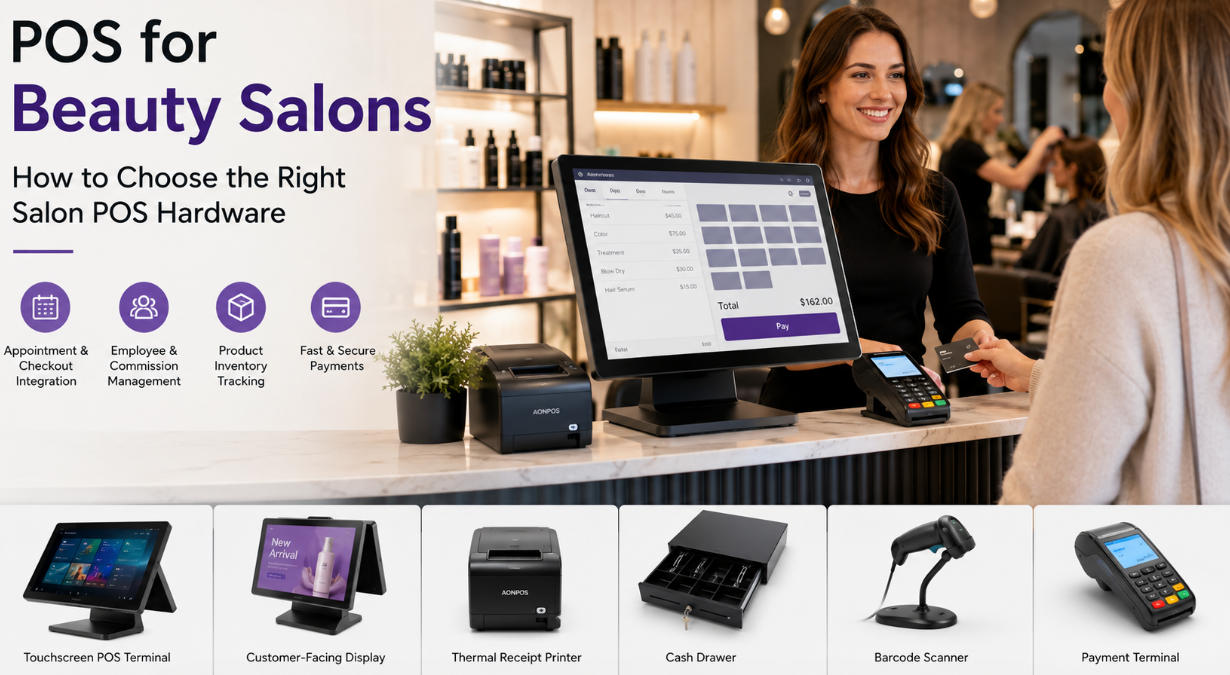
  • POS for Beauty Salons: How to Choose the Right Salon POS Hardware
    POS for Beauty Salons: How to Choose the Right Salon POS Hardware Jul 21, 2026
    Running a successful beauty salon requires much more than delivering excellent hair, nail, skincare, or spa services. Salon owners must coordinate appointments, manage employees, sell retail products, process payments, track commissions, and create a smooth experience for every client. At the center of these daily activities is the salon POS system. A modern salon POS combines specialized software with reliable hardware to help beauty businesses manage transactions and front-desk operations efficiently. While salon management software controls functions such as booking, client profiles, loyalty programs, and reporting, the POS hardware provides the physical platform employees use throughout the working day. Choosing the right salon POS hardware can improve checkout speed, reduce front-desk errors, support product sales, and create a more professional customer experience. This guide explains the essential components, features, configurations, and purchasing considerations for beauty salons, spas, nail studios, barbershops, and multi-location beauty businesses. Why Beauty Salons Need Specialized POS Hardware A beauty salon does not operate like a conventional retail store. A typical transaction may include several services, multiple employees, a client discount, a product purchase, a membership benefit, and a gratuity. For example, one customer might pay for a haircut, hair coloring, a conditioning treatment, and two retail products. Different team members may have delivered the services, requiring the system to allocate revenue or commissions correctly. The checkout station must therefore support a more complex workflow than simply scanning an item and accepting payment. A suitable salon POS helps employees: Find appointments quickly Add services and products to one transaction Apply packages, memberships, or promotions Assign services to specific employees Accept different payment methods Process deposits and gift cards Record tips where supported by the software Print or send receipts Schedule the customer’s next appointment Reliable hardware is especially important during busy periods. When several clients finish their appointments at the same time, slow or unstable equipment can create congestion around the reception desk. A responsive touchscreen and properly configured peripherals help the team complete transactions without disrupting the salon atmosphere. Essential Salon POS Hardware Components 1. Touchscreen POS Terminal The terminal is the central part of the salon POS setup. It runs the salon’s selected software and connects to payment devices, printers, scanners, displays, and other peripherals. Touchscreen operation is particularly useful in beauty environments because employees can select appointments, services, products, and payment options directly from visual menus. This can reduce keyboard use and make staff training easier. A salon terminal should ideally offer: A responsive capacitive touchscreen Sufficient processing power for the selected software SSD storage for faster startup and operation Multiple USB ports Ethernet and optional Wi-Fi connectivity Support for a receipt printer and cash drawer A stable stand suitable for frequent daily use An easy-to-clean exterior Screen size also matters. Compact salons may prefer a 12-inch or 14-inch device, while busy reception areas can benefit from a 15-inch or 15.6-inch display that gives staff more room to view appointments and transaction details. A model such as the AONPOS touch capacitive point-of-sale computer offers a 15-inch capacitive touchscreen and selectable processor, memory, and storage configurations. AONPOS also supports OEM and ODM requirements for distributors and solution providers. 2. Payment Terminal Beauty clients increasingly expect to pay by credit card, debit card, mobile wallet, or contactless payment. The payment terminal should integrate smoothly with the salon software whenever possible. Integrated payments can automatically transfer the transaction amount from the POS to the payment device. This reduces manual entry, lowers the risk of typing errors, and helps keep payment records aligned with sales reports. Before selecting a terminal, confirm: Which payment providers the software supports Whether the device accepts contactless payments Whether tip prompts are available where appropriate Whether receipts can be printed or delivered digitally Whether the device meets local payment-security requirements Payment hardware and processing contracts are often supplied separately from the main POS computer, so buyers should verify compatibility before placing a hardware order. 3. Receipt Printer Although many salons now provide email or SMS receipts, a thermal receipt printer remains useful for customers who prefer printed documentation. Thermal printers are generally suitable for salon environments because they are compact, fast, and do not require ink cartridges. Buyers should check the printer’s connection type, paper width, print speed, driver support, and compatibility with the selected salon POS software. The printer should also fit neatly into the reception counter without creating unnecessary cable clutter. 4. Cash Drawer Even salons that primarily accept digital payments may still need a cash drawer. It should be durable, secure, and sized according to the salon’s available counter space and expected cash volume. Many cash drawers connect to the receipt printer and open automatically when a cash transaction is completed. Managers should also ensure that the software provides employee permissions, cash-counting procedures, and shift reports to support accountability. 5. Barcode Scanner Beauty salons frequently sell shampoo, conditioner, styling products, nail care products, cosmetics, skincare items, brushes, and other accessories. A barcode scanner allows reception staff to add these products to a transaction without searching through a long product list. This can speed up checkout and reduce mistakes, particularly when similar products have different sizes, formulas, or prices. Retail-heavy salons may benefit from an omnidirectional scanner, while a basic handheld scanner may be enough for a smaller product selection. 6. Customer-Facing Display A customer display gives clients a clear view of services, products, discounts, taxes, and the final amount before payment. It may also show membership reminders, promotional images, product advertisements, or loyalty-program messages when supported by the software. This can be especially valuable in salons because transactions often include multiple services and products. Giving clients the ability to review the sale can improve transparency and reduce misunderstandings. A dual-screen terminal provides a larger and more integrated customer-facing experience than a basic numeric display. The AONPOS guide to dual-screen versus single-screen POS systems explains how the two configurations differ in footprint, customer interaction, and promotional capability. Important Salon POS Features Appointment and Checkout Integration The most important salon-specific capability is the connection between the appointment calendar and the checkout screen. When a client finishes a service, the receptionist should be able to open the appointment, confirm the services performed, add products, apply discounts, and accept payment without rebuilding the transaction from the beginning. This workflow can save time and reduce the chance of missing services or assigning revenue to the wrong team member. Employee and Commission Management Many salons use commission-based compensation, booth rental, hourly pay, or a combination of these structures. The salon POS software may need to identify which employee performed each service and who sold each retail product. The hardware must be responsive enough to handle employee switching, permission controls, detailed service menus, and reporting functions without noticeable delay. Because these capabilities depend primarily on software, salon owners should select their management platform first and then confirm the hardware requirements. Client Profiles and Service History Client records help beauty professionals deliver personalized service. Depending on the software, profiles may include previous appointments, formulas, preferred products, allergies, notes, membership status, and purchase history. A large, clear touchscreen makes it easier for authorized employees to access these details. However, salons must also use passwords, employee permissions, screen-locking procedures, and appropriate data-protection practices to keep customer information secure. Product Inventory Retail products can provide an important additional revenue stream. The salon POS should help track quantities, low-stock levels, supplier information, sales performance, and product movement. Hardware requirements may include a barcode scanner, receipt printer, label printer, or additional back-office workstation. Multi-location salons may also need reliable network connectivity so product data can be synchronized between branches. Memberships, Packages, and Gift Cards Many salons sell monthly memberships, prepaid treatment packages, loyalty rewards, and gift cards. These programs can improve retention and generate recurring revenue, but they also make transactions more complex. The checkout interface should allow staff to identify eligible benefits, apply package balances, redeem gift cards, and explain remaining value clearly to the client. A customer-facing display can make this process more transparent by showing how the final total was calculated. Single-Screen or Dual-Screen Salon POS? Both formats can work well, depending on the salon’s size and operating model. Single-Screen POS A single-screen salon POS is often suitable for: Independent stylists Small hair or nail salons Beauty studios with limited counter space Businesses with lower transaction volume Salons that primarily use digital receipts Its main advantages are a smaller footprint, simpler installation, fewer cables, and a lower initial hardware cost. The AONPOS all-in-one POS selection includes compact terminals with different screen sizes and hardware specifications, allowing buyers to match the device to their software and workspace. Dual-Screen POS A dual-screen salon POS is more suitable for: Busy reception areas Premium salons and spas Businesses with strong retail product sales Membership-focused beauty brands Multi-location salon chains Salons that want to display promotions at checkout The employee uses the main touchscreen while the client views transaction information on the second display. Depending on software support, the customer screen may also show digital advertisements, loyalty messages, or service recommendations. Dual-screen configurations can make the reception area feel more modern while creating another opportunity to promote products and future appointments. How to Choose the Best Salon POS Hardware Start With the Software Requirements POS hardware should never be selected without checking the software requirements. Some salon platforms run through a web browser, while others require Windows, Android, iOS, or a proprietary device. Confirm the supported operating system, processor, memory, storage, screen resolution, ports, and peripheral drivers before ordering. The beginner’s guide on how to operate a POS system provides a useful overview of how terminals, printers, scanners, cash drawers, and payment devices work together. Evaluate the Reception Space Measure the counter before choosing the terminal. Consider the base dimensions, screen movement, cable exits, receipt printer, payment device, scanner, and cash drawer. A salon reception area should remain tidy and welcoming. An oversized setup or poorly organized cables can make a premium interior look cluttered. An all-in-one terminal reduces the number of separate components on the counter and can simplify installation. Choose Commercial-Grade Construction Salon equipment may operate for long hours every day. Consumer tablets and home computers may appear affordable, but they are not always designed for continuous commercial use or frequent peripheral connections. Look for: A stable metal or reinforced stand Durable touchscreen construction Reliable internal cooling Commercial-grade ports and connectors Easy access for maintenance Long-term component availability The objective is not simply to buy the lowest-cost terminal. It is to reduce interruptions and achieve a lower total cost of ownership over the hardware’s working life. Plan for Connectivity A salon POS may need to connect to cloud software, payment services, printers, scanners, customer displays, and back-office systems. Useful connectivity options include: USB Ethernet Wi-Fi Bluetooth Serial ports Cash-drawer ports Video outputs for secondary displays Ethernet is generally preferable for the main reception terminal because it provides a stable connection. Wi-Fi can be valuable as a backup or for flexible device placement. Consider Future Expansion A small salon may later add more styling stations, open another branch, introduce memberships, or increase retail sales. Selecting scalable hardware can reduce the need for an early replacement. Buyers should consider whether the terminal can support: Additional memory or storage A second display More USB peripherals New payment hardware Multi-location software Updated operating-system requirements For resellers, software companies, and salon solution providers, custom branding and configuration may also be important. AONPOS manufactures all-in-one touch terminals, touch monitors, kiosks, printers, scanners, and related POS peripherals, with OEM and ODM services for international partners. Recommended Salon POS Configurations Small Independent Salon A practical setup may include: One compact touchscreen terminal One integrated payment device One thermal receipt printer One cash drawer Optional handheld barcode scanner This configuration keeps the counter simple while supporting appointments, service checkout, payments, and a small retail inventory. Busy Full-Service Beauty Salon A higher-volume salon may benefit from: A 15-inch all-in-one POS terminal A customer-facing display Integrated card and contactless payments A high-speed thermal printer A durable cash drawer An omnidirectional barcode scanner Wired network connectivity A backup device or second reception station This configuration is appropriate when several employees, service categories, memberships, and retail products must be managed at the same time. Multi-Location Salon Brand A salon chain may require standardized hardware across every branch. Standardization simplifies employee training, technical support, software deployment, spare-parts management, and future upgrades. Businesses sourcing terminals in volume should evaluate supplier consistency, quality-control processes, configuration options, branding, packaging, export experience, and long-term availability. The AONPOS B2B POS buyer guide provides additional guidance for distributors, system integrators, and businesses purchasing configurable commercial POS hardware. Why Consider AONPOS for Salon POS Hardware? AONPOS focuses on the development and production of commercial POS hardware rather than salon management software. Its product portfolio includes all-in-one touchscreen terminals, dual-screen systems, touch monitors, handheld devices, thermal printers, barcode scanners, and other checkout peripherals. The company’s terminal range includes selectable processors, memory capacities, storage options, screen formats, and peripheral configurations. This flexibility can be useful for salon software vendors, distributors, system integrators, and beauty brands that require hardware matched to a specific application. OEM and ODM capabilities can also support: Custom logos and enclosure branding Selected processor and memory configurations Single-screen or dual-screen designs Windows or Android deployment requirements Customized packaging Peripheral bundles Bulk purchasing projects A portable device such as the AONPOS S600 handheld POS may also support mobile transaction scenarios where compatible payment functions and software are available. Salon operators and solution providers can explore the wider product portfolio through the AONPOS official website. Final Thoughts The best salon POS is not simply the most powerful or expensive system. It is the system that fits the salon’s software, services, transaction volume, counter space, payment workflow, and plans for growth. A small beauty studio may only require a compact touchscreen and payment terminal. A busy full-service salon may benefit from a dual-screen workstation, barcode scanner, customer display, and integrated payment setup. A multi-location brand may prioritize standardized hardware, remote management, reliable supply, and OEM customization. Before purchasing, salon owners should confirm software compatibility, operating-system requirements, peripheral support, connectivity, and available counter space. They should also consider long-term reliability rather than focusing only on the initial price. With the right hardware foundation, a salon POS can help reception teams process transactions faster, support product sales, improve payment transparency, and deliver the polished customer experience that modern beauty clients expect.
  • Coffee Shop POS Hardware Checklist: What You Need for a Faster and More Reliable Café
    Coffee Shop POS Hardware Checklist: What You Need for a Faster and More Reliable Café Jul 20, 2026
    Running a coffee shop requires more than quality beans, skilled baristas, and an inviting atmosphere. Behind every smooth order is a collection of hardware that helps employees enter drinks, process payments, print tickets, manage cash, and communicate with customers. Choosing the right coffee shop POS hardware can shorten queues, reduce order mistakes, simplify employee training, and support future growth. Choosing the wrong equipment, however, may lead to slow transactions, cluttered counters, connectivity problems, and unexpected maintenance costs. Whether you are opening an independent café, upgrading an existing checkout station, or sourcing hardware for a multi-location coffee brand, this checklist explains the essential POS equipment you should evaluate. Why Coffee Shop POS Hardware Matters Coffee shops have a distinctive operating environment. Orders are often highly customized, transaction volumes can rise sharply during morning and lunchtime peaks, and counter space is usually limited. A customer may order a latte with oat milk, an extra espresso shot, less syrup, and a specific cup size. The employee must enter every modifier accurately while continuing to serve the next customer. The POS hardware must therefore be responsive, easy to operate, and dependable during long daily shifts. A well-planned coffee shop POS setup should help a café: Process orders quickly during busy periods Record drink modifiers accurately Support card, cash, contactless, and mobile payments Send clear order tickets to baristas Display prices and order details to customers Minimize the amount of equipment on the counter Integrate with compatible café management software Scale to additional counters, kiosks, or locations The hardware itself does not replace POS software. Instead, it provides the physical platform on which ordering, payment, inventory, loyalty, and reporting applications operate. 1. Commercial Touchscreen POS Terminal The touchscreen terminal is the central component of a coffee shop POS system. Employees use it to select menu items, add modifiers, apply discounts, accept payments, and manage transactions. A consumer tablet may be adequate for a small pop-up coffee stand, but a busy café normally benefits from a commercial-grade terminal designed for continuous operation. When comparing terminals, evaluate the following factors. Screen Size A 15-inch display is a practical choice for many coffee shops because it provides enough space for menu categories, drink sizes, modifiers, and payment buttons without occupying too much counter space. Compact 12-inch models can work well in coffee carts, kiosks, and cafés with extremely limited checkout areas. Larger displays may suit businesses with extensive menus or applications that require more information on screen. AONPOS offers a range of configurable all-in-one POS systems designed for restaurant and retail environments. An all-in-one design combines the display and computer in one enclosure, reducing the number of separate components around the checkout station. Touch Technology Capacitive touchscreens are generally well suited to modern cafés. They offer fast response, support intuitive gestures, and create a familiar smartphone-like user experience. The touch panel should respond accurately even when employees are entering orders rapidly. Poor touch performance can cause missed selections, duplicated items, and delays during peak hours. For a coffee shop environment, also consider a flat screen surface that is easy to wipe clean. Coffee splashes, syrup, milk residue, fingerprints, and dust can accumulate quickly around the counter. Processor, Memory, and Storage The necessary configuration depends on the POS software and operating system. A basic ordering application may have modest requirements, while a system running multiple integrations, cloud synchronization, delivery platforms, or customer-facing content may require more processing power. Before purchasing hardware, confirm the software provider’s minimum and recommended specifications for: Processor RAM Storage capacity Display resolution Operating system Graphics requirements Network connection Selecting a slightly higher specification than the minimum requirement can provide additional room for software updates and future applications. 2. Operating System Compatibility Coffee shop POS software may run on Windows, Android, Linux, or another specialized platform. Hardware and software compatibility should be confirmed before placing a bulk order. Do not select a terminal based only on appearance or price. Ask the software provider whether the hardware drivers, ports, processor architecture, display resolution, and peripheral interfaces have been tested. AONPOS focuses on POS hardware rather than locking buyers into one café management platform. This makes customizable hardware useful for software companies, system integrators, distributors, and coffee brands that already have a preferred software ecosystem. For broader purchasing considerations, the AONPOS guide to restaurant POS hardware provides additional information about selecting equipment for food-service environments. 3. Customer-Facing Display A customer-facing screen allows guests to review their order before payment. It may show product names, quantities, modifiers, taxes, discounts, totals, loyalty prompts, or promotional content, depending on the software. This visibility can help customers identify mistakes before the transaction is completed. For example, a customer may notice that the cashier selected whole milk instead of almond milk or entered the wrong drink size. There are two common configurations. Small Customer Display A compact secondary display is suitable when the goal is primarily to show transaction details. It takes up less space and can be attached to the main POS terminal. Full-Size Second Screen A larger screen offers more room for digital promotions, new drink announcements, seasonal menus, loyalty enrollment, QR codes, and branded content. Coffee shops considering this configuration can review the differences between dual-screen and single-screen POS systems. The right choice depends on the counter layout, customer experience strategy, budget, and software capabilities. 4. Payment Terminal Modern customers expect several payment options. A café may need to support chip cards, magnetic-stripe cards, NFC contactless payments, mobile wallets, and QR-based payment methods. The payment terminal may be a separate device connected to the POS system or an integrated module supplied through the payment service provider. Before selecting a payment device, verify: Payment processor certification Supported card and contactless standards Connection method Regional compliance requirements Encryption and security features Software integration Placement and cable management Customer accessibility Payment regulations and processor requirements vary by country and service provider. Therefore, merchants should confirm compatibility directly with their payment partner rather than assuming that any card reader will work with any POS terminal. 5. Thermal Receipt Printer Although digital receipts are becoming more common, printed receipts remain useful for customers, accounting, refunds, and order identification. Thermal printers are commonly used at coffee shop counters because they print quickly and do not require ink cartridges. Important purchasing criteria include: 58 mm or 80 mm paper support Printing speed Auto-cutter durability USB, Ethernet, serial, Bluetooth, or Wi-Fi connectivity Driver compatibility Easy paper loading Print-head service life Availability of replacement paper An 80 mm printer provides more space for detailed receipts, logos, QR codes, and promotional messages. A compact 58 mm printer may be sufficient where counter space is limited and receipts contain only basic information. AONPOS supplies POS hardware categories that include 58 mm and 80 mm thermal printer solutions, allowing buyers to create a more coordinated checkout hardware package. 6. Barista or Kitchen Ticket Printer A customer receipt printer and a preparation-area printer serve different purposes. The checkout printer produces a receipt for the customer. A barista printer produces an order ticket containing information such as: Order number Drink name Cup size Milk selection Temperature Syrup or flavor Extra shots Dine-in or takeaway status Customer name Order time Some small cafés use one printer for both functions, while higher-volume stores may route drink tickets to the coffee station and food tickets to a separate preparation area. If the printer will be placed near steam, heat, water, or food preparation, durability and installation location become especially important. The software must also support the required print routing. 7. Cash Drawer Cash remains relevant in many markets, so a secure cash drawer may still be required. Look for a drawer with: Durable metal construction Adjustable bill and coin compartments Secure locking mechanism Emergency key access Printer-driven or direct POS connection Removable cash tray Suitable dimensions for the counter Many cash drawers connect through the receipt printer and open automatically after an authorized cash transaction. Confirm the voltage and interface compatibility between the drawer and printer. The drawer should also fit the workflow. A unit that is too large wastes valuable counter space, while a drawer that is too small may be inconvenient during busy periods. 8. Barcode or QR Code Scanner A barcode scanner is not always essential for entering freshly prepared drinks, because baristas usually select these products from the touchscreen menu. However, it becomes valuable when a café sells packaged goods such as: Coffee beans Bottled beverages Packaged snacks Reusable cups Brewing equipment Gift cards Branded merchandise A 2D scanner can read both traditional product barcodes and QR codes. This may be useful for loyalty applications, digital coupons, employee identification, mobile orders, and customer membership programs. Choose between a fixed countertop scanner and a handheld scanner based on the café’s product range and counter layout. 9. Network Equipment and Offline Planning Cloud-based POS applications depend heavily on stable network connectivity. A café should plan its network infrastructure as carefully as its checkout hardware. A reliable setup may include: Business-grade router Secure Wi-Fi network Wired Ethernet connection for the main POS Separate guest and operational networks Backup internet connection Uninterruptible power supply Surge protection Cable management A wired Ethernet connection is often preferred for a fixed checkout station because it can provide greater consistency than Wi-Fi. Wireless connectivity remains useful for handheld devices, tablets, and flexible ordering stations. Ask the POS software provider what happens when the internet connection fails. Some systems support limited offline ordering or payment queuing, while others may lose important functionality. 10. Handheld POS Terminal A handheld terminal is optional, but it can expand how a coffee shop serves customers. Employees may use a portable device to: Take orders from customers waiting in line Accept payments at outdoor tables Support curbside pickup Process orders at events Operate a mobile coffee cart Reduce congestion around the main counter The AONPOS handheld POS terminal supports mobile transaction scenarios and multiple payment technologies. Before deployment, confirm that the selected café software is optimized for the device and screen size. Handheld terminals should complement the main counter rather than add unnecessary complexity. They are most valuable when mobility clearly improves service speed or customer convenience. 11. Self-Service Ordering Kiosk A self-ordering kiosk can be useful for high-volume cafés, food halls, airport locations, university campuses, and stores with extensive customization options. Customers can browse the menu, configure drinks, select food, review the order, and proceed to payment without waiting for a cashier. This can give front-of-house employees more time to prepare drinks, assist customers, and maintain the service area. A kiosk may include: Large capacitive touchscreen Industrial computer Payment terminal Receipt printer QR or barcode scanner NFC reader Camera Speaker Floor, wall, or countertop mounting structure AONPOS provides customizable self-service payment kiosk hardware in different screen sizes and installation formats. Buyers should verify software integration, payment certification, accessibility, menu design, and physical placement before deployment. A kiosk should not automatically replace personal service. In many coffee shops, the best approach is a hybrid model that gives customers a choice between cashier ordering and self-service. 12. Ports and Peripheral Connectivity A coffee shop POS terminal may need to connect to several devices simultaneously. Insufficient ports can force the operator to rely on adapters or hubs, creating a less reliable installation. Check whether the terminal provides enough of the following interfaces: USB Serial or COM RJ45 Ethernet HDMI or VGA Audio Cash drawer interface Wi-Fi Bluetooth Create a complete peripheral map before ordering. Include every current device and allow capacity for possible additions such as a second printer, customer display, scanner, weighing scale, or external payment terminal. 13. Counter Space and Cable Management The best technical specification is not useful if the hardware does not fit the service counter. Measure the available space and consider: POS terminal footprint Screen viewing angle Cash drawer position Printer paper access Payment terminal reach Customer display visibility Ventilation Cable routing Cleaning access Employee movement An all-in-one terminal can simplify the counter by reducing separate computer components. VESA-compatible mounting and adjustable stands may provide additional flexibility. Before final installation, simulate a complete transaction and confirm that employees can reach every device without twisting, crossing cables, or blocking the drink handoff area. 14. Durability and Maintenance Coffee shops expose electronics to moisture, heat, steam, sugar, grease, and constant handling. Hardware should be selected for commercial use rather than occasional home use. Ask suppliers about: Enclosure materials Touchscreen durability Operating temperature Cooling design Dust resistance Component availability Warranty terms Technical support Replacement procedures Product lifecycle The front surface should be easy to clean, but cafés must follow the manufacturer’s cleaning instructions. Liquid should never be sprayed directly into ports, ventilation openings, printers, or payment devices. Standardizing equipment across several locations can also simplify spare-parts management and employee training. 15. OEM and ODM Requirements for Coffee Shop Projects Distributors, POS software companies, and international coffee chains may require more than an off-the-shelf terminal. OEM and ODM requirements can include: Custom logo Enclosure color Screen size Processor configuration RAM and storage Port arrangement Integrated customer display Built-in printer or scanner Packaging Operating system image Regional power adapter Mounting structure AONPOS is a Shenzhen-based POS hardware manufacturer established in 2012, with a product portfolio that includes all-in-one touch POS terminals, touch monitors, kiosks, printers, scanners, stands, and other checkout peripherals. Its OEM and ODM POS hardware capabilities are particularly relevant for distributors, integrators, and brands building a standardized coffee shop POS solution. Final Coffee Shop POS Hardware Checklist Before approving your coffee shop POS configuration, confirm that you have evaluated: Commercial touchscreen POS terminal Compatible operating system Customer-facing display Payment terminal Customer receipt printer Barista or kitchen ticket printer Cash drawer Barcode or QR scanner Router and network equipment Power protection Optional handheld terminal Optional self-service kiosk Required ports and cables Counter dimensions Software and driver compatibility Warranty and technical support Spare equipment strategy OEM or ODM customization requirements Conclusion A reliable coffee shop POS setup is not defined by one device. It is a coordinated hardware system built around the café’s menu, transaction volume, payment methods, counter layout, and service model. Start with a responsive commercial touchscreen terminal, then add only the peripherals that support the actual workflow. Confirm software compatibility before purchasing, plan network and power protection, and consider future requirements such as customer displays, mobile ordering, and self-service kiosks. For independent cafés, the priority may be simplicity and efficient use of space. For chains, distributors, and system integrators, consistency, serviceability, customization, and product lifecycle are equally important. By treating POS hardware as long-term operational infrastructure rather than a collection of individual devices, coffee businesses can build a checkout environment that is faster, cleaner, easier to manage, and ready for future growth.
  • Bakery POS System Guide: How to Choose the Right POS Hardware for Your Bakery
    Bakery POS System Guide: How to Choose the Right POS Hardware for Your Bakery Jul 18, 2026
    A bakery may look simple from the customer’s side: choose bread, order a cake, pay, and leave. Behind the counter, however, bakery operations can be surprisingly complex. Employees must process morning rush-hour transactions, manage products with short shelf lives, record customized cake orders, apply discounts, accept multiple payment methods, and keep checkout lines moving. Bakeries that also operate cafés, delivery services, or multiple branches face even more operational pressure. A reliable bakery POS system can bring these activities together, helping bakery owners improve transaction speed, reduce order mistakes, organize inventory, and create a more consistent customer experience. This guide explains the essential features and hardware components of a bakery POS system, the differences between various configurations, and the factors businesses should consider when selecting POS hardware. What Is a Bakery POS System? A bakery POS system is a combination of software and hardware used to process sales and support daily bakery operations. Depending on the software platform, the system may handle: Counter sales Product and price management Cake and pastry customization Ingredient or finished-product inventory Customer loyalty programs Employee permissions Sales reporting Online and delivery orders Multi-location management The hardware usually includes a touchscreen POS terminal, receipt printer, cash drawer, barcode scanner, payment terminal, and optional customer display. The POS terminal acts as the central operating device. It runs the bakery’s POS software and connects with the peripherals needed to complete each transaction. For bakery chains, POS software developers, distributors, and system integrators, selecting stable and compatible hardware is especially important. The terminal must operate reliably throughout long business hours while supporting the software, interfaces, and peripherals required by the project. Businesses evaluating different terminal configurations can explore the AONPOS POS system range for all-in-one touchscreen hardware designed for retail and hospitality environments. Why Bakeries Need a Specialized POS System A general cash register may be sufficient for recording basic payments, but modern bakeries often require more operational flexibility. Faster Checkout During Peak Hours Many bakeries experience concentrated sales periods before work, during lunch, and in the early evening. A slow terminal or complicated interface can quickly create long queues. A responsive touchscreen allows employees to locate products, select quantities, apply discounts, and complete payments with fewer steps. Frequently purchased products can be organized into visual categories such as: Bread Cakes Pastries Cookies Sandwiches Coffee Beverages Seasonal products When the hardware responds quickly and the software interface is properly configured, employees can process more orders without sacrificing accuracy. Better Handling of Product Variations Bakery products are not always sold as standard items. Customers may request different sizes, flavors, fillings, decorations, packaging, or pickup dates. A bakery POS system can allow staff to add modifiers to an order, such as: Cake size Sponge flavor Cream or filling Decoration style Custom message Allergy notes Packaging requirements Delivery or collection time Recording these details digitally helps reduce the risk of incomplete handwritten notes and improves communication between front-counter employees and production teams. Improved Inventory Visibility Bakery inventory requires careful control because many products have limited shelf lives. Overstocking can create waste, while understocking can result in missed sales. A compatible POS software platform may help track sales quantities, update stock levels, and identify products that sell quickly or frequently remain unsold. This information can support more informed production planning. For example, a bakery may discover that croissant demand peaks on weekday mornings, while celebration cakes sell more frequently before weekends. The POS system does not replace accurate production planning, but it can provide useful sales data for purchasing, baking schedules, and stock decisions. More Accurate Order Processing During busy periods, verbal communication can lead to mistakes. An employee may forget a cake inscription, select the wrong quantity, or fail to communicate a customer’s allergy request. By recording order details directly in the bakery POS system, the business can create a clearer workflow from order entry to production and collection. For bakeries with kitchen printers or order display systems, the POS can also transmit the order directly to the relevant preparation area, depending on software compatibility. Consistent Multi-Location Operations A growing bakery business may eventually open additional branches, kiosks, or café locations. Using consistent POS hardware across multiple sites can simplify: Employee training Software deployment Peripheral installation Maintenance procedures Spare-parts management Remote technical support Standardized hardware also makes it easier for system integrators and bakery chains to replicate the same checkout environment in each location. Essential Bakery POS System Features The exact feature set depends on the bakery’s operating model. However, several functions are particularly valuable in bakery environments. 1. Intuitive Product Selection Employees should be able to find products quickly without memorizing complicated product codes. A visual touchscreen interface can organize items by category, display product images, and place popular products on the main sales screen. This is especially helpful when a bakery hires temporary or part-time staff. The display should be large enough to show several product categories clearly without taking up excessive counter space. A 15-inch touchscreen POS terminal is a common choice because it offers a practical balance between visibility and footprint. Smaller terminals may be suitable for bakery kiosks, mobile counters, or locations with limited space. 2. Product Modifiers Modifiers are important for made-to-order products. The POS software should allow employees to select variations and add special instructions without slowing the transaction. For example, a custom cake order may include: 10-inch size Chocolate sponge Strawberry filling Reduced-sugar cream Blue decoration Personalized message Saturday pickup A structured modifier system can help ensure that these details are captured consistently. 3. Preorders and Scheduled Pickup Many bakeries accept advance orders for birthday cakes, wedding desserts, holiday gift boxes, and corporate catering. The bakery POS system should make it easy to record: Customer name Contact information Deposit amount Remaining balance Pickup date and time Product specifications Special instructions The software should also make upcoming orders easy to retrieve, helping staff prepare production schedules and confirm customer collections. 4. Inventory and Waste Tracking Bakery operators need visibility into both sales and waste. The POS software may track finished products, ingredients, or both, depending on the platform. Useful functions include: Real-time stock updates Low-stock alerts Ingredient-level recipes Product expiration monitoring Waste recording Purchase-order management Supplier information Location-based stock transfers Even when ingredient-level tracking is not required, recording unsold or damaged products can help bakery managers understand actual product margins. 5. Combo and Meal Management Bakeries that also serve coffee, sandwiches, or breakfast items often sell combinations. Examples include: Coffee and croissant Sandwich, drink, and cookie Bread and spread bundle Afternoon tea set Holiday pastry box The POS should allow staff to select these combinations quickly while keeping the pricing and inventory records accurate. 6. Customer Loyalty Support Repeat customers are extremely important to local bakeries. A bakery POS system may support loyalty points, stored customer profiles, membership pricing, digital coupons, or birthday rewards. A customer-facing display can show order details and promotional content during checkout. For businesses considering this setup, the AONPOS guide to dual-screen and single-screen POS systems explains where each configuration may be suitable. 7. Sales and Product Reports Reporting tools can help bakery operators answer practical questions: Which bread sells best in the morning? Which cakes generate the highest revenue? What products are frequently discounted? Which days have the highest transaction volume? How much inventory is being wasted? Which branch performs best? What are the busiest checkout hours? Reliable POS hardware ensures that employees can continue recording transactions consistently, while the software transforms that transaction data into operational reports. Recommended Bakery POS Hardware Software features are important, but the quality of the hardware directly affects daily reliability. A complete bakery POS hardware setup may include the following components. All-in-One Touchscreen POS Terminal The all-in-one POS terminal combines the computer, touchscreen, and connectivity interfaces in a single unit. Compared with a separate desktop computer and monitor, an integrated terminal can reduce cable clutter and create a cleaner checkout area. This is particularly useful for bakeries, where counters may already contain packaging materials, displays, card readers, and food-service equipment. Important terminal specifications include: Screen size and resolution Capacitive touchscreen responsiveness Processor performance Memory and storage Operating-system compatibility USB and serial ports LAN and wireless connectivity VESA or stand compatibility Peripheral support Cooling design Ease of maintenance AONPOS manufactures all-in-one touchscreen terminals for commercial checkout environments. More information about the company’s POS hardware manufacturing capabilities is available on the AONPOS official website. Customer Display A customer display can show selected products, quantities, prices, discounts, and the final payment amount. This gives customers an opportunity to review their order before paying, which may reduce disputes and improve transaction transparency. The second screen can also be used for promotional content, new product announcements, loyalty offers, or seasonal campaigns when supported by the POS software. Thermal Receipt Printer A thermal receipt printer provides fast and quiet printing without ink cartridges. For bakery environments, consider: Printing speed Paper width Auto-cutter durability USB, LAN, or serial connectivity Driver compatibility Kitchen or order-ticket requirements Some bakeries use one printer at the checkout counter and another in the production area. The software must support the required routing configuration. Barcode Scanner Not every bakery product requires a barcode. Fresh bread and individual pastries are often selected directly from the POS interface. However, a scanner is useful when the bakery also sells packaged goods such as: Bottled drinks Coffee beans Jam Packaged cookies Gift boxes Branded merchandise Third-party retail products A 2D scanner may also support digital membership codes, promotional coupons, and mobile order references. Cash Drawer Although digital payments continue to grow, many bakeries still accept cash. A durable cash drawer should provide sufficient compartments for local currency and connect reliably with the receipt printer or terminal. The drawer should also fit beneath or beside the counter without interfering with employee movement. Payment Terminal The payment device may support chip cards, contactless cards, QR-code payments, mobile wallets, or other local methods. Payment requirements vary by country and payment provider. Buyers should confirm integration compatibility between the payment terminal, POS software, and operating system before finalizing the hardware configuration. Handheld POS Device A handheld terminal may be useful for bakery cafés, outdoor seating, queue busting, pop-up sales, or delivery operations. Employees can take orders away from the main counter and send them to the central system, depending on the software and network setup. AONPOS also provides Android handheld POS terminals for mobile transaction and service scenarios. Single-Screen or Dual-Screen Bakery POS? Both configurations can work well, but they serve different operating requirements. Single-Screen POS A single-screen terminal is often suitable for: Small neighborhood bakeries Low-volume counters Bakery kiosks Limited counter space Budget-sensitive installations Simple transaction workflows It provides the essential employee-facing interface while keeping the hardware configuration compact. Dual-Screen POS A dual-screen terminal adds a customer-facing display and may be more suitable for: High-volume bakeries Bakery cafés Premium retail environments Loyalty-focused businesses Stores using digital promotions Locations with complex orders The second screen can improve order confirmation and create additional opportunities for customer communication. The decision should be based on checkout volume, available counter space, software capabilities, and the desired customer experience rather than appearance alone. Windows or Android Bakery POS? The choice between Windows and Android depends primarily on the bakery POS software and integration requirements. Windows POS Terminals Windows terminals are commonly selected when the business needs: Compatibility with established desktop POS software Multiple peripheral connections Support for legacy devices Greater flexibility for local applications Integration with existing IT systems They are frequently used in full-size bakery stores and multi-location projects. Android POS Terminals Android terminals may be appropriate for: Compact checkout stations Cloud-based POS applications Mobile ordering Simple touchscreen workflows Lower-power deployments Kiosks and flexible service points Before selecting either platform, buyers should confirm the operating-system version, processor architecture, memory requirements, peripheral drivers, and software certification. How to Choose the Best Bakery POS System A bakery should evaluate the complete solution rather than selecting hardware or software independently. Define the Bakery’s Workflow Begin by mapping how orders move through the business. Consider whether the bakery offers: Counter-only sales Customized cakes Café seating Table service Delivery Online ordering Self-service ordering Catering Wholesale accounts Multiple branches A small bread shop and a multi-location bakery café may both need a bakery POS system, but their hardware configurations will be very different. Confirm Software Compatibility The terminal must support the selected bakery POS software. Confirm: Operating-system requirements CPU and memory recommendations Display resolution Touchscreen compatibility Database requirements Printer drivers Scanner support Payment integration Network requirements Testing the complete configuration before a large deployment can reduce integration problems. Evaluate Commercial Durability Consumer tablets and standard office computers may not be designed for continuous commercial checkout use. A bakery POS terminal may operate from early morning until late evening. It may also be exposed to flour dust, food particles, heat, moisture, and repeated touchscreen use. Commercial hardware should provide stable construction, reliable touch performance, practical cooling, and accessible service components. The AONPOS article on key factors in POS hardware selection provides additional guidance on evaluating processors, memory, storage, displays, and connectivity. Check Connectivity and Ports A bakery checkout station may need to connect to several devices simultaneously. Common interfaces include: USB Ethernet Serial ports HDMI or VGA Wi-Fi Bluetooth Cash-drawer ports Audio connections Buyers should create a list of required peripherals before choosing the terminal. Insufficient ports may require adapters or hubs, which can make the installation less reliable. Consider Maintenance and Replacement Downtime during a morning rush can immediately affect sales and customer satisfaction. Ask the supplier about: Warranty terms Spare-parts availability Component replacement Technical documentation Remote support Product lifecycle Packaging for international shipping Sample testing Batch consistency For multi-location projects, maintaining a small number of replacement terminals or critical spare parts can help reduce disruption. Plan for Future Expansion The selected bakery POS system should support the business’s next stage, not only its current requirements. A bakery may later add: A second checkout station Additional branches Customer-facing displays Kitchen printers Self-order kiosks Handheld terminals Loyalty programs Online ordering Centralized reporting Selecting scalable hardware at the beginning can make future upgrades easier. Bakery POS System Buying Checklist Before purchasing a bakery POS system, confirm the following: Business Requirements What types of products will be sold? Are customized cakes or advance orders accepted? Will the bakery offer café or table service? How many transactions occur during peak periods? Is the system for one location or multiple branches? Are online and delivery orders required? Software Requirements Does the software support bakery product modifiers? Can it manage preorders and deposits? Does it track stock and waste? Can it support loyalty programs? Is multi-location management available? Does it integrate with required payment providers? Hardware Requirements Is the touchscreen large and responsive enough? Does the processor meet the software requirements? Are sufficient memory and storage included? Are all required ports available? Is a customer display needed? Which printers, scanners, and drawers will be connected? Is a handheld device required? Supplier Requirements Can the supplier provide samples? Is OEM or ODM customization available? Can branding, housing, packaging, or specifications be customized? Are replacement parts available? What quality-control procedures are used? Can the supplier support repeat orders and larger deployments? Why Consider AONPOS for Bakery POS Hardware? AONPOS focuses on the development and manufacturing of POS hardware rather than limiting buyers to a single bakery software platform. This allows distributors, software companies, system integrators, and bakery operators to select hardware according to their own application and market requirements. Available hardware categories include: All-in-one touchscreen POS terminals Windows POS terminals Android POS devices Dual-screen checkout terminals Touchscreen monitors Handheld POS terminals Receipt printers Barcode scanners POS stands and peripherals For B2B projects, AONPOS can also support OEM and ODM requirements, including hardware configurations, branding, appearance, packaging, and selected functional adjustments. This manufacturing-oriented approach can be valuable for: Bakery POS software providers Regional POS distributors Retail technology integrators Bakery equipment suppliers Franchise operators Multi-location bakery groups Private-label POS brands Businesses should still test their chosen software, peripherals, and payment integrations with the final hardware configuration before deployment. Common Bakery POS System Mistakes to Avoid Choosing Hardware Before Confirming the Software A terminal may look suitable but fail to meet the software’s operating-system, memory, driver, or processor requirements. Always confirm software compatibility first. Underestimating Peak Transaction Volume A configuration that performs adequately during quiet periods may become slow when employees process continuous orders. Evaluate performance according to the busiest hour, not the average hour. Ignoring Counter Space A large screen, customer display, printer, scanner, payment terminal, and cash drawer can occupy considerable space. Plan the physical checkout layout before purchasing equipment. Using Too Many Unnecessary Accessories More hardware does not always create a better system. Every additional device introduces cables, drivers, maintenance requirements, and potential failure points. Select peripherals according to actual workflow needs. Focusing Only on Purchase Price The cheapest terminal may create higher costs through downtime, difficult maintenance, insufficient performance, or early replacement. Consider the total cost of ownership, including installation, support, repairs, spare parts, and future expansion. Failing to Test the Complete Setup A terminal, printer, scanner, payment device, and software application may work separately but still experience integration issues when connected together. A complete sample configuration should be tested before a large order or multi-store rollout. Final Thoughts The right bakery POS system should make daily operations easier rather than introduce additional complexity. For a small bakery, this may mean a compact touchscreen terminal that processes orders quickly and occupies minimal counter space. For a bakery café or chain, it may mean dual-screen terminals, handheld devices, kitchen printing, centralized reporting, and standardized hardware across several locations. The most effective buying process begins with the bakery’s workflow, followed by software selection, hardware compatibility testing, and supplier evaluation. Reliable POS hardware provides the physical foundation for every transaction. By choosing a responsive terminal, suitable peripherals, sufficient connectivity, and a scalable configuration, bakery operators can build a checkout system that supports faster service, more accurate orders, and long-term business growth.
  • Pharmacy POS Hardware Buying Guide: How to Build a Reliable Pharmacy Checkout System
    Pharmacy POS Hardware Buying Guide: How to Build a Reliable Pharmacy Checkout System Jul 15, 2026
    A pharmacy requires more than a standard cash register. In addition to processing everyday retail transactions, a pharmacy checkout station may need to handle prescription pickups, over-the-counter products, membership programs, insurance-related workflows, barcode-based inventory, customer identification, and multiple payment methods. The right pharmacy POS hardware provides a stable foundation for these operations. It helps pharmacists and cashiers complete transactions efficiently, reduces scanning and data-entry errors, and supports the pharmacy’s software, inventory, and customer-service processes. However, pharmacy owners, system integrators, software companies, and equipment distributors must evaluate more than screen size or processor specifications. Hardware reliability, peripheral compatibility, hygiene, serviceability, and long-term availability can all affect the total value of a pharmacy POS deployment. This pharmacy POS hardware buying guide explains the essential components, specifications, and purchasing considerations for independent pharmacies, hospital pharmacies, health and beauty retailers, and multi-location pharmacy chains. What Is a Pharmacy POS System? A pharmacy POS system is the combination of hardware and software used to manage checkout transactions and related retail workflows in a pharmacy. Depending on the pharmacy’s operating model, the system may support: Prescription pickup transactions Over-the-counter medicine sales Health, beauty, and personal-care product sales Barcode scanning Inventory updates Customer or loyalty accounts Staff permissions Discounts and promotions Receipt printing Cash and electronic payments Sales reporting Multi-store management The POS terminal acts as the primary workstation, while scanners, printers, cash drawers, customer displays, payment devices, and other peripherals complete the checkout configuration. Because pharmacy software requirements vary by country, region, and business model, buyers should confirm software compatibility before selecting the hardware platform. Why Pharmacy POS Hardware Requires Careful Selection Pharmacies combine the workflows of healthcare service environments and retail stores. This creates several hardware requirements that may not be as important in a small general merchandise shop. Transaction Accuracy A pharmacy may sell products with similar names, packaging, strengths, or sizes. Reliable barcode scanning and a responsive POS interface help reduce manual selection errors at checkout. Continuous Daily Operation Many pharmacies operate long hours, including weekends and holidays. Hardware instability can interrupt prescription pickup, delay customers, and create additional work for staff. Commercial-grade POS hardware is generally a better choice than consumer computers that were not designed for continuous transaction environments. Limited Counter Space Pharmacy counters often contain prescription bags, paperwork, card terminals, scanners, printers, and customer-facing materials. A compact all-in-one POS terminal helps preserve workspace while keeping essential devices accessible. Hygiene and Cleaning Pharmacy equipment is frequently touched by employees and may be located near customer service areas. Smooth surfaces, minimal screen bezels, stable housings, and manageable cable layouts can make routine cleaning easier. Peripheral Integration A pharmacy checkout station may require more connected devices than a basic retail counter. Buyers should confirm that the terminal has enough USB, serial, network, display, and cash-drawer connections for the complete setup. Essential Pharmacy POS Hardware Components A complete pharmacy POS setup normally includes several coordinated devices. 1. All-in-One Touchscreen POS Terminal The terminal is the central component of the pharmacy POS system. It runs the POS application and connects to the pharmacy’s checkout peripherals. An all-in-one terminal integrates the computer and touchscreen into a single commercial enclosure. Compared with a separate desktop computer and monitor, this design can reduce counter clutter, simplify installation, and create a more professional checkout area. Buyers can explore the AONPOS POS system range for all-in-one touchscreen terminals designed for retail and other commercial applications. Recommended Terminal Features For most pharmacy counters, consider: A 15-inch or 15.6-inch capacitive touchscreen An Intel or ARM processor compatible with the selected software At least 4 GB of memory for basic applications 8 GB or more for demanding or multi-application environments SSD or eMMC storage Gigabit Ethernet Wi-Fi where wireless networking is required Multiple USB ports Serial ports for legacy peripherals when necessary A compact and stable stand Windows or Android support based on the software platform The final specification should be based on the software vendor’s requirements rather than choosing the highest configuration automatically. 2. Barcode Scanner Barcode scanning is essential in most pharmacies. It allows staff to identify products quickly and helps ensure that the correct item, package size, and price are selected. A 2D barcode scanner is usually more flexible than a basic 1D scanner because it can read: Standard retail barcodes QR codes Data Matrix codes Barcodes displayed on smartphones Membership or loyalty codes Promotional vouchers Scanner selection should also consider damaged-label performance, reading distance, scanning angle, and compatibility with small or curved medicine packages. For counters with frequent transactions, a presentation scanner can provide hands-free operation. A handheld scanner may be more suitable when employees need to scan large packages or products away from the main counter position. 3. Receipt Printer A thermal receipt printer creates transaction records for customers and may also print pickup references, order numbers, coupons, or return documentation. Common printer widths include 58 mm and 80 mm. An 80 mm printer typically provides more space for detailed receipts, branding, product descriptions, tax information, and return policies. Important printer considerations include: Print speed Cutter reliability Paper-loading design Driver compatibility USB, Ethernet, Bluetooth, or serial connectivity Local paper availability Ease of maintenance A pharmacy with several checkout stations may benefit from Ethernet-connected printers because they can be managed more flexibly across the store network. 4. Cash Drawer Although electronic payments continue to grow, many pharmacies still accept cash. A commercial cash drawer should provide sufficient compartments, a secure locking mechanism, and compatibility with the receipt printer or POS terminal. Before purchasing, confirm: Drawer dimensions Currency layout Number of bill and coin compartments Printer-driven or terminal-driven connection Manual key access Expected transaction volume Counter installation requirements For high-volume locations, steel construction and durable drawer slides can provide better long-term reliability. 5. Payment Terminal The payment terminal may support credit cards, debit cards, chip cards, contactless cards, and mobile wallets. Payment hardware is often supplied or approved by a payment processor, acquiring bank, or local payment service provider. The POS terminal and payment device may operate independently or through an integrated connection. Before deployment, buyers should confirm: Payment processor compatibility Supported payment methods Integration with the pharmacy POS software Regional certification requirements Cable or wireless connection options Countertop mounting requirements Responsibility for software and security updates AONPOS primarily focuses on POS hardware platforms and checkout peripherals. Payment processing approval should be confirmed separately with the relevant payment provider. 6. Customer-Facing Display A customer display shows transaction information such as scanned products, quantities, prices, discounts, taxes, and the final amount. For pharmacies, this can improve checkout transparency and allow customers to identify pricing issues before payment. A larger second screen may also display: Loyalty enrollment information Store promotions Health and wellness campaigns Seasonal product recommendations Digital receipts Customer-facing payment instructions A dual-screen configuration can be particularly useful in pharmacies that also operate as health, beauty, or convenience retailers. 7. Label or Document Printer Some pharmacy workflows require additional printing beyond standard sales receipts. Depending on local regulations and software functions, the pharmacy may need separate devices for product labels, shelf labels, pickup documentation, or internal stock records. These printers should be evaluated separately from the receipt printer because print size, media type, resolution, and software integration requirements can differ. 8. UPS and Power Protection Unexpected power interruptions can stop checkout operations and potentially affect locally stored transaction data. A suitable uninterruptible power supply can provide temporary power for the POS terminal, network equipment, and selected peripherals. Surge protection is also important in areas with unstable electricity. When choosing a UPS, calculate the combined power requirements of all connected equipment rather than sizing it for the POS terminal alone. Key Features to Look for in Pharmacy POS Hardware Reliable Commercial-Grade Construction A pharmacy POS terminal should be designed for repeated daily use. Look for: Durable touchscreen glass A stable metal or reinforced stand Secure hinges Commercial-grade connectors Effective thermal management Easy access for maintenance Replaceable storage or memory where required Fanless terminals can reduce noise and limit the amount of dust drawn into the enclosure. However, the terminal must still provide effective heat dissipation for the selected processor and operating environment. Responsive Capacitive Touchscreen Employees may perform hundreds of touchscreen actions during a shift. A slow or inaccurate screen can affect productivity and increase frustration. Projected capacitive touchscreens generally provide smooth operation and support multi-touch gestures. A true-flat or narrow-bezel design can also be easier to clean than a deeply recessed display. For most pharmacy counters, a 15-inch or 15.6-inch screen provides a practical balance between visibility and counter space. Adequate Processor and Memory The required performance depends on the pharmacy software, operating system, browser usage, database architecture, connected devices, and number of applications running at the same time. A basic pharmacy retail application may operate well on an entry-level processor. More complex environments involving multiple software modules, local databases, video content, or background integrations may require a higher-performance configuration. When comparing specifications, evaluate: Processor generation and architecture Number of cores Memory capacity Storage type Operating-system requirements Software vendor recommendations Expected software lifecycle The article on key factors in POS hardware selection provides additional guidance on evaluating processors, memory, storage, displays, and connectivity. SSD Storage Solid-state drives generally provide faster startup, quieter operation, and better resistance to vibration than mechanical hard drives. Storage capacity should account for: Operating-system files Pharmacy or retail software Local databases Product images Log files Updates Temporary files Future software growth Even when most data is stored in the cloud, sufficient local storage is necessary for reliable system operation. Sufficient Connectivity A pharmacy POS station may need to connect to a scanner, receipt printer, cash drawer, payment terminal, customer display, keyboard, scale, label printer, network, and other devices. Prepare a complete peripheral list before ordering the terminal. Common connections include: USB-A USB-C RS-232 serial RJ45 Ethernet HDMI or VGA Audio Wi-Fi Bluetooth Cash-drawer ports Powered USB in specialized installations It is advisable to leave one or two ports available for future expansion or service equipment. Network Reliability Pharmacies may depend on cloud-hosted systems, central databases, real-time inventory, electronic payments, and multi-location reporting. Stable network connectivity is therefore essential. A wired Ethernet connection is generally preferred for the primary checkout station because it offers predictable performance. Wi-Fi can provide flexibility but should be supported by secure, business-grade network infrastructure. Where continuous service is critical, buyers may also consider: Backup internet connectivity Local offline transaction support Redundant network equipment Automatic data synchronization Remote device monitoring Offline capabilities depend mainly on the POS software and payment environment, so they should be verified before deployment. Software and Operating-System Compatibility Hardware should be selected around the intended pharmacy software. Before placing an order, confirm: Supported operating systems Minimum and recommended processor requirements Memory requirements Display resolution Touchscreen driver support Peripheral driver availability Browser requirements Database requirements Payment integration Local language support Windows is widely used for desktop pharmacy applications and legacy peripheral integration. Android may be suitable for cloud-based, lightweight, or purpose-built retail applications. Neither platform is automatically better. The correct choice depends on the pharmacy software and IT environment. Security Considerations Pharmacy POS hardware can contribute to system security, but security also depends heavily on software, network architecture, staff procedures, and regulatory requirements. A secure deployment may include: Individual employee accounts Role-based access permissions Automatic screen locking Encrypted network communication Regular software updates Antivirus or endpoint protection where appropriate Restricted USB access Secure device mounting Controlled administrator privileges Reliable backup procedures The POS terminal should not be treated as the sole storage location for critical business information. Pharmacies should work with qualified software, payment, and compliance providers to determine the requirements applicable to their country and operating model. Single-Screen or Dual-Screen Pharmacy POS? Both configurations can work effectively, depending on the pharmacy’s priorities. Single-Screen POS A single-screen terminal is suitable for: Small independent pharmacies Limited counter space Low to moderate transaction volumes Budget-sensitive deployments Counters where a separate customer display is already installed It is usually simpler to deploy and requires less space. Dual-Screen POS A dual-screen terminal may be suitable for: High-volume pharmacy counters Health and beauty retail formats Pharmacies with loyalty programs Locations displaying promotions Stores requiring greater checkout transparency Modern customer-facing counter designs The second screen can show transaction details, promotional content, or customer instructions without interrupting the cashier interface. Recommended Pharmacy POS Configurations Different pharmacy formats may require different hardware combinations. Independent Community Pharmacy A practical setup may include: 15-inch all-in-one touchscreen POS Entry-level or mid-range processor 4 GB to 8 GB memory SSD storage 2D handheld barcode scanner 80 mm thermal receipt printer Cash drawer Payment terminal Wired Ethernet UPS This configuration offers a balance of cost, reliability, and functionality. High-Volume Pharmacy A higher-volume location may require: 15.6-inch commercial POS terminal Mid-range or high-performance processor 8 GB or more memory SSD storage Presentation barcode scanner Customer-facing display High-speed 80 mm printer Heavy-duty cash drawer Integrated payment terminal Gigabit Ethernet Backup connectivity UPS and surge protection The focus should be transaction speed, ergonomic operation, and reduced downtime. Pharmacy and Health Retail Store A combined pharmacy and retail store may benefit from: Dual-screen POS terminal 2D presentation scanner Customer-facing promotional display Receipt printer Cash drawer Payment terminal Loyalty or membership reader Label printer Inventory handheld device Multi-location management support This configuration supports both pharmacy service and broader retail merchandising. Multi-Store Pharmacy Chain A pharmacy chain should prioritize standardization. The hardware specification may include: A consistent terminal model across locations Standard processor, memory, and storage configuration Identical scanner and printer models Centralized operating-system images Asset identification labels Remote management tools Spare equipment strategy Standard mounting and cable plans Long-term component availability Standardization makes training, maintenance, replacement, and software testing more efficient. Retail buyers planning larger rollouts may also find the grocery store POS hardware buying guide useful, as many high-volume grocery checkout considerations also apply to pharmacy retail environments. Questions to Ask Before Buying Pharmacy POS Hardware Before requesting a quotation, prepare clear answers to the following questions. What Software Will Run on the Terminal? Provide the operating system, software name, minimum hardware specification, and required drivers. Which Peripherals Must Be Connected? List every scanner, printer, cash drawer, display, payment device, keyboard, scale, label printer, and external accessory. How Many Checkout Stations Are Required? Include initial quantities, pilot units, spare units, and expected future expansion. What Is the Daily Transaction Volume? Transaction volume influences the appropriate printer, scanner, cash drawer, and terminal specification. Is a Customer Display Required? Determine whether the store needs a basic price display or a full second touchscreen. What Network Connections Are Available? Confirm whether the site will use Ethernet, Wi-Fi, Bluetooth, mobile data, or a combination. Are Customizations Needed? OEM and ODM buyers may require: Custom logos Housing colors Packaging BIOS settings Operating-system installation Memory and storage configurations Port changes Branded startup screens Custom stands Peripheral bundles Regional power adapters What Certifications Are Required? Certification requirements vary by country and project. Confirm electrical, environmental, radio, payment, and import requirements before mass production. What Is the Warranty and Support Process? Clarify: Warranty period Covered components Response times Spare-part availability Remote technical support Repair procedures Replacement policy Shipping responsibilities Product lifecycle The guide on choosing a Chinese POS hardware supplier discusses supplier evaluation, after-sales support, and total-cost considerations in greater detail. Common Pharmacy POS Buying Mistakes Choosing Hardware Before Confirming the Software A terminal may appear powerful but still be unsuitable if the software requires a different operating system, screen resolution, port type, or processor architecture. Always confirm software requirements first. Comparing Only the Initial Purchase Price Low-cost equipment can become expensive if it produces frequent failures, lacks compatible drivers, or cannot be repaired locally. Evaluate the total cost of ownership, including: Installation Software setup Peripheral replacement Maintenance Staff downtime Spare units Technical support Shipping Future upgrades Ordering Too Few Ports A terminal with enough ports for the initial setup may have no capacity for a future scanner, display, printer, or service device. Create a port map before approving the hardware specification. Using Consumer Devices for Permanent Checkout Stations Consumer tablets and desktop computers can be useful in some mobile or temporary applications, but they may not provide the mounting stability, port selection, thermal performance, or lifecycle required for permanent pharmacy checkout counters. Ignoring Ergonomics Poor screen height, an unstable stand, inconvenient scanner placement, or excessive cable clutter can slow down employees throughout every shift. Test the complete counter layout, not only the individual terminal. Skipping a Pilot Deployment For multi-location projects, a pilot installation can reveal software, driver, networking, cable, mounting, and employee-training issues before mass rollout. A pilot should reproduce the real operating environment as closely as possible. How to Evaluate a Pharmacy POS Hardware Supplier A reliable supplier should do more than provide a product catalog. Look for a partner that can support: Hardware configuration recommendations Software compatibility checks Peripheral testing OEM and ODM customization Sample production Pre-shipment inspection Packaging design International logistics Technical documentation Spare parts After-sales service Long-term project planning Buyers should provide a clear request for quotation that includes expected quantities, operating system, processor, memory, storage, display requirements, ports, peripherals, certifications, packaging, destination country, and customization needs. This allows suppliers to recommend a realistic configuration instead of quoting an unsuitable standard model. Why Consider AONPOS for Pharmacy POS Projects? AONPOS develops and manufactures all-in-one touch POS terminals and related checkout hardware for retail and commercial environments. For pharmacy POS projects, AONPOS can support configurations involving: Single-screen POS terminals Dual-screen POS terminals Windows-based hardware Android-based hardware Capacitive touchscreens Multiple processor options Configurable memory and storage Barcode scanners Thermal receipt printers Touch monitors POS stands Other checkout peripherals OEM and ODM customization AONPOS hardware can be configured for independent stores, equipment distributors, software providers, system integrators, and multi-location retail projects. Because pharmacy workflows and regulations differ across markets, AONPOS buyers should provide detailed software, peripheral, certification, and deployment requirements during the quotation process. Final Pharmacy POS Hardware Checklist Before purchasing a pharmacy POS system, verify the following: The hardware is compatible with the pharmacy software. The operating system is correctly specified. The processor and memory meet recommended requirements. SSD or suitable solid-state storage is included. The touchscreen is responsive and easy to clean. The terminal has enough ports for all peripherals. The barcode scanner can read required 1D and 2D codes. The receipt printer supports the correct paper width. The cash drawer matches the local currency. The payment terminal is approved by the payment provider. Network and offline requirements are understood. Power protection is included where necessary. Warranty and support terms are documented. Spare units and spare parts are planned. Required certifications are confirmed. OEM or ODM customization details are approved before production. A pilot test is completed before a large rollout. Conclusion Choosing the right pharmacy POS hardware is not simply a matter of purchasing a touchscreen cash register. The complete system must support the pharmacy’s software, products, transaction volume, peripherals, network environment, payment methods, and long-term operating requirements. For most pharmacies, a reliable all-in-one touchscreen terminal, 2D barcode scanner, thermal receipt printer, cash drawer, payment terminal, wired network connection, and power protection provide a strong starting point. Independent pharmacies may prioritize simplicity and space efficiency, while high-volume stores and pharmacy chains may require dual screens, standardized configurations, remote management, spare-unit planning, and stronger supplier support. By defining technical requirements before requesting quotations and testing the complete setup through a pilot deployment, buyers can reduce integration problems, control long-term costs, and build a more reliable pharmacy checkout environment. For customizable pharmacy POS terminals and peripheral configurations, visit AONPOS to discuss your software platform, project quantity, target market, and OEM or ODM requirements.
  • Traditional Cash Registers vs Modern POS Systems: ROI Comparison for Retailers
    Traditional Cash Registers vs Modern POS Systems: ROI Comparison for Retailers Jun 23, 2026
    In today’s highly competitive retail environment, technology plays a decisive role in operational efficiency, customer experience, and long-term profitability. One of the most significant upgrades retailers consider is moving from traditional cash registers to modern POS systems. While the upfront investment can seem substantial, the return on investment (ROI) of a retail POS system often far outweighs its cost when evaluated over time. This article provides a professional ROI comparison between cash registers and POS systems, focusing on cost structure, operational efficiency, and long-term business impact. 1. Cash Register vs POS System: Core Differences A traditional cash register is designed primarily for basic transaction processing—calculating totals, storing cash, and printing receipts. It is simple, reliable, and inexpensive, but limited in functionality. In contrast, a modern POS system is a fully integrated retail management solution. It combines sales processing with inventory tracking, analytics, customer management, and often cloud-based reporting. Key distinction: Cash register = transaction recording tool POS system = retail automation system with data-driven decision support 2. Cost Structure: Initial Investment vs Long-Term Value Traditional Cash Registers Low upfront cost Minimal maintenance expenses No subscription fees Limited upgrade capability However, hidden costs emerge over time: Manual inventory management labor Higher error rates in accounting Lost sales due to stock inaccuracies Modern POS Systems Higher initial setup cost Possible subscription or licensing fees Hardware + software integration costs But they reduce long-term operational expenses: Automated inventory tracking Reduced labor dependency Real-time sales insights Lower shrinkage and human error This shift transforms POS from an expense into a revenue optimization tool. 3. Retail POS ROI: Where the Value Comes From The ROI of a retail POS system is driven by measurable improvements in efficiency and revenue generation: 1. Inventory Optimization Modern POS systems provide real-time inventory data, reducing overstocking and stockouts. This alone can significantly improve cash flow and reduce waste. 2. Faster Checkout Experience Reduced transaction time increases customer throughput, especially important in high-volume environments like supermarkets. 3. Data-Driven Decisions Retailers gain insights into: Best-selling products Peak sales hours Customer behavior patterns These insights enable smarter purchasing and marketing strategies. 4. Labor Efficiency Automation reduces reliance on manual processes such as stock counting and sales reporting, lowering operational labor costs. 4. Supermarket POS Comparison: Scale Matters In a supermarket environment, the difference between cash registers and POS systems becomes even more pronounced. Cash Register Limitations: No centralized inventory system Manual price updates Inefficient multi-cashier coordination POS System Advantages: Centralized database across all checkout points Integrated barcode scanning and pricing updates Multi-store synchronization Advanced loss prevention tools For supermarkets, even a small percentage improvement in efficiency translates into substantial financial gains. 5. Modern POS Benefits Beyond Transactions A modern POS system is no longer just a checkout tool—it is a complete retail automation system. Additional benefits include: Customer loyalty program integration Cloud-based reporting and remote management Integration with e-commerce platforms Automated tax and compliance reporting Multi-location business management These capabilities significantly increase scalability and reduce administrative burden. 6. POS Upgrade Cost Analysis: Is It Worth It? When evaluating POS upgrade cost analysis, retailers should consider: Short-term costs: Hardware purchase (terminals, scanners, printers) Software subscription or licensing Employee training Long-term ROI factors: Reduced inventory loss (shrinkage reduction) Increased sales efficiency Lower staffing requirements per transaction Improved customer retention In most retail scenarios, ROI becomes positive within 6–18 months depending on store size and transaction volume. 7. Final Verdict: Which One Wins? While cash registers remain suitable for extremely small or low-transaction businesses, they are increasingly outdated in modern retail environments. Modern POS systems clearly outperform traditional cash registers in: Efficiency Scalability Data intelligence Long-term profitability For most retailers, upgrading to a POS system is not just a technological improvement—it is a strategic investment in business growth.
  • Why POS System Failures Are Costing Supermarkets Revenue?
    Why POS System Failures Are Costing Supermarkets Revenue? Jun 21, 2026
    In today’s highly competitive grocery retail environment, speed and reliability at the checkout are no longer optional—they are essential. Yet many supermarkets continue to suffer from POS system downtime cost, leading to significant financial losses, operational inefficiencies, and damaged customer trust. Point-of-Sale (POS) systems are the backbone of modern retail operations. When they fail, even briefly, the ripple effects can be far more expensive than most retailers anticipate. This article explores how retail system failure, supermarket checkout problems, and POS reliability issues directly impact revenue—and what supermarkets can do to reduce risk through stronger retail loss prevention strategies. The Hidden Financial Impact of POS System Downtime Cost At first glance, a few minutes of system downtime may not seem critical. However, in a busy supermarket environment, every second counts. When POS systems go offline, transactions stop completely. Customers are forced to wait, abandon purchases, or leave for competitors. This creates immediate revenue loss, but also hidden long-term costs: Lost sales during checkout disruption Reduced basket sizes due to abandoned carts Staff idle time with no transactional flow Emergency IT support and recovery costs Reputation damage affecting future foot traffic Studies in retail operations consistently show that POS system downtime cost can range from hundreds to thousands of dollars per minute in high-traffic supermarkets. How Retail System Failure Disrupts Store Operations A modern supermarket depends on integrated systems: inventory management, pricing databases, payment gateways, loyalty programs, and digital promotions—all connected through the POS. When a retail system failure occurs, it rarely affects only the checkout counter. Instead, it can trigger a chain reaction: 1. Checkout Paralysis Cashiers cannot process payments, including credit cards, mobile wallets, or loyalty points. 2. Inventory Mismatch Products may not scan correctly, causing pricing errors or stock inconsistencies. 3. Customer Flow Bottlenecks Long queues build quickly, especially during peak hours, leading to frustration and abandonment. 4. Staff Workflow Breakdown Employees are forced into manual processes, slowing operations and increasing error rates. Even a short outage can severely disrupt store efficiency and reduce overall productivity for the entire day. Supermarket Checkout Problems and Customer Experience Damage Customer experience is one of the most sensitive areas affected by POS instability. Modern shoppers expect fast, frictionless checkout processes. When they encounter supermarket checkout problems, frustration escalates quickly. Common issues include: Frozen or unresponsive POS terminals Payment authorization delays Barcode scanning errors System lag during peak hours Failed digital coupon or loyalty redemptions These issues do more than slow transactions—they directly influence customer perception. A single negative checkout experience can lead to: Reduced customer loyalty Negative online reviews Lower likelihood of repeat visits Shift to competing supermarkets In retail, convenience is a competitive advantage. POS instability undermines that advantage instantly. Understanding POS Reliability Issues in Modern Retail Systems Many supermarkets still operate on legacy systems or poorly integrated POS infrastructure. This creates recurring POS reliability issues that are often predictable—but not always addressed. Key technical causes include: Outdated Hardware Old terminals struggle to handle modern software demands, especially cloud-based integrations. Network Instability POS systems depend heavily on stable internet connectivity. Even minor disruptions can halt transactions. Software Bugs and Poor Updates Unstable software releases or incompatible updates can lead to system crashes. Insufficient Load Handling During peak hours, such as weekends or holidays, systems may fail under high transaction volume. Lack of Redundancy Without backup systems, a single point of failure can shut down an entire store’s checkout process. Retailers that ignore these reliability concerns often face recurring disruptions that accumulate into significant annual revenue loss. POS Failures and Their Link to Retail Loss Prevention While retail loss prevention is often associated with theft and shrinkage, system failures represent a different but equally important form of loss. POS instability can contribute to: Unrecorded or incomplete transactions Pricing inconsistencies exploited by customers or internal errors Manual overrides that bypass controls Data loss affecting inventory accuracy Fraud opportunities during system downtime When systems fail, staff may rely on manual workarounds, increasing the risk of human error and financial leakage. In this sense, improving POS reliability is not just an IT priority—it is a core loss prevention strategy. The True Cost of Ignoring POS System Downtime The financial consequences of ignoring POS instability go beyond immediate lost sales. Over time, supermarkets experience compounding damage: Lower customer retention rates Increased operational inefficiency Higher IT maintenance costs Reduced employee productivity Weakening brand reputation In highly competitive retail markets, even small inefficiencies can determine whether customers choose your store or a competitor’s. Strategies to Reduce POS System Failures To minimize risk and improve reliability, supermarkets should adopt a proactive approach: 1. Upgrade to Cloud-Based POS Systems Cloud infrastructure improves scalability, real-time syncing, and remote monitoring. 2. Implement System Redundancy Backup servers and offline transaction modes ensure continuity during outages. 3. Strengthen Network Infrastructure Dedicated retail-grade internet connections reduce downtime risks. 4. Regular Software Testing and Updates Controlled update cycles prevent unexpected system conflicts. 5. Predictive Monitoring and Alerts AI-driven monitoring tools can detect anomalies before failures occur. 6. Staff Training for Contingency Operations Employees should be trained to handle manual operations when necessary without losing control of transaction integrity. Conclusion POS systems are no longer just checkout tools—they are mission-critical infrastructure for modern supermarkets. As retail becomes more digital and customer expectations rise, POS system downtime cost becomes increasingly significant. Failures in retail systems, recurring supermarket checkout problems, and unresolved POS reliability issues all contribute to lost revenue and weakened customer trust. At the same time, these failures directly undermine retail loss prevention efforts. Supermarkets that invest in resilient, scalable, and well-monitored POS systems are not just improving operations—they are protecting revenue, reputation, and long-term competitiveness.
  • Custom POS Hardware: What Can Be Customized?
    Custom POS Hardware: What Can Be Customized? Jun 06, 2026
    Understanding the Possibilities of a Custom POS System In today's competitive retail and hospitality landscape, businesses increasingly seek technology solutions tailored to their unique operational requirements. While software customization often receives the most attention, hardware customization is equally important. A well-designed custom POS system combines both software and hardware elements to create a seamless user experience, improve efficiency, and strengthen brand identity. But what exactly can be customized in POS hardware? From device appearance to internal components and industry-specific features, modern POS manufacturers offer a wide range of customization options. This article explores the key aspects of custom POS hardware and how businesses can benefit from tailored point-of-sale solutions. Why Businesses Choose a Custom POS System Standard POS terminals may satisfy basic transaction needs, but they often fail to address specialized operational requirements. Businesses operating in retail, restaurants, healthcare, hospitality, logistics, and self-service environments frequently require hardware that aligns with their workflows. A custom POS system can help businesses: Improve operational efficiency Enhance customer experience Strengthen brand consistency Support industry-specific applications Reduce long-term maintenance costs Differentiate from competitors As technology evolves, customization has become more accessible, allowing businesses of various sizes to implement solutions that fit their exact needs. 1. Exterior Design and Branding Customization One of the most visible aspects of POS hardware customization is the physical appearance of the device. Custom Colors Manufacturers can produce POS terminals in colors that match a company's brand identity. Instead of standard black or white models, businesses can choose custom color schemes that create a consistent customer-facing environment. Logo Integration Brand logos can be incorporated directly into: POS terminal casings Customer-facing displays Packaging materials Peripheral devices This approach helps reinforce brand recognition across multiple touchpoints. Industrial Design Adjustments For large deployments, businesses may request modifications to: Device shape Display bezel design Mounting options Stand configurations Cable management systems These adjustments help create a more professional and cohesive appearance. 2. Display and Touchscreen Customization The display is the primary interface between employees and the POS system. Customization options include both hardware specifications and user interaction features. Screen Size Selection Different industries require different screen configurations: 10-inch displays for compact retail counters 15.6-inch screens for standard POS stations 21-inch or larger displays for self-service kiosks Touch Technology Businesses can choose from various touch technologies, including: Capacitive touchscreens Resistive touchscreens Multi-touch displays Glove-compatible touch solutions Brightness and Durability For outdoor or high-light environments, displays can be customized with: High-brightness panels Anti-glare coatings Waterproof protection Scratch-resistant surfaces These enhancements improve usability and extend device lifespan. 3. Processor and Performance Configuration A custom POS system often requires specific performance levels depending on application complexity. CPU Selection Businesses can choose processors based on workload requirements: Entry-level processors for basic transactions Mid-range CPUs for retail management High-performance processors for data-intensive applications Memory and Storage Customization options commonly include: RAM upgrades SSD capacity expansion Industrial-grade storage Enhanced data security features These configurations ensure the system can handle future software updates and growing transaction volumes. 4. Connectivity and Interface Options Different business environments require different connectivity solutions. Custom Port Configuration POS manufacturers can provide combinations of: USB ports Serial ports (RS232) Ethernet ports HDMI outputs Cash drawer interfaces Wireless Connectivity Many businesses require integrated: Wi-Fi Bluetooth 4G/5G modules NFC communication These features support mobile payments and flexible deployment scenarios. 5. Payment Module Integration Payment technology is one of the most critical components of a modern POS solution. Card Reader Options Businesses can customize support for: EMV chip cards Magnetic stripe cards Contactless payments Mobile wallets Regional Compliance Different markets have different payment standards and certifications. A customized hardware platform can be adapted to local compliance requirements, reducing deployment complexity. 6. Industry-Specific Hardware Features One major advantage of a custom POS system is the ability to integrate industry-focused functionality. Retail Retail businesses may require: Barcode scanners RFID readers Customer displays Inventory management peripherals Hospitality Restaurants and cafes often benefit from: Spill-resistant designs Kitchen display connectivity Fast-order entry interfaces Compact countertop footprints Healthcare Healthcare environments may need: Antimicrobial surfaces Enhanced security modules Medical-grade certifications Easy-clean enclosures Self-Service Applications Kiosks and self-service terminals can incorporate: Receipt printers QR code scanners ID verification modules Biometric authentication devices 7. Peripheral Customization POS hardware extends beyond the main terminal. Common customizable peripherals include: Receipt printers Cash drawers Barcode scanners Customer displays Fingerprint readers Weighing scales Ensuring compatibility between all components creates a more reliable ecosystem and simplifies maintenance. 8. Operating System and Firmware Customization Hardware customization often works hand-in-hand with software optimization. Manufacturers can provide support for: Windows-based POS systems Android POS terminals Linux platforms Custom firmware development This flexibility allows businesses to deploy software environments that align with their operational goals. 9. Ruggedization and Environmental Protection Certain industries require POS devices capable of operating in demanding environments. Available enhancements may include: IP-rated water resistance Dust protection Shock resistance Fanless thermal design Extended temperature tolerance These features are especially valuable in warehouses, outdoor retail locations, transportation hubs, and industrial facilities. Choosing the Right Custom POS Hardware Partner Successful customization requires collaboration with an experienced manufacturer that understands both hardware engineering and commercial deployment requirements. When evaluating a supplier, consider: Customization capabilities Manufacturing experience Certification support Production scalability Technical support services Long-term product availability Companies such as Aonpos, which focus on POS hardware development and manufacturing, often provide flexible customization options that allow businesses to adapt hardware configurations to specific market requirements while maintaining reliability and performance standards. Future Trends in Custom POS Systems The demand for customized POS hardware continues to grow as businesses seek greater operational flexibility. Emerging trends include: AI-enabled POS terminals Cloud-connected hardware ecosystems Modular device architectures Enhanced biometric security IoT integration Sustainable hardware materials As these technologies mature, the ability to customize both hardware and software will become an increasingly important competitive advantage. Conclusion A modern custom POS system goes far beyond simple transaction processing. Businesses can customize virtually every aspect of POS hardware, including design, display specifications, performance components, connectivity, payment modules, and industry-specific features. By investing in tailored POS hardware, organizations can improve efficiency, support unique workflows, enhance brand consistency, and prepare for future growth. Whether operating in retail, hospitality, healthcare, or self-service environments, customized POS solutions provide the flexibility needed to meet evolving customer and operational demands.
  • POS Machine vs POS System: What’s the Difference?
    POS Machine vs POS System: What’s the Difference? May 28, 2026
    In today’s retail and hospitality industry, businesses rely heavily on digital payment and management technologies to improve efficiency, customer experience, and operational control. However, many people still confuse the terms POS machine and POS system. Although they are closely related, they are not the same thing. Understanding the difference between a POS machine and a POS system can help business owners choose the right solution for their operations. In this article, we’ll explain how they differ, how they work together, and which one is best for your business. What Is a POS Machine? A POS machine (Point of Sale machine) is the physical device used to process transactions. It is mainly designed for accepting payments from customers through various payment methods such as: Credit cards Debit cards Contactless payments Mobile wallets (Apple Pay, Google Pay, etc.) QR code payments Traditionally, POS machines were simple card terminals connected to banks or payment processors. Modern POS machines have become more advanced and often include: Touchscreen displays Receipt printers Barcode scanners NFC payment support Wi-Fi and Bluetooth connectivity Android-based operating systems In short, the POS machine focuses primarily on payment processing. Common Types of POS Machines 1. Countertop POS Machines Typically used in retail stores, supermarkets, and restaurants where the terminal remains fixed at the checkout counter. 2. Mobile POS Machines Portable devices designed for delivery services, pop-up stores, food trucks, and field businesses. 3. Smart POS Terminals All-in-one Android POS devices that combine payment acceptance with basic business applications. Manufacturers such as Aonpos have introduced smart POS hardware solutions that support multiple payment methods while offering greater flexibility for modern businesses. What is a POS System? A POS system is a complete business management solution that includes both hardware and software. While the POS machine handles payments, the POS system manages the entire transaction workflow and business operations. A typical POS system may include: POS machine or terminal POS software Inventory management Sales reporting Customer relationship management (CRM) Employee management Cloud data synchronization Accounting integration Essentially, the POS system acts as the operational center of a business. POS Machine vs POS System: Key Differences Understanding the distinction between the two is important when selecting technology for your business. Feature POS Machine POS System Main Purpose Payment processing Business management Components Hardware terminal Hardware + software Functionality Accepts payments Manages sales, inventory, reports, and customers Software Integration Limited Extensive Business Insights Minimal Advanced analytics and reporting Scalability Basic Highly scalable Best For Simple payment needs Growing businesses with operational requirements How POS Machines and POS Systems Work Together A POS machine is often one component of a larger POS system. For example, when a customer makes a purchase: The cashier scans products through the POS system. The system calculates the total amount. The POS machine processes the payment. The POS system records the transaction data. Inventory levels update automatically. Sales reports are generated in real time. This integration allows businesses to streamline operations and reduce manual work. Which One Does Your Business Need? The answer depends on your business size, industry, and operational complexity. Choose a POS Machine If: You only need to accept payments Your business is small or mobile You don’t require inventory tracking You want a low-cost payment solution Examples include: Food delivery drivers Small kiosks Market vendors Temporary pop-up shops Choose a POS System If: You manage inventory You operate multiple locations You need employee management You want detailed sales analytics You run a restaurant or retail store Examples include: Restaurants Supermarkets Retail chains Cafés Beauty salons Benefits of Modern POS Systems Modern cloud-based POS systems offer much more than payment processing. Key benefits include: 1. Real-Time Business Insights Business owners can monitor sales, inventory, and performance remotely. 2. Improved Customer Experience Faster checkout and multiple payment options improve customer satisfaction. 3. Better Inventory Management Automatic stock updates help reduce errors and prevent shortages. 4. Multi-Location Management Businesses with multiple stores can manage operations centrally. 5. Data Security Modern POS systems often include encryption and compliance features for secure transactions. The Rise of Android Smart POS Solutions The POS industry has evolved significantly with the introduction of Android-based smart POS terminals. These devices combine payment processing with business applications in a single platform. Companies like Aonpos are part of this growing trend, providing smart POS hardware solutions designed for retail, hospitality, and mobile commerce environments. Android POS devices are increasingly popular because they support app ecosystems, cloud connectivity, and flexible customization. Final Thoughts Although the terms are sometimes used interchangeably, there is a clear difference between a POS machine and a POS system. A POS machine focuses mainly on payment acceptance, while a POS system provides a complete operational and management solution for businesses. For small businesses with simple payment needs, a POS machine may be sufficient. However, businesses looking to scale, improve efficiency, and gain deeper operational insights will benefit more from a full POS system. As payment technology continues to evolve, smart POS solutions are becoming increasingly important for modern commerce. Choosing the right combination of hardware and software can help businesses improve productivity, customer experience, and long-term growth.
  • What is the Best POS for Small Businesses? A Complete Guide to Choosing the Right System
    What is the Best POS for Small Businesses? A Complete Guide to Choosing the Right System May 21, 2026
    Running a small business comes with a unique set of challenges. You’re balancing inventory management, customer relationships, sales tracking, employee oversight, and more—all while trying to grow your business. One of the most powerful tools to help streamline these tasks is a small business POS system. But with so many options available, how can a small business owner choose the best POS system without being overwhelmed by features, pricing, and technical jargon? This guide breaks down everything you need to know to make an informed decision, focusing on practicality, usability, and long-term value. Why a POS System Matters for Small Businesses A POS system is more than just a cash register. It’s a centralized platform that helps you manage transactions, inventory, and customer interactions efficiently. Small businesses, in particular, benefit from POS systems because they help save time, reduce errors, and provide insights that can drive growth. Here’s why a small business POS system is essential: 1. Faster and More Accurate Transactions Long checkout lines or manual entry errors can frustrate customers and reduce sales. A modern POS system allows for fast scanning, multiple payment methods, and automatic tax calculations, making every transaction smoother. 2. Better Inventory Management Manual inventory tracking can be time-consuming and prone to mistakes. A POS system automatically updates stock levels after each sale, alerts you when items are low, and generates purchase orders if needed. This ensures you never run out of your best-selling products. 3. Informed Decision-Making A POS system collects and organizes sales data, giving business owners insights into trends and performance. From identifying top-selling products to tracking peak shopping hours, this data enables smarter decisions for marketing, inventory, and staffing. 4. Improved Customer Experience Many POS systems include customer management features like loyalty programs, purchase history tracking, and personalized promotions. These tools help small businesses build strong customer relationships without additional manual effort. Key Features to Look for in a Small Business POS System When evaluating POS systems, it’s important to focus on features that solve real business problems rather than flashy extras that won’t be used. Here are the most critical aspects to consider: 1. Ease of Use Small business owners often wear multiple hats. A system with a steep learning curve can slow down staff and frustrate both employees and customers. Look for a POS with an intuitive interface, easy navigation, and accessible customer support. 2. Payment Processing Flexibility Today’s customers expect multiple payment options, from credit and debit cards to mobile wallets and contactless payments. A good POS system should accept all major payment types and support secure, compliant transactions. 3. Inventory and Order Management Whether you run a retail store, café, or boutique, inventory is the backbone of your business. Look for features like real-time stock updates, low-stock alerts, automated reorder suggestions, and integrated supplier management. 4. Reporting and Analytics Actionable insights are only valuable if they are easy to access and understand. Choose a POS system that offers detailed reports, sales breakdowns, and customizable dashboards so you can make data-driven decisions without spending hours on spreadsheets. 5. Integration Capabilities Your POS system should integrate seamlessly with your existing tools, such as accounting software, e-commerce platforms, marketing apps, and payroll solutions. Integration reduces errors, saves time, and ensures all aspects of your business operate cohesively. 6. Scalability Your business will evolve, and your POS system should grow with it. Whether expanding to new locations or adding more product lines, a scalable system ensures you won’t need to start over when growth happens. Common Challenges Small Businesses Face When Choosing a POS System Even with clear criteria, small business owners often face common challenges when selecting a POS system. Understanding these obstacles can help you avoid costly mistakes. 1. Overpaying for Unnecessary Features Many POS providers market systems with advanced features that small businesses may never use, such as sophisticated CRM tools or multi-location inventory management. Evaluate what you truly need and avoid paying for extras. 2. Choosing the Wrong Hardware Some POS systems require proprietary hardware, while others work on tablets or existing devices. Consider the upfront cost, compatibility, and future flexibility when selecting hardware. 3. Underestimating Training Needs Even the most intuitive system requires staff training. Look for POS providers that offer thorough onboarding, tutorials, and ongoing support to ensure your team can use the system effectively. 4. Ignoring Data Security POS systems handle sensitive customer data. Ensure your system follows best practices for payment security, data encryption, and compliance with regulations such as PCI DSS. How to Compare Small Business POS Systems When choosing the right POS system, it’s helpful to take a structured approach. Here’s a step-by-step method to make comparison easier: Step 1: Identify Your Business Needs Start by making a list of your top priorities. Are you focused on inventory management, loyalty programs, reporting, or mobile payments? Knowing your priorities will narrow down your options. Step 2: Set Your Budget Consider both upfront costs (hardware, software) and ongoing expenses (monthly fees, payment processing fees). Be realistic about what your business can afford without compromising essential features. Step 3: Evaluate Usability Request demos or trials to see how each system works in a real-world scenario. Ask your staff to test it and provide feedback on ease of use and efficiency. Step 4: Check Reviews and Reputation Look for reviews from businesses similar to yours. A system with strong customer support and reliable uptime is often more valuable than one with flashy but underperforming features. Step 5: Consider Growth Potential Choose a system that can scale with your business. Can it handle additional products, locations, or sales channels? A scalable POS reduces the need for future replacements. Spotlight: Aonpos for Small Businesses Among the many options available, Aonpos is a noteworthy choice for small businesses seeking a reliable, feature-rich small business POS system. Here’s why: User-Friendly Interface: Designed for business owners and staff with minimal technical knowledge. Comprehensive Inventory Management: Track products, manage suppliers, and automate low-stock alerts. Sales Analytics: Provides detailed reports to help you identify trends and optimize operations. Flexible Payment Processing: Accepts multiple payment methods, including credit cards, contactless, and mobile wallets. Cloud-Based Management: Monitor sales, inventory, and employee performance from anywhere. Scalable Solution: Supports business growth without requiring costly system replacements. While AonPOS offers all these features, it remains flexible and avoids unnecessary complexity, making it ideal for small business owners who need a practical and efficient solution. Tips for Getting the Most Out of Your POS System Choosing the right POS system is just the beginning. To maximize its benefits, consider these tips: Train Your Staff Thoroughly: Ensure everyone knows how to use the system efficiently to reduce errors and speed up transactions. Leverage Analytics: Regularly review reports to identify trends, optimize inventory, and make strategic decisions. Integrate with Other Tools: Connect your POS system to accounting, marketing, and e-commerce platforms for seamless operations. Regularly Update Software: Keep your system updated to access new features, security patches, and performance improvements. Engage Your Customers: Use POS features like loyalty programs, email promotions, and purchase history tracking to enhance customer experience and retention. Conclusion Selecting the right POS system is one of the most important decisions a small business owner can make. A good small business POS system not only processes transactions but also improves operational efficiency, enhances customer satisfaction, and provides insights that drive growth. Solutions like Aonpos offer the right balance of functionality, simplicity, and scalability, making them a strong choice for small businesses looking for a practical and reliable system. By carefully evaluating your needs, budget, and long-term goals, you can find a POS system that supports your business today and grows with it in the future. Investing in the right POS system allows you to focus less on manual tasks and more on what matters most—building your business and delighting your customers.
1 2

Un total de 2paginas

¿Necesitas ayuda? Habla con nosotros

dejar un mensaje
Para cualquier solicitud de información o soporte técnico, rellene el formulario. Todos los campos marcados con asterisco* son obligatorios.
entregar

Hogar

productos

whatsApp

contacto