
POS for Fruit & Vegetable Markets: The Complete Hardware Buying Guide for Fresh Produce Retailers
Jul 27, 2026Fruit and vegetable markets have very different checkout requirements from conventional retail stores. Many products are sold by weight rather than by unit, prices change frequently, and cashiers must process loose produce, packaged food, promotional bundles, and reusable bags within the same transaction.
The checkout environment can also be demanding. Moisture, dust, leaves, labels, and continuous customer traffic are common around the counter. During busy periods, even a small delay in weighing produce, finding a product code, or entering a price can create long queues.
A well-designed POS for Fruit & Vegetable Markets connects weighing, product identification, pricing, payment, and sales reporting in one efficient workflow. Whether the business is an independent greengrocer, farmers’ market stall, organic food shop, wholesale produce outlet, or multi-location fresh-food chain, choosing the right POS hardware can improve checkout speed and reduce avoidable errors.
This guide explains the essential hardware, integration requirements, and purchasing considerations for building a reliable produce-market POS solution.
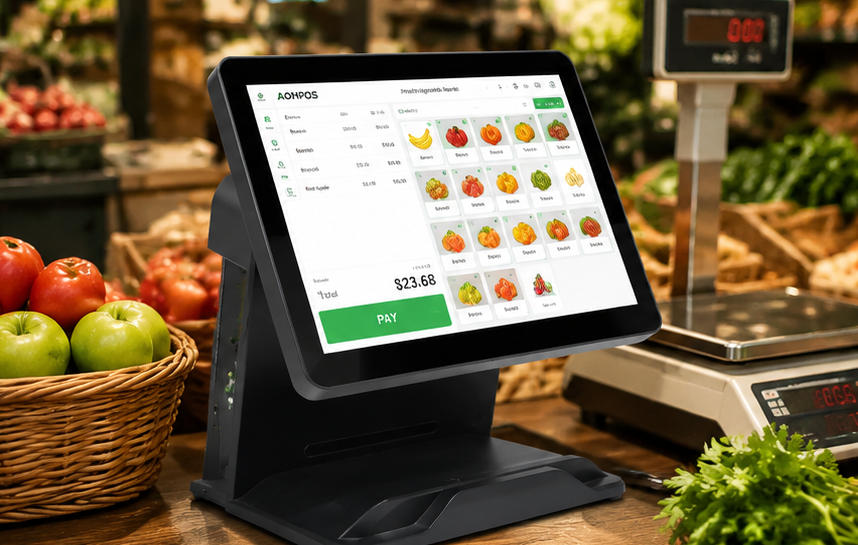
Fresh-produce retail combines high transaction frequency with constantly changing products and prices.
A cashier may process loose apples sold by weight, prepacked berries with a barcode, herbs sold by bunch, discounted ripe fruit, and bottled juice in one order. Each product can require a different identification or pricing method.
Produce prices may also change according to season, supplier cost, origin, quality grade, ripeness, or remaining shelf life. Stores often need to update prices quickly or apply end-of-day markdowns to reduce waste.
A suitable POS system should help the business:
The objective is not simply to replace a traditional cash register. It is to create a complete checkout workstation designed around the practical realities of selling fresh food.
Weight-based selling is one of the most important requirements in produce retail. The POS should connect to a compatible commercial scale so that the measured weight can be transferred directly into the transaction.
Automatic weight transfer reduces manual input and lowers the risk of cashiers entering an incorrect quantity. It also makes the checkout process faster, particularly when customers purchase several types of loose produce.
Depending on the store layout, scales may be installed:
Some stores weigh products and print barcoded labels before checkout. Others calculate the final price only when the customer reaches the cashier.
Before purchasing POS hardware, buyers should confirm the scale protocol, interface, software compatibility, and local legal metrology requirements. Common connections include USB, serial, and network interfaces. A POS terminal with sufficient ports provides greater flexibility when integrating scales and other peripherals.
Not every fruit or vegetable carries a barcode. Cashiers often identify loose produce through PLU codes, category menus, or visual product buttons.
A responsive touchscreen can display commonly sold items as large, recognizable shortcuts. Products may be grouped into categories such as:
Seasonal bestsellers can be placed on the first screen, reducing the number of taps required to complete a transaction.
A commercial AONPOS touch point-of-sale computer provides a responsive interface for product selection, quantity entry, discount application, and payment processing. In a high-volume produce shop, screen responsiveness and menu clarity are usually more valuable than unnecessary decorative features.
Loose produce may rely on PLU codes, but fruit and vegetable markets often sell many barcoded products as well. These can include:
A scanner should read standard retail barcodes quickly and reliably. Stores using QR codes for product traceability, promotions, loyalty programs, or mobile payments may benefit from a 2D barcode scanner.
Label printing is equally important for businesses that weigh and package produce before checkout. A printed label can contain the product name, weight, unit price, total price, packing date, origin, and barcode.
The POS workstation should provide stable connections for scanners and label printers without creating excessive cable clutter around the counter.
Fresh produce does not always follow a fixed-price retail model. Prices may change because of seasonality, supplier availability, quality, ripeness, or remaining shelf life.
A suitable POS application should allow authorized staff to update prices and create temporary promotions without rebuilding the entire product database.
Useful pricing functions may include:
The hardware must support these workflows with a clear display, responsive input, and secure access to management functions.
A customer-facing screen can show the product name, weight, price per kilogram, discount, and final total. Allowing customers to verify this information before payment can improve transparency and reduce disputes.
Fruit and vegetable markets serve a broad range of customers, so payment flexibility is important. A complete checkout station may need to support:
The POS terminal should offer enough connectivity for the payment terminal, cash drawer, receipt printer, scale, scanner, and optional customer display.
A permanent retail store may benefit from a full-size dual-screen checkout. A farmers’ market stand or mobile produce seller may need a more portable configuration.
For flexible selling environments, the AONPOS smart handheld POS terminal provides a compact option for mobile payments, outdoor stalls, delivery services, and temporary checkout points.
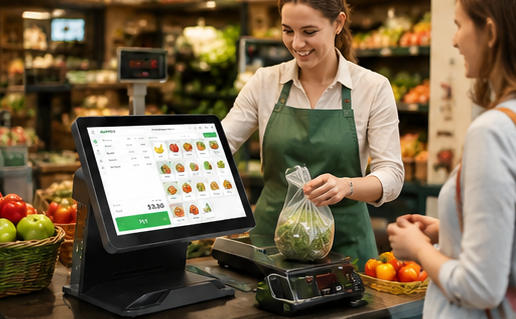
The all-in-one terminal is the central component of the checkout station. It combines the computer, display, and touchscreen in one enclosure, reducing counter clutter and simplifying installation.
For a fixed fruit and vegetable shop, a 15-inch screen normally provides enough space for visual product buttons, transaction details, and management functions.
The AONPOS POS system range includes configurable commercial terminals for different retail layouts and software environments.
When evaluating an all-in-one terminal, buyers should consider:
The correct specification depends primarily on the software and peripheral requirements. Purchasing the most powerful processor is not always necessary, but choosing insufficient memory, storage, or connectivity can limit future expansion.
The scale should be approved for retail trade in the target market and compatible with the selected POS software.
Important factors include accuracy, maximum capacity, readability, calibration support, communication protocol, and ease of cleaning. A removable weighing tray can make daily sanitation more convenient.
The counter should position the scale where employees can place produce naturally. Staff should not need to repeatedly lift bags across the scanner, payment terminal, or other equipment.
A presentation scanner is suitable for a busy fixed checkout because employees can pass products in front of it with minimal movement.
A handheld scanner offers more flexibility when scanning large bags, crates, boxes, or products that are difficult to move across the counter. Some high-volume stores use both formats.
Thermal receipt printers are widely used in retail because they print quickly, operate quietly, and do not require ink cartridges.
Produce retailers should select a printer with easy paper loading and a cutter designed for frequent commercial use. Stores that weigh and package products before checkout may also require a separate label printer.
Before deployment, confirm:
Cash remains important in many produce markets. The cash drawer should fit securely under or beside the counter and connect correctly to the receipt printer or POS terminal.
A customer display provides additional transparency during weighed transactions. It allows shoppers to see the selected product, measured weight, unit price, discount, and total.
A second screen can also display seasonal offers, membership messages, product origins, or promotional content. Businesses comparing display options can review the AONPOS guide to dual-screen and single-screen POS systems.
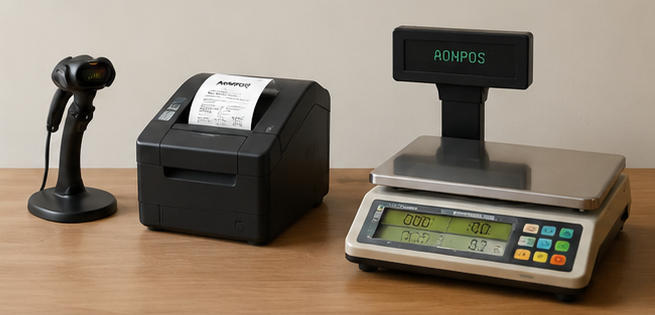
A small neighborhood produce shop may only require:
The main priorities are simple operation, easy staff training, fast product lookup, and minimal counter clutter.
An AONPOS desktop all-in-one POS terminal can provide a practical foundation for a permanent checkout that requires a full-size touchscreen and configurable hardware.
Portability is the primary consideration for an outdoor or temporary market stall. The operator may need a handheld POS, mobile payment acceptance, wireless connectivity, and a battery-powered printer.
Because outdoor conditions are less controlled, buyers should also consider protective cases, stable equipment stands, spare batteries, mobile network reliability, and offline transaction capabilities.
Every component should be easy to transport and quick to install at the beginning of the trading day.
In a supermarket, the produce department normally forms part of a broader retail system. Hardware must integrate with centralized inventory, pricing, promotions, loyalty programs, and reporting.
Scales and label printers may be positioned inside the produce department, while final payment takes place at the main checkout.
High-volume environments benefit from commercial-grade terminals, fast scanning, customer-facing displays, and standardized peripheral connections. The AONPOS guide to grocery store POS hardware provides additional information for larger food-retail deployments.
Wholesale businesses may sell by kilogram, carton, crate, pallet, or negotiated price. Their POS requirements can include account-based transactions, invoice printing, industrial-scale integration, warehouse connectivity, and larger order screens.
A dual-screen configuration allows the buyer to confirm products, quantities, and prices while the operator prepares the order. Additional USB, serial, and network ports may be necessary for scales, scanners, document printers, and warehouse equipment.
A multi-location retailer needs standardized hardware that can be reproduced consistently across every store.
Using the same terminal specification simplifies:
Before a large rollout, the buyer should test a complete pilot workstation. The test should include the POS terminal, scale, barcode scanner, printer, cash drawer, payment device, customer display, software, and network configuration.
Testing only the terminal does not confirm that the complete checkout system will operate reliably.
Fresh-food retail can expose POS equipment to moisture, soil, dust, leaves, packaging materials, and frequent cleaning.
Terminals should be installed away from direct water exposure. The surrounding counter should be easy to clean without requiring staff to disconnect the entire workstation.
Cable management is particularly important. Loose cables collect dirt, make sanitation more difficult, and can be accidentally pulled during busy periods. Power and data cables should be routed securely beneath or behind the counter.
The terminal stand should remain stable during rapid touchscreen operation. Ports should be accessible for maintenance but protected from accidental contact.
Solid-state storage is generally preferable for commercial POS terminals because it has no moving parts and supports faster startup. Buyers should also confirm the availability of replacement power adapters, storage devices, displays, touch panels, and other service components.
A POS terminal cannot be selected independently from the software. The application determines the required operating system, processor, memory, storage, screen resolution, drivers, and peripheral interfaces.
Before ordering, prepare a compatibility checklist covering:
AONPOS focuses on configurable POS hardware rather than restricting buyers to one software platform. This flexibility is useful for distributors and system integrators, but it also makes technical validation before production essential.
POS distributors, software developers, and retail system integrators may need more than a standard off-the-shelf terminal.
Project requirements can include:
A reliable hardware partner should help confirm technical requirements before mass production. The development process should include specification approval, sample testing, software installation, peripheral validation, packaging confirmation, and quality-control planning.
As a professional POS hardware manufacturer, AONPOS provides all-in-one touch terminals and OEM/ODM services for international distributors, software providers, and system integrators.
This allows solution providers to combine AONPOS hardware with their own software, scale integration, payment ecosystem, accessories, and brand identity.
Before purchasing a POS for fruit and vegetable markets, test the complete transaction process under realistic working conditions.
The test should include:
The best POS is not necessarily the system with the longest feature list. It is the system that helps cashiers identify products quickly, record weight accurately, apply the correct price, and complete transactions without unnecessary steps.
For a small greengrocer, the ideal solution may be one touchscreen terminal connected to a scale and receipt printer. For a chain or wholesale operation, it may include standardized dual-screen workstations, multiple weighing points, mobile terminals, label printers, and customized hardware.
By treating the POS as a complete operational workstation rather than simply a computer on the counter, fruit and vegetable retailers can shorten queues, reduce pricing mistakes, improve customer confidence, and build a more scalable foundation for future growth.
Tel / Whatsapp : +86 -15999943922
Correo electrónico : nikki@aonpostech.com


© 2026 Tecnología Co., Ltd de Shenzhen Aonpos .Reservados todos los derechos