Fanless POS vs Traditional POS: Which Design Makes More Sense for Commercial Use?
Aug 07, 2026
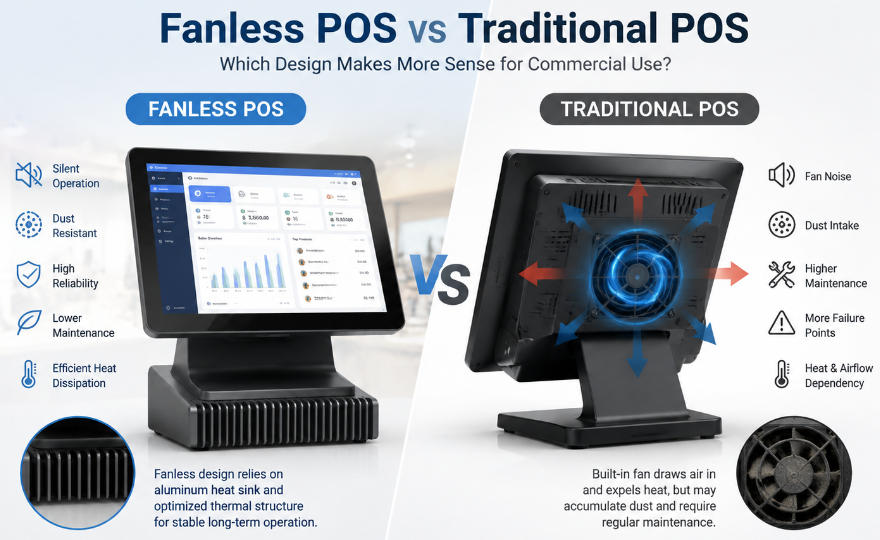
When businesses compare fanless POS vs traditional POS, the decision is rarely about cooling technology alone. What really matters is how that design affects the terminal after thousands of operating hours: performance stability, maintenance frequency, contamination inside the enclosure, energy consumption, downtime, and ultimately total cost of ownership.
This distinction becomes especially important in commercial environments.
A POS terminal installed in a quiet fashion boutique faces very different conditions from one operating beside a restaurant kitchen. A supermarket checkout may process transactions for 12 or more hours per day, while a convenience store terminal could operate almost continuously. A bakery introduces another challenge: fine flour particles that can gradually enter electronic equipment.
For POS distributors, system integrators, software companies, and multi-location retailers, these operating conditions matter more than a specification sheet alone.
So rather than asking whether fanless technology is simply "better," a more useful question is:
Which cooling architecture better matches the workload, environment, and expected lifecycle of the POS deployment?
Fanless POS vs Traditional POS: The Differences That Actually Matter
From a purchasing perspective, the most useful comparison is not how each cooling system works, but what changes during daily operation.
Decision Factor
Fanless POS
Traditional Fanned POS
Mechanical cooling parts
No cooling fan
Includes cooling fan
Dust and contaminant intake
Lower
Higher due to airflow
Operating noise
Virtually silent
Fan noise possible
Cooling-related maintenance
Lower
Periodic cleaning may be required
High-performance CPU flexibility
More dependent on thermal design
Generally greater
Suitability for dusty/greasy environments
Strong
More maintenance-sensitive
Long operating hours
Well suited with correct thermal design
Depends on fan and ventilation condition
Mechanical failure points
Fewer
Fan adds another component
Typical priority
Reliability and low maintenance
Higher thermal capacity
The differences may appear relatively small when equipment is new.
After several years of commercial use, they can become much more significant.
1. The Real Reliability Question Is What Happens After 10,000+ Operating Hours
Most POS terminals perform well when they are new. Long-term reliability is a more meaningful test.
Consider a supermarket operating a checkout terminal 14 hours per day. At that rate, the system can accumulate more than 5,000 operating hours in a single year.
A convenience store running around the clock can approach 8,760 hours annually.
Over a three- to five-year hardware lifecycle, internal components are therefore exposed to tens of thousands of operating hours.
This is where cooling architecture becomes relevant.
A traditional cooling fan contains bearings and rotating components. Dust accumulation, bearing wear, blocked ventilation, and declining fan performance can gradually affect cooling efficiency.
A fanless system removes this particular mechanical component from the equation.
That does not mean fanless automatically means failure-proof. Mainboard quality, storage, power supply design, touchscreen durability, thermal engineering, component selection, and manufacturing quality remain critical.
But when two systems are appropriately engineered for the same workload, reducing unnecessary moving parts can simplify long-term maintenance.
This is particularly relevant for companies deploying hundreds of terminals, because a small difference in field failure or maintenance rates can become a substantial operational issue at scale.
2. Environment Can Matter More Than Processor Specifications
POS buyers often start comparisons with CPU models.
In many commercial deployments, the physical environment deserves equal attention.
Restaurants expose electronics to airborne grease and food particles. Bakeries may have fine flour dust in the surrounding air. Convenience stores operate for long hours with limited opportunities for equipment maintenance. Supermarkets combine continuous operation with high customer traffic and airborne dust.
Traditional active cooling continuously exchanges air between the terminal and its surroundings.
That airflow can also carry contaminants into the enclosure.
Initially, this may have little effect. Over time, however, deposits can accumulate around ventilation openings, fan blades, heat sinks, and internal components.
A fanless architecture significantly reduces this continuous intake of environmental contaminants.
For this reason, fanless POS terminals are particularly attractive for food-service and high-duty-cycle environments—not simply because they are quieter, but because their thermal architecture can reduce one important pathway for contamination.
Businesses comparing hardware for these applications can explore AONPOS POS system solutions, which cover configurations for different retail and hospitality requirements.
3. Fanless Does Not Mean Low Performance
This is one of the most persistent misconceptions in POS hardware procurement.
Historically, passive cooling was strongly associated with low-power processors and relatively limited computing capability. Modern processor efficiency has changed that equation considerably.
For a typical POS workload, the terminal may need to handle:
Transaction processing
Inventory queries
Barcode input
Receipt printing
Payment device communication
Cloud synchronization
Customer display output
Loyalty programs
Browser-based applications
Basic reporting
None of these automatically requires a high-wattage desktop-class processor.
The better purchasing question is not:
"Which POS has the most powerful CPU?"
It is:
"What level of sustained processing performance does the software actually need?"
If the application runs efficiently on a lower-power Intel platform, for example, a well-designed passive thermal system may provide sufficient performance without requiring active cooling.
The situation changes when a terminal handles heavy local databases, resource-intensive ERP applications, advanced analytics, multiple demanding applications, computer vision, or other high-load workloads.
In those cases, active cooling may provide more thermal headroom.
This is why CPU selection and cooling design should never be evaluated separately.
4. Thermal Engineering Is More Important Than the Word "Fanless"
There is also an important distinction between a fanless POS terminal and a well-engineered fanless POS terminal.
Simply removing a fan does not create a reliable system.
Heat still has to go somewhere.
A properly engineered fanless terminal needs an effective thermal path from heat-generating components to heat sinks, structural components, or the chassis. Processor selection, internal layout, thermal materials, enclosure construction, and ventilation strategy all influence the result.
Poor thermal engineering can lead to:
CPU throttling
Reduced sustained performance
Component stress
Unexpected shutdowns
Shorter hardware lifespan
This is especially important for OEM and ODM buyers.
When evaluating samples, buyers should not focus only on whether the terminal boots successfully or passes a short software demonstration. Long-duration testing under realistic workloads provides much more useful information.
A terminal operating comfortably for ten minutes in an air-conditioned showroom does not necessarily represent its behavior after a full shift in a warm restaurant.
For projects requiring configurable processor, memory, storage, screen, and interface options, AONPOS POS hardware solutions provide a useful starting point for matching hardware architecture to commercial deployment requirements.
5. Maintenance Economics Change as Deployment Size Increases
Maintenance is easy to underestimate when purchasing a small number of terminals.
Imagine that cleaning or servicing a fan-cooled system requires only a modest amount of technician time each year.
For five terminals, that may be insignificant.
For 500 terminals distributed across restaurants or retail locations, it becomes a completely different calculation.
The cost is not limited to replacement fans.
A realistic maintenance calculation may include:
Technician labor
Travel
Store coordination
Replacement parts
Shipping
Temporary replacement hardware
Checkout downtime
Internal IT administration
This is why large deployments should evaluate maintenance events per terminal, not just hardware acquisition cost.
A fanless architecture cannot eliminate POS maintenance, but it removes fan inspection, fan cleaning, and fan replacement from the maintenance schedule.
For distributors and integrators responsible for after-sales support, this difference can be particularly valuable.
6. Purchase Price vs Total Cost of Ownership
Suppose Terminal A costs less upfront but requires more maintenance during its service life.
Terminal B costs slightly more but requires fewer technician interventions.
Which one is cheaper?
Without considering the full lifecycle, the purchase price alone cannot answer that question.
A more useful calculation is:
TCO = Purchase Cost + Deployment + Energy + Maintenance + Repairs + Downtime + Replacement + Logistics
Downtime deserves particular attention.
If a checkout terminal fails during peak business hours, the cost is not limited to the repair invoice. The store may experience longer queues, reduced transaction capacity, frustrated customers, and additional workload for employees.
For businesses operating many locations, reliability therefore has measurable economic value.
This is also why choosing the cheapest CPU or the highest-performance CPU can both be mistakes. Hardware should be sized around the real workload and expected lifecycle.
7. Where Fanless POS Has the Strongest Advantage
Fanless architecture becomes particularly compelling when environmental contamination, operating hours, or maintenance access are significant concerns.
Restaurants and QSR
Restaurant POS terminals frequently operate near food preparation areas. Grease and food particles make reducing internal airflow desirable, while quiet operation is an additional benefit in customer-facing environments.
Bakeries
Fine flour dust can penetrate electronics through ventilation openings. A system that minimizes air exchange with the surrounding environment can reduce contamination-related maintenance.
Supermarkets
High transaction volume and long operating hours place reliability ahead of many cosmetic specifications. Fanless hardware can be especially useful where terminals are expected to remain in service for several years.
A configurable terminal such as the AONPOS AP14 Windows supermarket electronic cash register illustrates how different processor and hardware configurations can be matched to checkout requirements rather than relying on one fixed specification.
Convenience Stores
Long opening hours make component durability and low-maintenance hardware particularly important.
Boutique Retail and Hospitality
Here, environmental contamination may be less severe, but silent operation and clean all-in-one designs fit premium customer-facing spaces.
The common factor across these applications is not simply "retail."
It is the combination of long operating hours, customer-facing deployment, limited maintenance windows, and the need for predictable reliability.
8. Where Traditional Active Cooling Still Makes Sense
A balanced comparison also needs to recognize where active cooling remains useful.
Higher-performance processors generate more heat under sustained workloads. If a project genuinely requires that computing capability, active cooling can provide greater thermal flexibility.
Examples may include POS terminals running:
Large local databases
Heavy ERP software
Complex back-office functions
Multiple resource-intensive applications
Advanced analytics
Graphics-heavy interfaces
AI or computer-vision functions
The key phrase is genuinely requires.
Using an unnecessarily powerful processor in a checkout terminal can increase power consumption, heat generation, cooling requirements, and cost without producing a meaningful improvement in transaction speed.
At the same time, forcing an underpowered processor into a fanless design simply to advertise "fanless" can compromise the user experience.
The correct architecture should follow the software workload.
9. Energy Consumption Becomes More Relevant at Scale
Energy efficiency rarely determines a single-terminal purchase.
At fleet level, it deserves more attention.
Consider two terminal configurations differing by only 15 watts in average consumption.
For one POS terminal operating 12 hours per day, the difference may appear negligible.
Across 1,000 terminals, however:
15 W × 12 hours × 365 days × 1,000 terminals = 65,700 kWh per year
Actual consumption will vary by processor, display, peripherals, workload, power management, and operating schedule, but the example illustrates an important procurement principle:
Small hardware differences become large operational differences at scale.
Because fanless platforms are often designed around more power-efficient processors, they can contribute to lower fleet-level energy consumption when properly matched to the software.
10. OEM/ODM Buyers Should Specify the Application Before the CPU
For OEM/ODM projects, one of the most common mistakes is starting with a processor request.
A buyer may ask for "Core i5 POS" because that specification appears stronger in a product catalog.
A more productive sourcing process starts with the application.
Before finalizing the hardware platform, define:
Operating hours: Is the terminal used eight hours daily or continuously?
Software load: What POS, database, ERP, or browser applications will run simultaneously?
Environment: Will the terminal operate around grease, flour, dust, heat, or moisture?
Peripheral requirements: How many USB, serial, LAN, cash drawer, printer, scanner, MSR, and display connections are required?
Display configuration: Is a second customer-facing display required?
Lifecycle expectation: Is the project designed for two years, five years, or longer?
Deployment scale: Are 20 units being installed or 2,000?
Service model: Who pays for field maintenance and replacement?
Only after answering these questions does CPU selection become meaningful.
This approach also helps avoid over-specification, which can unnecessarily increase BOM cost across a large production order.
Businesses planning complete configurations may find AONPOS's guide to what hardware is included in a POS system useful when defining terminal and peripheral requirements.
11. A Better Way to Compare Fanless and Traditional POS Hardware
Instead of asking suppliers only for CPU, RAM, storage, and price, professional buyers should compare hardware around the expected deployment.
A practical evaluation can include:
Run the actual POS software on the sample.
Test the expected peripheral configuration.
Simulate a full working shift rather than a short demonstration.
Evaluate operating temperature under sustained workload.
Check performance consistency rather than only startup speed.
Consider environmental contamination.
Estimate maintenance requirements over the target lifecycle.
Calculate TCO across the entire planned fleet.
This type of testing provides much more useful information than comparing specification sheets.
For additional context on the cooling decision itself, AONPOS also discusses fanless vs fanned POS system durability, which can be used alongside broader hardware evaluation criteria.
So, Which One Should You Choose?
For most conventional checkout workloads, fanless POS hardware has a strong practical case.
Modern POS applications often do not require processors with extremely high thermal output. In those situations, passive cooling can deliver sufficient computing performance while eliminating a mechanical fan, reducing airflow-related contamination, lowering noise, and simplifying long-term maintenance.
The advantages become particularly meaningful in restaurants, bakeries, supermarkets, convenience stores, and large multi-location deployments.
Traditional fan-cooled hardware still has an important role when sustained high-performance computing is genuinely required. Its greater thermal capacity can support processors and workloads that would be difficult to manage passively within a compact enclosure.
So the decision should not be:
Fanless or fanned?
It should be:
What combination of performance, thermal design, environment, reliability, and lifecycle cost best fits this deployment?
Final Thoughts
The most useful fanless POS vs traditional POS comparison is not about which cooling method looks better on a specification sheet. It is about what happens after the terminal has processed thousands of transactions and accumulated thousands of operating hours.
For many retail and hospitality applications, fanless architecture offers a compelling balance of performance, reliability, quiet operation, reduced contamination, and lower cooling-related maintenance.
For more demanding computing environments, active cooling can provide the additional thermal headroom required for higher-performance processors.
For distributors, POS software companies, system integrators, retailers, and OEM/ODM buyers, the best purchasing strategy is therefore to define the application first and configure the hardware second.
AONPOS develops configurable POS hardware for different commercial environments, allowing processor, memory, storage, displays, interfaces, and peripheral configurations to be matched to actual project requirements.
In the end, the better POS terminal is not the one with the highest specification or the longest feature list.
It is the one that can deliver the required performance reliably—with the least unnecessary complexity—throughout its expected commercial lifecycle.