
Fanless vs. Fanned POS Systems: Which Is More Durable for Your Business?
Jan 11, 2026When you’re in the middle of a lunch rush or a holiday sale, the last thing you want to think about is the thermal physics inside your checkout counter. But the truth is, how your POS system breathes—or doesn’t—will eventually determine how long it lives.
At the heart of the hardware world, there’s a long-standing debate: Do you go with a traditional fanned unit, or do you switch to a modern fanless design? After years of helping businesses at Aonpostech find the right fit, we’ve seen that the answer usually depends on your environment, not just the specs on a box.
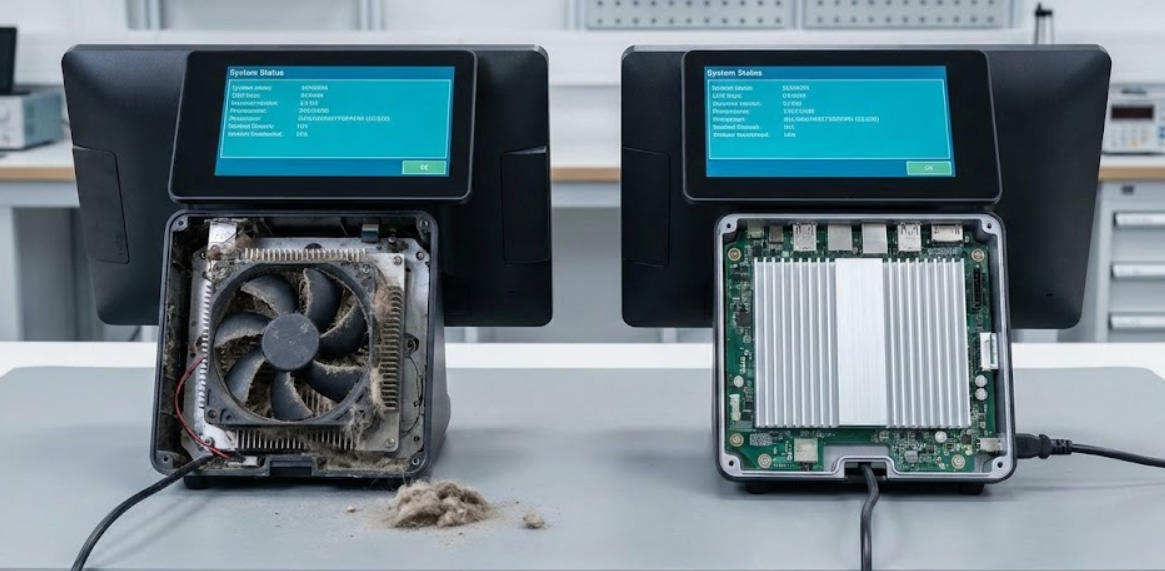
Think about the last time you looked at the back of an old desktop computer. It’s usually caked in gray dust. In a fanned POS system, a small mechanical fan spins thousands of times per hour to pull cool air over the processor.
The problem? It’s also pulling in everything else.
If you run a bakery, that fan is sucking in flour. If you run a busy restaurant, it’s pulling in atomized cooking grease. Eventually, that fan slows down, gets loud, and stops. When the fan dies, the processor "throttles"—meaning your software starts lagging—or worse, the motherboard fries. This is why, for 90% of our retail and hospitality clients, we recommend a fanless architecture.
A fanless machine, like our Aonpos AP14, doesn't "inhale." Instead, it uses passive cooling. The entire chassis acts as a giant radiator, pulling heat away from the CPU and dissipating it through the aluminum casing.
Silent Operation: There’s no constant hum. This is a game-changer for high-end boutiques, spas, or quiet cafes.
Lower Maintenance: You don’t need to vacuum out vents every three months. You just wipe the screen and go.
Sealed Reliability: Because there are no air intake holes, these units are much better at surviving the humid, greasy, or dusty conditions found in a real-world business.
This is the most common question we get. Five years ago, the answer might have been yes. But in 2026, processors like the Intel J4125 (a staple in the Aonpos line) have become incredibly efficient. They provide snappy performance for Windows-based POS software without generating enough heat to require a fan.
However, if your business is doing more than just taking orders—say, you’re running a massive local database, high-end video displays, or complex ERP software—you might need the raw horsepower of an Intel Core i5 or i7. These chips usually do need a fan to stay cool.
In those cases, we suggest looking at dual-screen setups like the Aonpos AP15D. If you need that level of power, just be prepared for a bit more scheduled maintenance to keep those fans clean.
If we’re talking pure, long-term durability in a tough environment (kitchens, outdoor kiosks, or busy retail), fanless is the winner. By removing the fan, you remove the most common mechanical point of failure. You’re left with a solid-state machine that is built to sit on a counter and work for years without complaining.
Go Fanless if you want a "set it and forget it" machine that can survive flour, grease, and dust.
Go Fanned only if your software is so heavy that you absolutely require the high-wattage power of an i-series processor.
At Aonpos, we’ve engineered our terminals to handle the heat, regardless of which path you choose. If you’re tired of hardware that chokes after a year of hard work, it might be time to look at a fanless upgrade.
Tel / Whatsapp : +86 -15999943922
Correo electrónico : nikki@aonpostech.com


© 2026 Tecnología Co., Ltd de Shenzhen Aonpos .Reservados todos los derechos