Can Your Self-Service Equipment Operate 24 Hours a Day?
Dec 15, 2025
Yes, Self-Service Kiosks Can Run 24/7—Here’s What Guarantees Uninterrupted Uptime
The core promise of self-service equipment is accessibility. Whether you operate a restaurant, a retail store, or a payment facility, the ability to serve customers around the clock—long after staff have gone home—is the defining feature of these solutions.
So, can your self-service kiosk truly operate 24 hours a day, 7 days a week, 365 days a year? The definitive answer is yes, provided the equipment is engineered for continuous uptime.
Achieving true 24/7 service involves three critical pillars: hardware built for endurance, software designed for stability, and an operational strategy focused on proactive maintenance.
1. The Hardware Foundation: Built for Perpetual Endurance
A commercial kiosk is not a consumer PC. The components used must be industrial-grade to withstand constant power cycles, environmental fluctuations, and user interaction. This is the starting point for achieving continuous uptime.
A. Industrial-Grade Core Components
High-traffic use requires components that are designed to handle high duty cycles without failure:
Processors and Memory: Equipment relies on robust, reliable CPUs (such as the Intel J4125/I3/I5 series found in Aonpos kiosks) and DDR memory to manage thousands of transactions daily without performance degradation.
Solid-State Drives (SSDs): Unlike traditional hard disk drives (HDDs), the use of mSATA SSDs eliminates moving parts, reducing heat generation and dramatically improving speed and reliability against vibration and constant usage cycles.
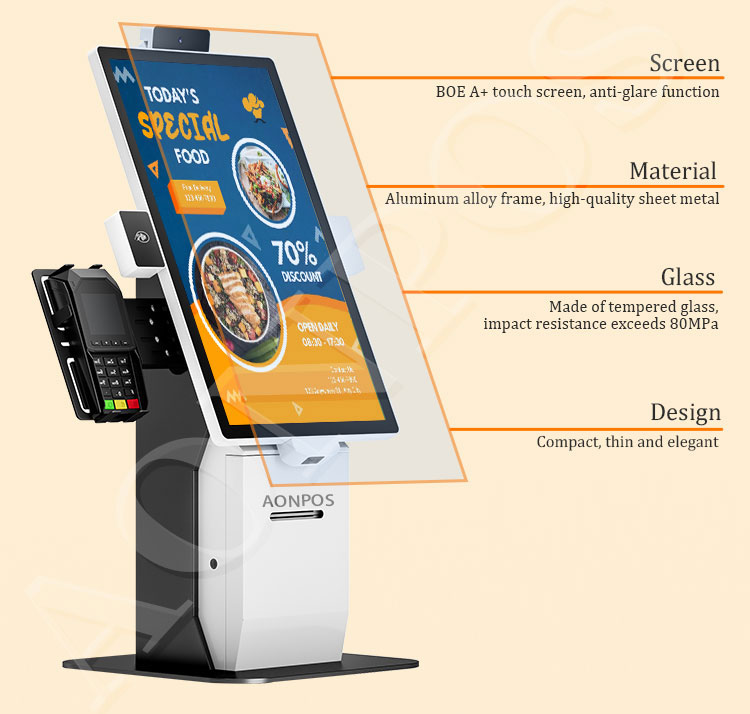
Capacitive Touchscreens: Modern kiosks utilize true-flat, 10-point capacitive touch screens that are highly durable, resistant to wear and tear, and designed for millions of touches.
B. Thermal and Environmental Resilience
Running non-stop means managing heat, which is the enemy of electronics. Quality self-service equipment incorporates:
Optimized Cooling Systems: Internal cooling is precisely engineered to maintain temperatures within a safe operating range, ensuring components do not prematurely fail due to heat stress.
Durable Chassis Design: Kiosks are often constructed with rugged materials like Aluminum Alloy and ABS Plastic, offering physical protection and acting as a passive thermal sink.
Wide Operating Temperature Ranges: Industrial-grade devices are verified to operate reliably across real-world temperatures, often rated to handle environments from 0°C up to 40°C.
2. The Software Engine: Designed for Unbreakable Flow
Even the most robust hardware can fail if the operating software is unstable. Continuous operation is guaranteed by smart software design.
A. Watchdog Systems and Crash Recovery
A high-availability system must be able to heal itself instantly. Intelligent kiosk software includes:
Automatic Restarts: A software "watchdog" constantly monitors the primary application. If the application freezes or crashes for any reason, the watchdog immediately forces a silent restart of the application or the operating system, often restoring service within seconds without requiring human intervention.
Non-Intrusive Updates: To maintain service, critical updates and patches are scheduled during periods of minimal traffic (typically early morning hours) or are designed to be deployed in the background without forcing a service disruption or reboot.
B. Remote Monitoring and Fault Alarms
The ability to run 24/7 means being able to detect problems instantly, even if the location is unmanned.
Intelligent Management: Advanced kiosks are equipped with cloud-based systems that provide remote monitoring and fault alarms. If a component fails (e.g., a printer runs out of paper or a payment peripheral disconnects), the system instantly sends an alert to the operator's support dashboard.
Proactive Diagnostics: System logs and performance data are continuously analyzed to spot performance bottlenecks or potential hardware issues before they become critical failures, allowing for preventive maintenance.
3. The Operational Blueprint: Maintaining Perpetual Service
While the technology enables 24/7 operation, the operator's strategy sustains it. A successful continuous service model relies heavily on logistics and proactive support.
A. Scheduled Consumable and Quick Maintenance Checks
Certain components are designed to run out of material—namely the printer.
Modular Design for Service: Aonpos kiosks often feature a modular design that makes maintenance fast and easy. Components like thermal printers or scanners are designed to be accessed and swapped out quickly, reducing service downtime.
Quick Reloads: Scheduled 3-minute checks for refilling consumables like receipt paper or cleaning the screen keep the machine ready. By integrating these checks into low-traffic times, the machine’s availability remains virtually uninterrupted.
B. Dedicated 24-Hour Support
Reliability is backed by the promise of immediate support. Reputable manufacturers offer:
24-Hour Standby and Technical Guidance: Access to technical staff for remote troubleshooting is essential. The manufacturer's team should be on 24-hour standby to guide customers through simple fixes or initiate remote diagnostics, minimizing field service visits.
The Takeaway: From Availability to Reliability
The answer to "Can the self-service equipment operate 24 hours a day?" is an emphatic Yes, but only when it is rooted in industrial-grade hardware, intelligent fault-recovery software, and streamlined maintenance protocols. Choosing a partner like Aonpos, which engineers its kiosks specifically for 7*24 hours uninterrupted service, ensures your business truly capitalizes on the benefits of self-service: maximized revenue and unrivaled customer convenience.