Aonpos todo en una posición
  • What are the different installation options for self-service kiosks? (Wall-mounted / Freestanding / Desktop)
    What are the different installation options for self-service kiosks? (Wall-mounted / Freestanding / Desktop) Dec 17, 2025
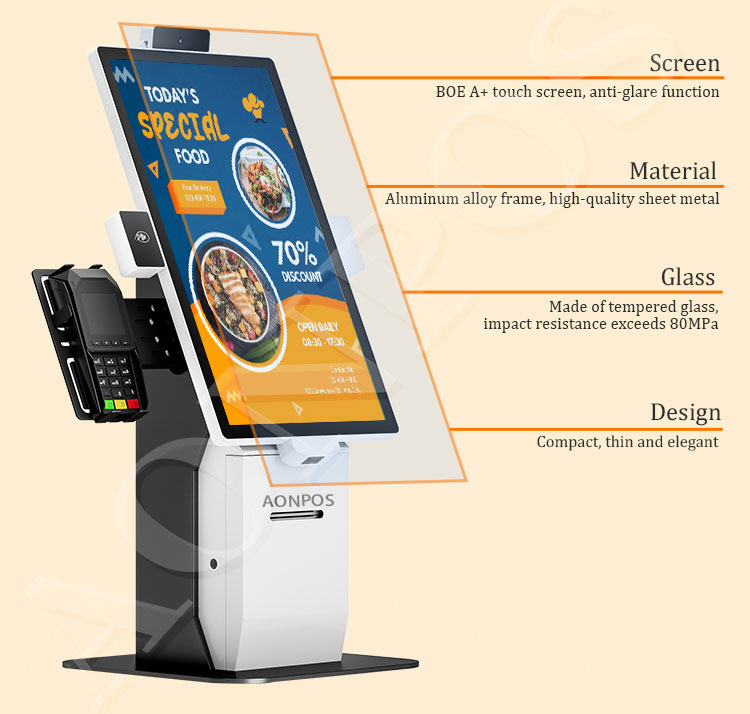
    In the modern business landscape, efficiency is everything. Integrating a self-service payment kiosk can reduce labor costs, eliminate long queues, and improve order accuracy. However, choosing the right hardware is only half the battle—choosing the right installation method is what determines how effectively your customers interact with your brand. At Aonpos, our flagship modular solutions like the APK06 Series are designed to adapt to various environments. Below, we break down the three primary installation options to help you decide which is right for your space. 1. Wall-Mounted Kiosks: The Ultimate Space Saver Wall-mounted kiosks are directly attached to a vertical surface, making them the gold standard for high-traffic areas with limited floor space. Best For: Narrow hallways, small retail shops, and pharmacies. The Aonpos Advantage: Our wall-mount-ready terminals feature sleek, durable aluminum designs that blend seamlessly into modern décor. Why Choose It? Zero Footprint: Frees up 100% of your floor space for customer movement. High Security: Being bolted to a structural wall makes these units nearly impossible to tamper with or move. Custom Height: You can install them at the perfect ergonomic height for your specific customer base, including ADA-compliant heights for accessibility. 2. Freestanding Kiosks: Maximum Visibility & Functionality Freestanding (or floor-standing) kiosks are independent structures that stand on a pedestal or base. They are "beacons" that naturally draw customer attention in open areas. Best For: Large restaurant lobbies, airport check-ins, and shopping mall wayfinding. The Aonpos Advantage: The Aonpos Floor Stand Ordering Kiosk supports large screen sizes (up to 32 inches) and can house heavy-duty 80mm thermal printers and NFC payment modules within the stand itself. Why Choose It? 360-Degree Visibility: They catch the eye from across a large room, encouraging "self-service first" behavior. Component Storage: The large base allows for more peripherals, such as cash recyclers or high-capacity ticket printers. Flexibility: While stable, they can be repositioned during store renovations without structural wall repairs. 3. Desktop & Countertop Kiosks: Portable & Versatile Desktop kiosks sit on existing counters or desks. They are ideal for businesses that want to modernize their Point of Sale (POS) without a full construction project. Best For: Cafés, hotel receptions, and boutique "manned" service counters. The Aonpos Advantage: Our APK06 Modular Desktop Kiosk is a groundbreaking device. Its modular design allows businesses to swap out screens (15.6" to 23.8") and components to meet changing needs. Why Choose It? Lowest Installation Cost: Simply place it on the counter and plug it in. No drilling or structural work required. Human-Tech Hybrid: Perfect for environments where a staff member is nearby to assist, creating a more personalized high-tech experience. Waterproof Options: Aonpos offers waterproof modern designs, essential for the demanding food and beverage industry. Comparison Table: At-a-Glance Feature Wall-Mounted Freestanding Desktop / Countertop Space Required Minimal (0 Floor Space) Significant Floor Space Moderate Counter Space Installation Difficulty Medium (Professional) Medium (Assembly) Low (Plug-and-Play) Visibility Moderate Very High Low/Moderate Typical Screen Sizes 15.6" - 21.5" 21.5" - 32" 15.6" - 23.8" Aonpos Model APK07 / PK1851 APK06 / Floor Stand APK06 Desktop Frequently Asked Questions (FAQ) Q: Can one kiosk support multiple installation types? A: Yes! The Aonpos APK06 is a modular system. It is specifically designed to be "groundbreaking" by allowing the same core unit to be deployed as either a desktop or a floor-standing model, depending on the modules you choose. Q: How do I handle cable management for a clean look? A: For wall-mounted and freestanding units, Aonpos kiosks feature internal routing channels. This hides power and internet cables inside the enclosure, preventing accidental unplugging and maintaining a professional aesthetic. Q: What technical specs should I look for in a payment kiosk? A: Ensure your kiosk has a capacitive touch screen for responsiveness, a high-performance CPU (like the i3/i5 or RK3568 options in the APK series), and integrated NFC/Printer support to handle all-in-one transactions. Conclusion Choosing between wall-mounted, freestanding, or desktop kiosks depends on your floor plan and customer flow. Whether you need the space-saving power of a wall-mount or the modular flexibility of the Aonpos APK06, we have the hardware to scale your business. Explore the full Aonpos Self-Service Kiosk Range Here
  • What are the differences between outdoor and indoor self-service kiosks?
    What are the differences between outdoor and indoor self-service kiosks? Dec 21, 2025
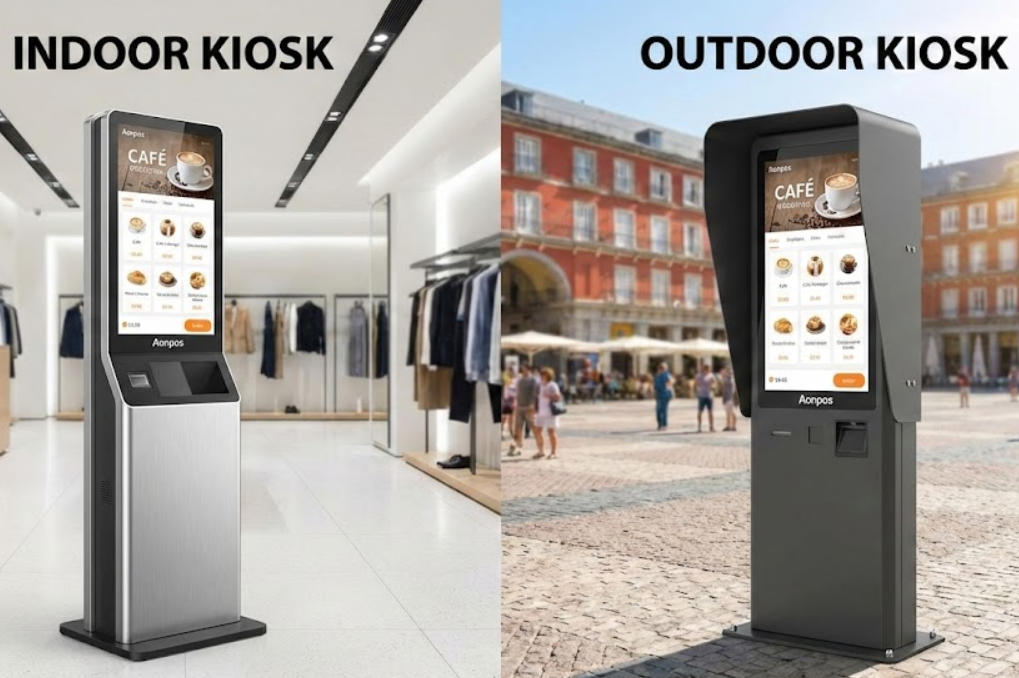
    Outdoor vs. Indoor Self-Service Kiosks: 5 Critical Differences You Need to Know The global shift toward automation is no longer a trend—it’s the standard. From fast-food chains to retail giants, businesses are deploying self-service payment kiosks to slash wait times and reduce labor costs. However, one of the most expensive mistakes a business owner can make is choosing the wrong environment for their hardware. Should you invest in an indoor kiosk or a rugged outdoor model? While they may look similar on the surface, the internal engineering is worlds apart. Based on the latest innovations from Aonpos, here are the five critical differences between indoor and outdoor self-service kiosks. 1. Weatherproofing and IP Ratings The most obvious difference is environmental protection. An indoor kiosk, like the Aonpos AP022, is designed for climate-controlled environments like malls or restaurants. It uses high-quality aluminum alloy and ABS plastic to maintain a sleek, professional look. In contrast, an outdoor kiosk must withstand rain, snow, and dust. High-end models feature an IP65 rating, meaning they are completely dust-tight and protected against water jets. Aonpos has pioneered "modular waterproof" designs that allow these machines to operate in demanding "Coffee Pop-Up" or outdoor market scenarios without risking internal circuitry. 2. Display Visibility (Nits and Brightness) Have you ever tried to read your phone screen in direct sunlight? It’s nearly impossible. Indoor Kiosks: Usually feature a brightness of 250 to 300 nits, which is perfect for indoor lighting. Outdoor Kiosks: Require high-brightness panels, often exceeding 1500 nits, paired with anti-glare tempered glass. Aonpos utilizes true-flat 10-point capacitive touch screens across their lineup, ensuring that whether your kiosk is a 15.6-inch desktop unit or a 32-inch floor-standing giant, the touch response remains fluid and the visuals remain crisp. 3. Thermal Management Systems Indoor environments are stable, usually staying between 0°C and 40°C. Outdoor kiosks, however, face the "greenhouse effect"—sunlight hitting the glass can cook the internal CPU. To combat this, outdoor units often include internal HVAC systems or advanced fan cooling. Aonpos hardware is engineered for 24/7 commercial use, featuring a "Watchdog Timer" (WDT) and industrial-grade processors (from Intel J4125 to high-performance i5/i7) that maintain stability even when temperatures fluctuate between -15°C and 50°C. 4. Security and Vandalism Resistance Indoor kiosks are often monitored by staff. Outdoor kiosks are often left unattended overnight. Outdoor models require: Thicker Steel Enclosures: To prevent forced entry. Security Locks: Multi-point locking systems for cash and component access. Bolted Bases: To ensure the unit cannot be moved. Aonpos offers modular architecture, allowing businesses to choose between lightweight stands for indoor retail or heavy-duty, reinforced bases for public squares. 5. Modular Flexibility Whether indoor or outdoor, your kiosk needs to grow with your business. This is where Aonpos excels. Their "Lego-like" modular design allows you to swap components easily: Payment: Integrate NFC, QR code scanners, or traditional card readers. Printing: Choose between 58mm or 80mm thermal printers with auto-cutters. Verification: Add ToF cameras for facial recognition or ID scanners. The Verdict: Which One Do You Need? Choose Indoor if you are running a restaurant, hotel lobby, or retail checkout where the environment is stable and space is a premium. Choose Outdoor if you are offering 24/7 services such as ticketing, drive-thru ordering, or outdoor pop-up events. Ready to Transform Your Business? Aonpos provides factory-direct, customizable self-service solutions designed to improve efficiency and customer satisfaction. Whether you need a wall-mounted indoor terminal or a rugged outdoor payment kiosk, our modular systems are built to perform. Explore the Aonpos Kiosk Range Today FAQ Section (Optimized for Google Featured Snippets) Q: Can I use an indoor kiosk in a semi-outdoor area? A: It is not recommended unless the area is completely protected from humidity and temperature extremes. Using an indoor kiosk in a semi-outdoor setting can void warranties and lead to screen fogging or hardware failure. Q: What is the best screen size for a self-service kiosk? A: For retail and restaurants, 21.5-inch and 27-inch screens are the industry standard as they offer the best balance between visibility and space-saving. Q: Are Aonpos kiosks compatible with Windows and Android? A: Yes. Aonpos kiosks support Android 7.1 through 11 and Windows 7, 10, and 11, allowing for seamless integration with your existing POS software.
  • Can self-service machines be placed in places with high humidity, such as train stations or near the seaside?
    Can self-service machines be placed in places with high humidity, such as train stations or near the seaside? Dec 26, 2025
    The Ultimate Guide to Deploying Self-Service Kiosks in High-Humidity and Coastal Environments For businesses expanding their digital footprint into high-traffic areas—such as bustling train stations or scenic seaside piers—the environment is the biggest hurdle to hardware longevity. High humidity, salt-laden air, and rapid temperature fluctuations can destroy standard electronics in months. In this guide, we explore the technical requirements for deploying self-service payment kiosks in challenging climates and how to ensure your investment stands the test of time. 1. Understanding the Challenges: Humidity vs. Hardware In environments like underground train stations or coastal boardwalks, humidity levels often exceed 80%. This leads to three primary hardware killers: Electronic Corrosion: Moisture causes "creeping" corrosion on circuit boards, leading to intermittent failures or total system shorts. Condensation & Dew Point: When warm, humid air hits a cool kiosk surface, condensation forms inside. This is particularly dangerous for thermal printers and card readers. Saline Oxidation: For seaside locations, salt spray acts as a catalyst for rust, eating through standard powder-coated steel within a single season. 2. Essential Technical Standards for Humid Environments To combat these issues, hardware must meet specific industrial benchmarks. IP Ratings: The First Line of Defense When selecting a kiosk, look for the Ingress Protection (IP) rating. For high-humidity indoor areas (train stations), an IP54 rating is often sufficient. However, for true outdoor or seaside deployment, IP65 or IP66 is mandatory. This ensures the unit is sealed against both micro-dust and high-pressure water jets (or heavy rain). Material Science: Beyond Standard Steel Standard kiosks use cold-rolled steel. For high-humidity areas, materials must be upgraded: 304/316 Stainless Steel: 316-grade is the "marine grade" standard, containing molybdenum to resist chloride (salt) corrosion. Industrial Powder Coating: A multi-layer outdoor-grade coating provides an additional barrier against moisture. 3. Protecting the "Brain": Internal Climate Control A high-quality self-service kiosk is more than just a metal box; it is a climate-controlled ecosystem. Industrial Dehumidifiers/Heaters: Small internal heating elements keep the internal temperature slightly above the "dew point," preventing condensation from ever forming on the screen or motherboard. Conformal Coating: Leading manufacturers like Aonpostech utilize conformal coating on PCBs. This is a specialized chemical film that waterproofs the electronic components themselves, providing a second layer of protection if moisture does enter the unit. High-Brightness, Anti-Fog Displays: High-humidity often comes with high heat. Industrial screens with optical bonding prevent "fogging" between the glass layers and ensure visibility even in direct sunlight. 4. Maintenance Strategies for Coastal Deployments Even the best-engineered kiosk requires a maintenance plan to combat the elements: Salt Removal: In seaside locations, a monthly wipe-down with fresh water prevents salt crust from building up on ports and sensors. Seal Audits: Every six months, inspect the rubber gaskets and seals. UV rays and humidity can cause seals to crack, compromising the IP rating. Filter Checks: If the kiosk uses fan-based cooling, filters must be cleaned or replaced regularly to maintain airflow. 5. Why Choose Aonpostech for Challenging Environments? At Aonpostech, we specialize in rugged, high-performance self-service payment kiosks designed for diverse global climates. Our kiosks are built with industrial-grade components that offer: Multi-Payment Integration: Secure handling of cash, cards, and QR codes in any environment. Customized Enclosures: Tailored material choices, from reinforced steel to marine-grade finishes. Expert Engineering: Optimized thermal management systems to handle the humidity of a tropical station or the salt air of a coastal pier. Deploying self-service technology in high-humidity areas is entirely possible with the right engineering. By prioritizing IP ratings, material quality, and internal climate control, you can provide 24/7 service to your customers, regardless of the weather. Ready to deploy your next project in a challenging environment? Explore our full range of Self-Service Payment Kiosks and contact our technical team for a custom solution.
  • Android vs. Windows Self-Service Kiosks: Which Is Right for Your Business?
    Android vs. Windows Self-Service Kiosks: Which Is Right for Your Business? Dec 28, 2025
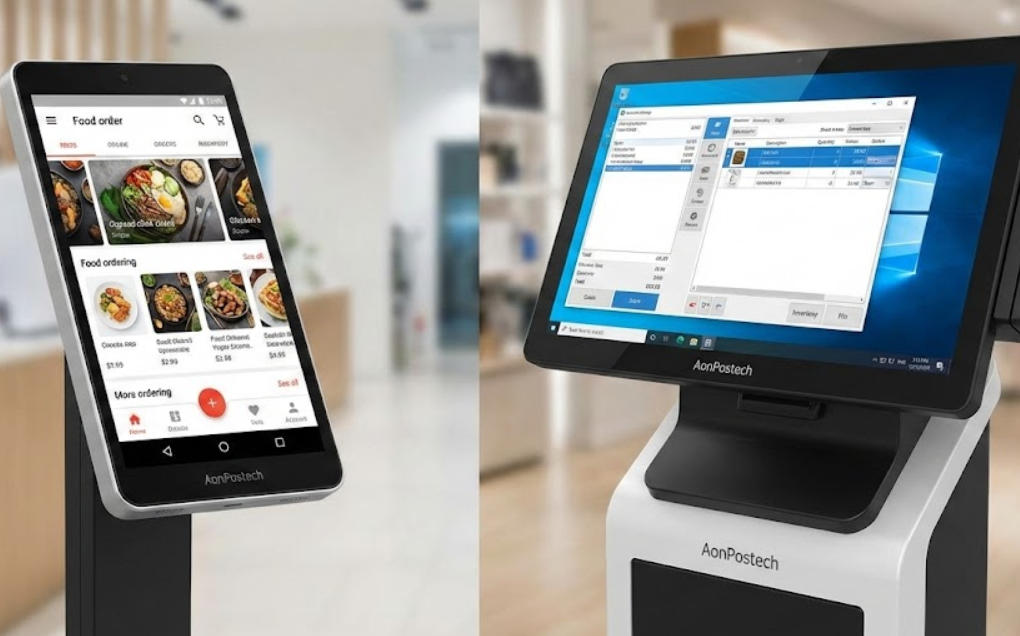
    In the modern landscape of retail and hospitality, the choice of a self-service kiosk is no longer just about the screen size—it is about the "brain" powering the experience. As businesses transition to automated checkout, the debate between Android-based and Windows-based systems has become a pivotal decision for ROI. At AonPostech, we provide industrial-grade hardware for both ecosystems. Here is a deep dive into the technical and operational differences to help you choose. 1. Technical Architecture & Performance The primary difference lies in the hardware architecture and processing power. Android Kiosks: Typically powered by ARM-based processors (like the Rockchip RK3568 found in our APK06 series). They are highly energy-efficient, generate less heat, and offer a "mobile-native" feel that mirrors the smartphones your customers use daily. Windows Kiosks: Utilize x86 architecture (Intel Core i3/i5/i7). These are "powerhouse" machines designed for heavy multitasking. If your kiosk needs to run complex local databases or high-end graphics alongside a POS system, Windows is the industry standard. 2. Total Cost of Ownership (TCO) When scaling a fleet of kiosks, cost is a major factor. Android: Generally offers a lower entry price. Since the OS is open-source, there are no heavy licensing fees. Maintenance is often streamlined via Mobile Device Management (MDM) software. Windows: Requires a paid license (Windows 10 IoT or Pro). While the upfront cost is higher, Windows offers a longer lifecycle for industrial models—often 5 to 7 years of stable operation in high-traffic environments. 3. Comparison Table: At a Glance Feature Android (e.g., AonPostech RK3568) Windows (e.g., Intel i5 Series) Best For QSR, Ticketing, Simple Retail Pharmacy, Grocery, Legacy ERP User Interface Intuitive, Touch-First Powerful, Multi-Window Licensing Low to None High (Standard License Fees) Connectivity Cloud-Native, Bluetooth/Wi-Fi Legacy USB, Serial, On-Premise Security App Sandboxing Enterprise-Grade (Active Directory) Why Hardware Quality Matters: The AonPostech Advantage Regardless of the OS, the hardware must be built for 24/7 "Always-On" reliability. AonPostech kiosks, such as the AP022 and APK06, are engineered with: Modular Design: Swap printers, scanners, or NFC modules in minutes without replacing the whole unit. Industrial Cooling: Aluminum alloy and ABS plastic chassis prevent thermal throttling, a common cause of system crashes in "budget" consumer-grade kiosks. High-End Peripherals: Integrated 80mm thermal printers and high-sensitivity QR scanners ensure a zero-friction checkout. Frequently Asked Questions (FAQ) Is Android or Windows more secure for handling payments? Both are secure, but they handle data differently. Android uses "sandboxing," which isolates the payment app from the rest of the system, making it very hard for malware to spread. Windows offers deeper integration with enterprise security tools like Windows Defender and BitLocker, which is preferred by IT departments managing large corporate networks. Can I run my current Windows POS software on an Android kiosk? No, they are built on different codebases. However, most modern software providers now offer web-based or cloud-native versions of their POS, which run perfectly on Android systems. If you have a legacy system that must run locally, a Windows-based model like the AonPostech PK1851 is the correct choice. Which system is easier to maintain remotely? Android is the winner for remote management. Using MDM tools, you can push app updates, lock the screen into "Kiosk Mode," and troubleshoot devices across thousands of locations from a single dashboard. While Windows supports remote desktop and Group Policy, it often requires more technical expertise to manage at scale. Do AonPostech kiosks support customization? Yes. We specialize in OEM/ODM services. Whether you need a 15.6-inch desktop unit or a 32-inch floor-standing ordering terminal, we can customize the CPU, RAM, and peripheral modules to fit your specific OS choice and branding. Final Verdict: Which should you choose? Choose Android if you are a Quick Service Restaurant (QSR) or boutique retail store looking for a cost-effective, sleek, and easy-to-manage solution. Choose Windows if you are a large-scale enterprise with complex security requirements or need to integrate with legacy hardware that requires specific Windows drivers. Ready to upgrade your customer experience? Explore the AonPostech Kiosk Range to find the perfect match for your business.
  • Why Does My Self-Service Kiosk Keep Restarting?
    Why Does My Self-Service Kiosk Keep Restarting? Jan 01, 2026
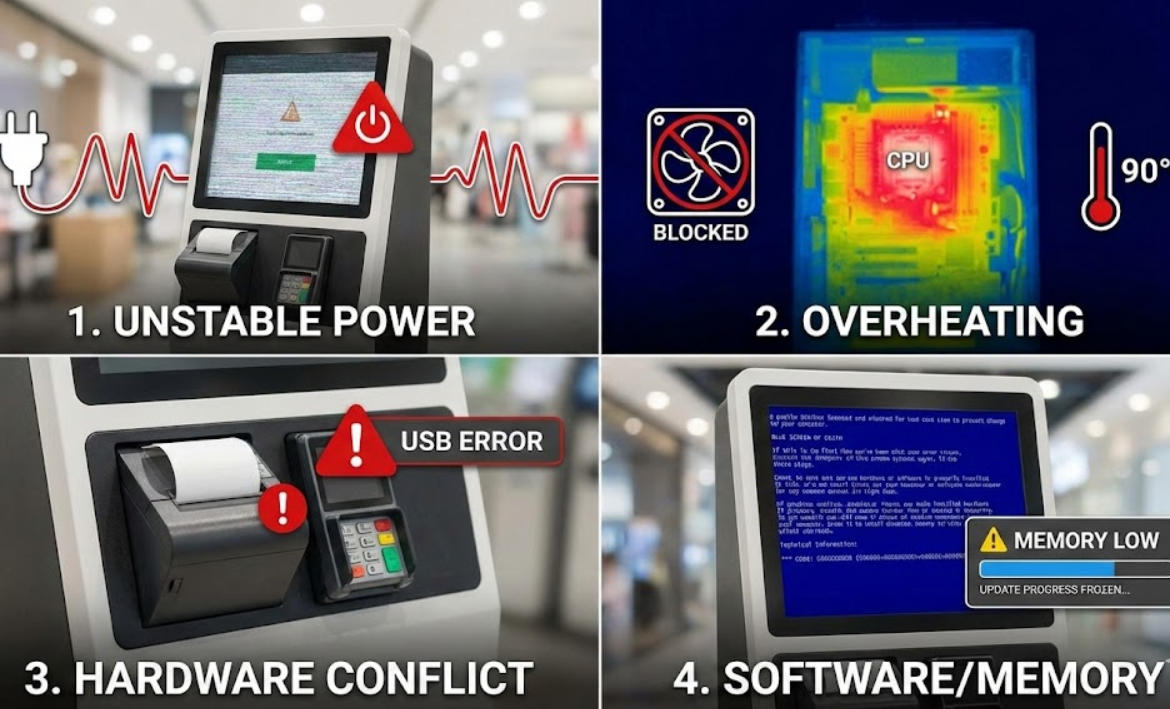
    In the world of automated retail and hospitality, a self-service payment kiosk is the backbone of efficiency. However, few things are more frustrating for both business owners and customers than a machine that frequently restarts or enters a "boot loop." Frequent reboots don’t just cause downtime; they lead to lost revenue and a poor brand image. In this guide, we explore the primary technical reasons behind kiosk instability and how choosing industrial-grade hardware, such as Aonpostech Self-Service Kiosks, can prevent these issues. 1. Unstable Power Supply and Voltage Fluctuations The most common cause of spontaneous restarts is the power source. Unlike consumer PCs, a self-service payment kiosk often houses multiple peripherals (thermal printers, card readers, scanners) that all draw power simultaneously. The Issue: If the input voltage drops (a "brownout") or surges, the Power Supply Unit (PSU) will restart the system to protect the motherboard. The Solution: Always use a dedicated Online UPS. Aonpostech kiosks are designed with industrial-grade power management to handle the high-current demands of integrated payment components. 2. Thermal Throttling and Overheating Self-service kiosks often operate 24/7 in enclosed spaces or high-traffic outdoor environments. The Issue: If dust clogs the internal fans or the thermal paste on the CPU dries out, the system temperature will spike. To prevent permanent damage, the motherboard initiates a thermal shutdown. Aonpostech Advantage: High-quality kiosks utilize superior heat dissipation designs and industrial cooling fans to ensure stable performance even in demanding environments. 3. Peripheral Hardware Conflicts A kiosk is a complex ecosystem of hardware. A faulty receipt printer, a short-circuiting QR scanner, or a loose USB connection can send "noise" back to the motherboard. The Issue: A "USB Device Not Recognized" error or a driver crash for a peripheral can trigger a Blue Screen of Death (BSOD), resulting in a reboot. Maintenance Tip: Regularly check internal connections. Ensuring your hardware is sourced from a reliable manufacturer like Aonpostech ensures that all modules (printers, card readers, and screens) are fully compatible and rigorously tested. 4. Software Memory Leaks and OS Updates Sometimes the hardware is perfect, but the software is at fault. The Issue: If the kiosk application has a "memory leak," it will slowly consume all available RAM until the operating system crashes. Additionally, forced Windows or Linux updates may trigger restarts at the most inconvenient times. The Solution: Optimize your kiosk software and disable "Auto-Updates" in favor of scheduled maintenance windows. 5. Faulty RAM or SSD Storage If your kiosk restarts during specific tasks—like processing a payment or loading a video—the internal memory (RAM) or the storage drive (SSD) might be failing. The Issue: A "bit flip" in a faulty RAM stick or a bad sector on an SSD will cause an immediate system crash. Pro Tip: Use industrial-grade SSDs and RAM. Aonpostech utilizes high-performance internal components to ensure long-term stability under heavy daily use. Quick Troubleshooting Table Symptom Likely Cause Suggested Action Restarts during printing Power Supply (PSU) overload Check PSU wattage/Replace printer Restarts in the afternoon Overheating Clean dust filters / Check ventilation Restarts after a card swipe Peripheral Driver Conflict Update card reader drivers Infinite boot loop OS Corruption / SSD Failure Reinstall OS or replace SSD Conclusion: Reliability Starts with Hardware While software tweaks can help, the stability of a self-service payment kiosk ultimately depends on the quality of its build. Choosing a professional partner like Aonpostech ensures your business is powered by industrial-grade motherboards, robust enclosures, and certified peripherals designed to withstand the rigors of 24/7 operation. Are you looking for a more reliable self-service solution? Explore the full range of Aonpostech Payment Kiosks and reduce your downtime today.

¿Necesitas ayuda? Habla con nosotros

dejar un mensaje
Para cualquier solicitud de información o soporte técnico, rellene el formulario. Todos los campos marcados con asterisco* son obligatorios.
entregar

Hogar

productos

whatsApp

contacto