What are the different installation options for self-service kiosks? (Wall-mounted / Freestanding / Desktop)
Dec 17, 2025In the modern business landscape, efficiency is everything. Integrating a self-service payment kiosk can reduce labor costs, eliminate long queues, and improve order accuracy. However, choosing the right hardware is only half the battle—choosing the right installation method is what determines how effectively your customers interact with your brand.
At Aonpos, our flagship modular solutions like the APK06 Series are designed to adapt to various environments. Below, we break down the three primary installation options to help you decide which is right for your space.
Wall-mounted kiosks are directly attached to a vertical surface, making them the gold standard for high-traffic areas with limited floor space.
Best For: Narrow hallways, small retail shops, and pharmacies.
The Aonpos Advantage: Our wall-mount-ready terminals feature sleek, durable aluminum designs that blend seamlessly into modern décor.
Why Choose It?
Zero Footprint: Frees up 100% of your floor space for customer movement.
High Security: Being bolted to a structural wall makes these units nearly impossible to tamper with or move.
Custom Height: You can install them at the perfect ergonomic height for your specific customer base, including ADA-compliant heights for accessibility.
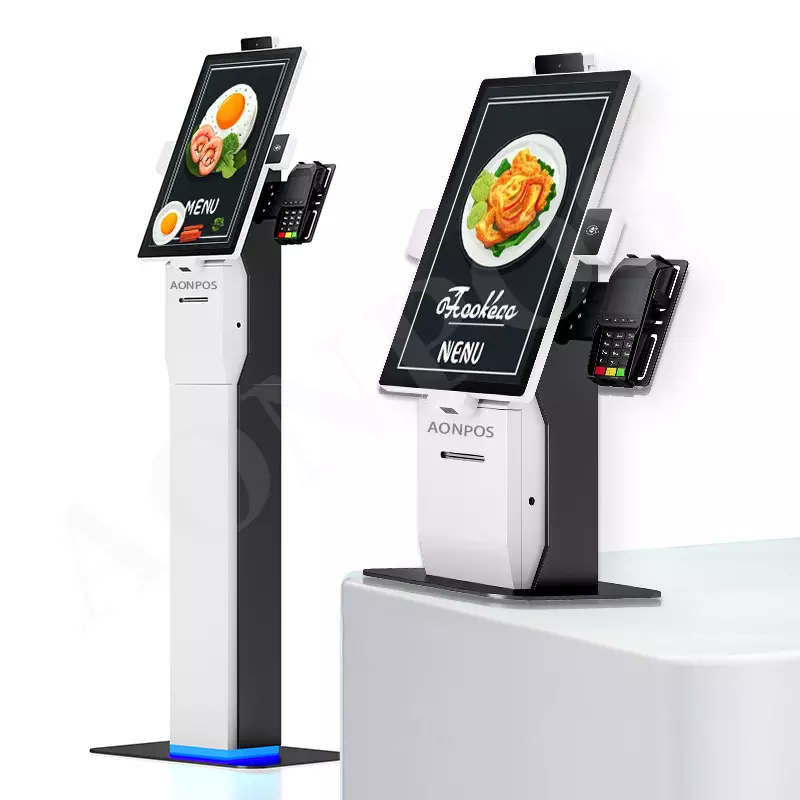
Freestanding (or floor-standing) kiosks are independent structures that stand on a pedestal or base. They are "beacons" that naturally draw customer attention in open areas.
Best For: Large restaurant lobbies, airport check-ins, and shopping mall wayfinding.
The Aonpos Advantage: The Aonpos Floor Stand Ordering Kiosk supports large screen sizes (up to 32 inches) and can house heavy-duty 80mm thermal printers and NFC payment modules within the stand itself.
Why Choose It?
360-Degree Visibility: They catch the eye from across a large room, encouraging "self-service first" behavior.
Component Storage: The large base allows for more peripherals, such as cash recyclers or high-capacity ticket printers.
Flexibility: While stable, they can be repositioned during store renovations without structural wall repairs.
Desktop kiosks sit on existing counters or desks. They are ideal for businesses that want to modernize their Point of Sale (POS) without a full construction project.
Best For: Cafés, hotel receptions, and boutique "manned" service counters.
The Aonpos Advantage: Our APK06 Modular Desktop Kiosk is a groundbreaking device. Its modular design allows businesses to swap out screens (15.6" to 23.8") and components to meet changing needs.
Why Choose It?
Lowest Installation Cost: Simply place it on the counter and plug it in. No drilling or structural work required.
Human-Tech Hybrid: Perfect for environments where a staff member is nearby to assist, creating a more personalized high-tech experience.
Waterproof Options: Aonpos offers waterproof modern designs, essential for the demanding food and beverage industry.
| Feature | Wall-Mounted | Freestanding | Desktop / Countertop |
| Space Required | Minimal (0 Floor Space) | Significant Floor Space | Moderate Counter Space |
| Installation Difficulty | Medium (Professional) | Medium (Assembly) | Low (Plug-and-Play) |
| Visibility | Moderate | Very High | Low/Moderate |
| Typical Screen Sizes | 15.6" - 21.5" | 21.5" - 32" | 15.6" - 23.8" |
| Aonpos Model | APK07 / PK1851 | APK06 / Floor Stand | APK06 Desktop |
A: Yes! The Aonpos APK06 is a modular system. It is specifically designed to be "groundbreaking" by allowing the same core unit to be deployed as either a desktop or a floor-standing model, depending on the modules you choose.
A: For wall-mounted and freestanding units, Aonpos kiosks feature internal routing channels. This hides power and internet cables inside the enclosure, preventing accidental unplugging and maintaining a professional aesthetic.
A: Ensure your kiosk has a capacitive touch screen for responsiveness, a high-performance CPU (like the i3/i5 or RK3568 options in the APK series), and integrated NFC/Printer support to handle all-in-one transactions.
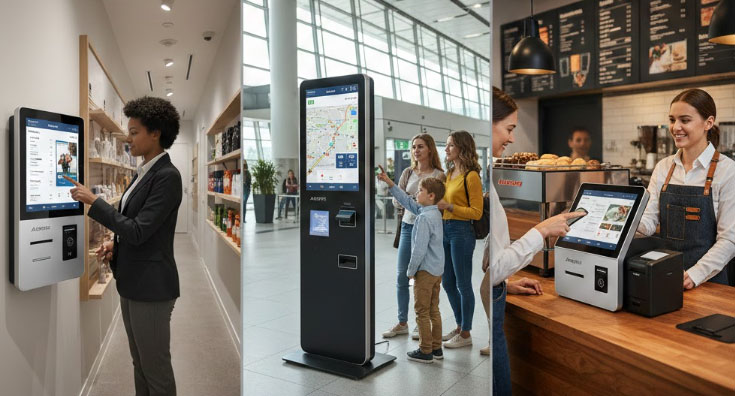
Choosing between wall-mounted, freestanding, or desktop kiosks depends on your floor plan and customer flow. Whether you need the space-saving power of a wall-mount or the modular flexibility of the Aonpos APK06, we have the hardware to scale your business.
Tel / Whatsapp : +86 -15999943922
Correo electrónico : nikki@aonpostech.com


© 2026 Tecnología Co., Ltd de Shenzhen Aonpos .Reservados todos los derechos