Best POS Hardware for Grocery Stores: A Complete Buying Guide
Jul 06, 2026
Running a grocery store requires much more than simply processing payments. From barcode scanning and inventory tracking to weighing fresh produce and managing long checkout lines, every piece of grocery store POS hardware plays a critical role in daily operations.
Whether you operate a neighborhood grocery store, supermarket, convenience store, or fresh food market, choosing the right POS hardware can significantly improve checkout speed, inventory accuracy, and customer satisfaction.
In this guide, we'll explain everything you need to know about selecting grocery POS hardware and why AONPOS has become a trusted partner for retailers worldwide.
Why Grocery Stores Need Specialized POS Hardware
Unlike restaurants or clothing stores, grocery retailers process hundreds or even thousands of products every day.
A complete grocery POS system must handle:
High-volume barcode scanning
Fresh produce sold by weight
Fast payment processing
Inventory synchronization
Loyalty programs
Receipt printing
Cash management
Long operating hours
Because of these demanding environments, grocery businesses require commercial-grade POS hardware that is reliable, durable, and easy to maintain.
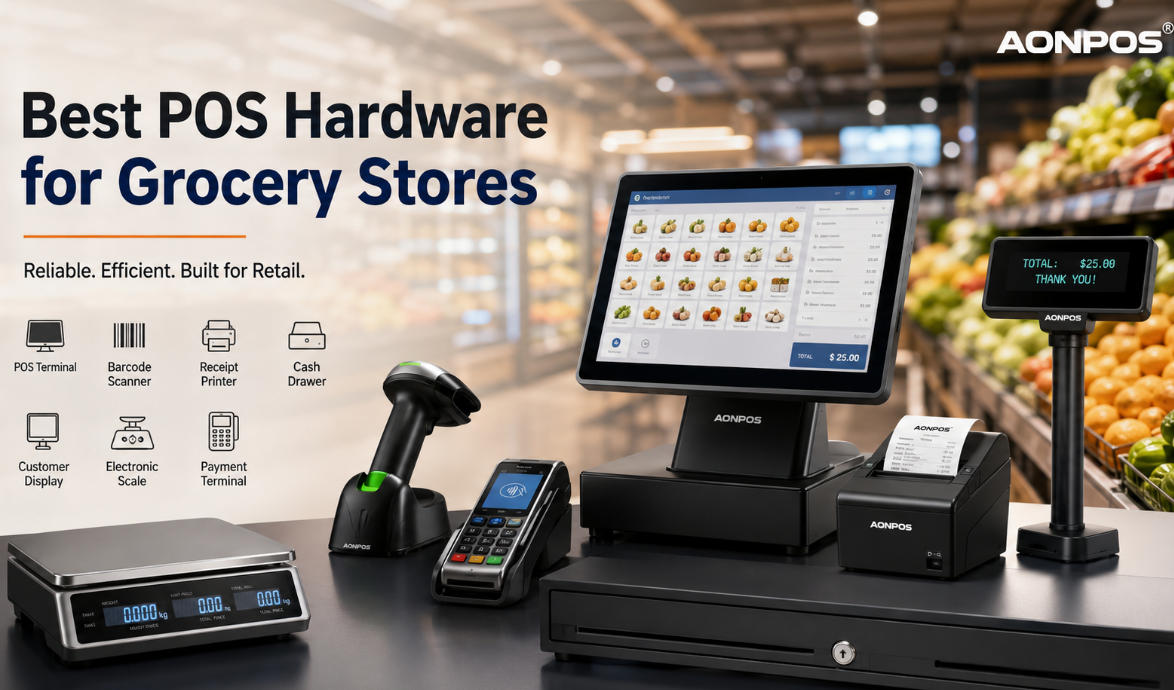
Essential Grocery Store POS Hardware
1. POS Terminal
The POS terminal serves as the central hub of your checkout system.
Modern grocery POS terminals combine:
High-performance processors
Touchscreen displays
Windows or Android operating systems
Multiple USB and serial ports
LAN and Wi-Fi connectivity
A powerful terminal allows cashiers to process transactions quickly while running inventory, pricing, and customer management software simultaneously.
What to Look For
15.6-inch or larger touchscreen
Fanless industrial design
SSD storage
Intel or ARM processor
Multiple peripheral connections
AONPOS offers industrial-grade POS terminals designed specifically for high-volume retail environments.
2. Barcode Scanner
Barcode scanners are among the most frequently used pieces of grocery store POS hardware.
A high-quality scanner should read:
1D barcodes
2D QR codes
Damaged labels
Mobile payment codes
Loyalty cards
Recommended Features
Omnidirectional scanning
Fast decoding
Hands-free operation
USB plug-and-play
Long service life
For busy grocery stores, presentation scanners can significantly reduce cashier fatigue while increasing checkout speed.
3. Receipt Printer
Customers still expect printed receipts, especially for grocery purchases.
Thermal receipt printers provide:
High-speed printing
Quiet operation
Low maintenance
No ink replacement
Typical specifications include:
80mm paper width
Auto cutter
USB + Ethernet connectivity
250mm/s print speed
Reliable receipt printing minimizes checkout interruptions during peak shopping hours.
4. Cash Drawer
Although digital payments continue to grow, many grocery stores still process cash transactions.
A commercial cash drawer should offer:
Heavy-duty steel construction
Multiple bill compartments
Coin organizers
Electronic opening
Manual emergency release
Durability is particularly important for grocery stores that remain open every day.
5. Customer Display
A customer-facing display improves transparency during checkout.
It allows shoppers to view:
Product prices
Discounts
Loyalty points
Total amount
Promotional advertisements
Many modern grocery stores also use customer displays for cross-selling promotions.
6. Electronic Scale Integration
Fresh fruits, vegetables, meat, seafood, and deli products are often sold by weight.
A grocery POS system should integrate seamlessly with electronic weighing scales.
Benefits include:
Automatic weight transfer
Reduced manual input
Accurate pricing
Faster checkout
Lower risk of cashier errors
Scale compatibility is one of the most important considerations when selecting grocery POS hardware.
7. Payment Terminal
Modern customers expect multiple payment options.
Your POS hardware should support:
Credit cards
Debit cards
NFC payments
Mobile wallets
QR code payments
Contactless transactions
Fast payment processing shortens queues and enhances the shopping experience.
Features to Consider When Buying Grocery Store POS Hardware
Not all POS hardware is designed for grocery environments.
Before making a purchase, consider the following factors.
Durability
Grocery stores operate long hours with continuous customer traffic.
Commercial-grade hardware should withstand:
Continuous operation
Dust
Heat
Frequent cleaning
Heavy daily use
Expandability
Your business may grow over time.
Choose hardware that supports additional:
Barcode scanners
Customer displays
Cash drawers
Receipt printers
Payment terminals
Weighing scales
Expandable systems help protect your investment.
Compatibility
Always verify compatibility with your POS software.
Good grocery POS hardware should work with:
Windows POS software
Android POS systems
ERP software
Inventory management platforms
Retail management systems
Easy Maintenance
Downtime costs money.
Choose hardware that offers:
Fanless cooling
Modular design
Easy component replacement
Long product lifecycle
Reliable technical support
Why Choose AONPOS Grocery Store POS Hardware?
With years of experience in POS manufacturing, AONPOS provides reliable retail hardware solutions for supermarkets, grocery stores, convenience stores, and chain retailers around the world.
Our solutions include:
All-in-one POS terminals
Barcode scanners
Thermal receipt printers
Cash drawers
Customer displays
POS accessories
OEM & ODM customization
Advantages of AONPOS
✔ Industrial-grade durability
✔ Fast and stable performance
✔ Flexible hardware configurations
✔ Competitive factory pricing
✔ Global shipping
✔ Professional OEM/ODM services
Whether you're opening a new grocery store or upgrading an existing checkout system, AONPOS delivers dependable hardware designed for demanding retail environments.
How to Choose the Right Grocery POS Hardware
Before purchasing, ask yourself:
How many checkout counters do you operate?
Do you sell products by weight?
Do you need mobile payment support?
Will you expand to multiple locations?
Does your POS software support your hardware?
Selecting hardware based on your business model ensures better long-term performance and lower maintenance costs.
Final Thoughts
The right grocery store POS hardware is an investment that directly impacts efficiency, customer satisfaction, and profitability.
A complete solution typically includes a POS terminal, barcode scanner, receipt printer, cash drawer, customer display, payment terminal, and scale integration. By choosing reliable commercial hardware, grocery retailers can reduce checkout delays, improve inventory accuracy, and support future business growth.
As a professional POS hardware manufacturer, AONPOS is committed to delivering high-performance, cost-effective retail solutions for grocery stores of all sizes. Whether you need standard products or customized OEM/ODM services, AONPOS can help you build a modern and efficient checkout experience.