POS Systems for Clothing Retailers: A Complete Guide to Smarter Fashion Store Operations
Jul 12, 2026Clothing retail is more complex than simply scanning an item and accepting payment. Fashion stores must manage products in multiple sizes, colors, styles, seasons, and locations while delivering a fast and personalized customer experience.
The right POS Systems can bring these activities together in one connected retail environment. From processing transactions and managing product variants to supporting loyalty programs and omnichannel sales, a modern point-of-sale system can become the operational center of a clothing store.
In this guide, we explore the essential features clothing retailers should consider when choosing a POS system, the hardware required for different fashion retail environments, and how AONPOS can support retail technology providers with customizable POS hardware.
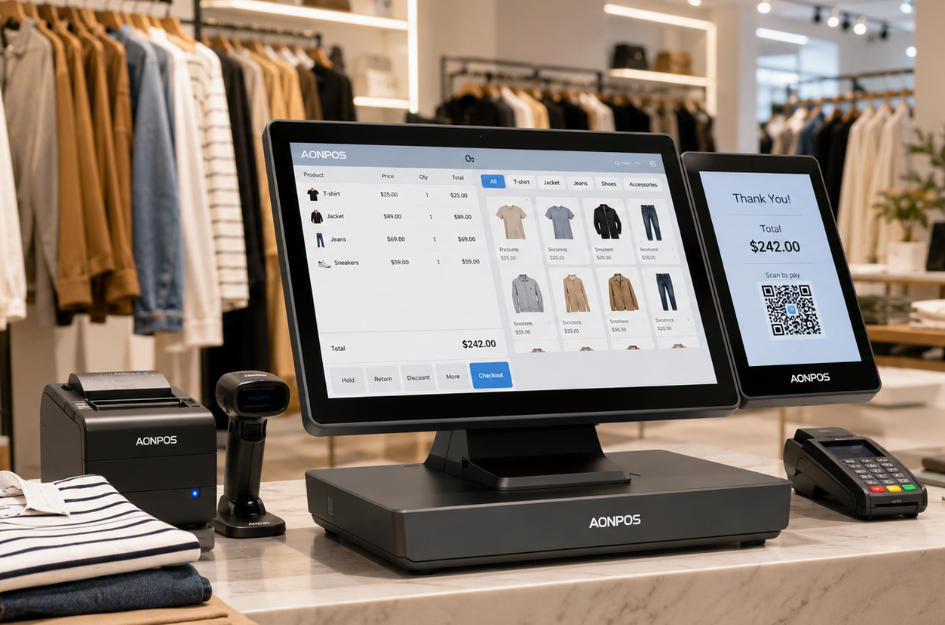
POS Systems for clothing retailers combine hardware and software to process sales and support daily store operations. Unlike a basic cash register, a retail POS system can connect checkout activities with inventory records, customer information, employee management, promotions, and sales reporting.
A typical clothing store POS setup may include:
Retailers can explore different configurations through the AONPOS POS system range, which includes all-in-one terminals designed for retail, hospitality, and other commercial environments.
Fashion retailers face inventory and customer-service challenges that are different from those of restaurants, convenience stores, and other businesses.
One shirt, for example, may be available in five sizes, four colors, and several seasonal collections. Although customers see these items as variations of the same product, each variation usually requires an individual SKU and accurate stock record.
Modern POS Systems help clothing retailers manage this complexity while maintaining an efficient checkout process.
Product variation management is one of the most important requirements for a clothing store.
A suitable POS system should allow retailers to organize products according to:
When an item is sold, returned, exchanged, transferred, or received, the system should update the correct variation rather than simply adjusting the total quantity of the general product.
This level of accuracy helps prevent situations in which the system shows that a product is available while the customer’s preferred size or color is actually out of stock.
Customers expect checkout to be quick, especially during weekends, seasonal promotions, and holiday sales.
An efficient clothing retail POS station should support:
A commercial all-in-one POS terminal can reduce the number of separate devices on the counter and create a cleaner checkout area that fits the visual design of a modern fashion store.
Returns are a normal part of apparel retail. Customers may purchase the wrong size, change their mind about a color, or exchange an online order in a physical store.
A clothing retail POS system should make it easy to:
A clear returns workflow improves customer satisfaction while giving management better visibility into product quality, sizing issues, and buying patterns.
Not every POS solution is equally suitable for fashion retail. Retailers and solution providers should evaluate both software capabilities and hardware performance before selecting a system.
Real-time inventory visibility helps staff answer customer questions immediately.
Instead of checking the stockroom manually, an employee should be able to use the POS terminal or a mobile device to confirm whether a particular size or color is available in the current store, another branch, or a warehouse.
The system should also support:
For growing retailers, real-time inventory information can reduce stockouts, avoid unnecessary overstocking, and improve purchasing decisions.
Clothing retailers may handle hundreds or thousands of SKUs. Barcode support makes it easier to identify the correct item variation during checkout, stock receiving, counting, and returns.
Reliable POS hardware should provide sufficient connectivity for barcode scanners, printers, customer displays, and other retail peripherals.
The AONPOS AP14 retail POS terminal, for example, features a 15-inch capacitive touchscreen and configurable processing, memory, and storage options, making it suitable for different retail software requirements.
Fashion purchases are often influenced by personal preferences, previous purchases, style, and brand loyalty.
When connected to CRM or loyalty software, POS Systems can help retailers record useful customer information such as:
Sales associates can use this information to provide more relevant recommendations and create a more personalized shopping experience.
Retailers must, however, collect and use customer information responsibly and follow applicable privacy and data-protection requirements.
Fashion stores frequently run promotions based on seasons, collections, membership levels, product categories, or purchase quantities.
A suitable POS platform should support promotions such as:
Automated promotion calculation reduces manual errors and ensures that customers receive consistent pricing across employees and store locations.
Many clothing retailers now sell through physical stores, online shops, social platforms, and marketplaces.
POS Systems can support omnichannel retail by connecting store transactions with e-commerce operations. Depending on the software platform, retailers may offer services such as:
For retailers evaluating the wider role of modern POS technology, the AONPOS guide to all-in-one POS systems versus traditional cash registers explains why connected POS infrastructure offers more operational capabilities than conventional cash-register hardware.
A clothing brand may begin with one boutique and later expand to several stores, franchise locations, or shop-in-shop counters.
Scalable POS Systems should allow managers to monitor multiple locations from a central platform. Useful multi-store capabilities include:
Retailers should choose hardware that can be standardized across locations while still accommodating different counter layouts and operating requirements.
POS data can help clothing retailers understand what customers are buying and how store performance changes over time.
Useful reports may include:
These insights can support merchandising, purchasing, staffing, promotion planning, and seasonal inventory decisions.
POS software is only effective when it runs on dependable commercial hardware. Clothing retailers should select each hardware component according to the size, layout, and sales model of the store.
The main terminal should provide a responsive interface, stable performance, sufficient connection ports, and compatibility with the retailer’s chosen operating system and software.
Common options include:
AONPOS provides a broad selection of touchscreen POS hardware for commercial deployments, including Windows-based all-in-one terminals and configurable retail models.
A second screen allows customers to review items, quantities, prices, discounts, and totals before payment.
It can also be used to display:
A dual-screen POS system can improve transaction transparency while creating an additional communication channel at the checkout counter.
Retailers comparing display configurations can also read the guide to dual-screen versus single-screen POS systems.
A barcode scanner reduces manual data entry and helps staff select the exact SKU associated with each size and color.
Retailers should consider scanning speed, supported barcode formats, reading distance, connection type, and the ability to scan damaged or poorly printed labels.
Receipt printers remain important for customers who prefer printed proof of purchase and for stores with specific return-policy requirements.
Depending on the store environment, retailers may choose:
A compact POS configuration with integrated peripherals can save counter space in boutiques and mall kiosks.
Although digital payments continue to grow, many clothing stores still need to accept cash. The cash drawer should be durable, easy for authorized employees to operate, and compatible with the POS terminal or receipt printer.
The payment device should support the payment methods commonly used in the retailer’s target market, which may include:
Payment devices and POS terminals must be deployed according to the requirements of the payment processor, acquiring bank, software provider, and applicable security standards.
Handheld devices can give sales associates access to product and inventory information without returning to the main counter.
They may be used for:
AONPOS offers Android handheld POS terminals for mobile retail and operational applications. Such devices can complement fixed checkout stations in larger fashion stores or high-traffic sales environments.
Many fashion retailers benefit from combining fixed and mobile POS hardware rather than choosing only one format.
A fixed POS station is usually the best choice for:
It provides a consistent location for transactions and can connect to multiple peripherals.
Mobile POS devices are useful for:
The best configuration depends on store size, customer volume, payment requirements, and software compatibility.
Retailers should evaluate a POS solution as a long-term operational investment rather than selecting it only according to purchase price.
Before comparing products, retailers should identify:
Clear requirements make it easier to avoid paying for unnecessary functions or selecting hardware that cannot support future growth.
Retailers should confirm that the POS hardware supports their selected software, operating system, ports, drivers, screen resolution, and peripheral connections.
Software developers and system integrators may also need customized BIOS settings, branded startup screens, preinstalled system images, or specific processor and memory configurations.
Consumer computers and tablets may appear cost-effective, but they are not always designed for continuous commercial use.
Retail environments require hardware that can handle:
Commercial POS hardware can provide a more stable foundation for daily store operations.
The appearance of POS hardware matters in fashion retail. A large or cluttered checkout setup can conflict with a carefully designed store interior.
Retailers should consider:
Compact all-in-one hardware can create a cleaner counter and leave more space for packaging, accessories, or customer interaction.
A POS setup that works for one boutique may not be suitable for a growing chain.
Scalable POS Systems should make it possible to add:
Standardizing hardware across locations can simplify employee training, technical support, spare-parts planning, and device maintenance.
The lowest-cost terminal may create higher long-term costs if it has limited connectivity, poor component quality, insufficient performance, or limited upgrade options.
Retailers should compare total cost of ownership, including maintenance, downtime, peripheral replacement, software compatibility, and expected service life.
A generic checkout solution may process payments successfully but fail to manage sizes, colors, and style variations efficiently.
For clothing retailers, variant-level inventory control should be treated as a core requirement.
A complicated return process slows employees and frustrates customers. The POS software should make exchanges between different sizes and colors straightforward.
Stores should evaluate whether the POS infrastructure can support higher transaction volumes during holidays, clearance events, product launches, and seasonal promotions.
Adding temporary mobile terminals or an extra checkout station can help reduce queues.
Processors, memory, storage, operating systems, display sizes, and ports should be selected according to the software environment.
Retailers, software providers, and hardware manufacturers should confirm compatibility before large-scale deployment.
AONPOS is a POS hardware manufacturer offering all-in-one touch terminals, dual-screen systems, handheld devices, monitors, printers, barcode scanners, and other retail peripherals.
For clothing retail deployments, AONPOS hardware can support applications such as:
In addition to standard products, AONPOS provides OEM and ODM support for POS software companies, distributors, system integrators, and retail technology brands.
Customization requirements may include:
Businesses developing their own retail solution can learn more about AONPOS through the company’s OEM and ODM POS manufacturing capabilities.
Different clothing retail formats require different POS configurations.
A practical configuration may include:
This setup keeps the checkout area organized while covering essential transaction requirements.
A suitable configuration may include:
The handheld device can help employees check product availability and perform stock-related tasks on the sales floor.
A multi-location deployment may require:
An experienced hardware partner can help ensure that device specifications remain consistent across branches and future store openings.
A portable configuration may include:
This setup can reduce installation complexity while giving employees the flexibility to sell in temporary locations.
The best solution depends on the store’s size, SKU volume, number of locations, sales channels, and software requirements. In general, clothing retailers should prioritize product-variant management, real-time inventory, fast barcode scanning, returns, loyalty features, reporting, and omnichannel integration.
Yes. Suitable retail POS software can assign an individual SKU or barcode to every size, color, and style combination. This allows inventory to be tracked at the variant level.
A small boutique can benefit from a POS system because it combines checkout with inventory records, customer management, sales reporting, and promotion control. A compact all-in-one terminal may provide the necessary functionality without occupying excessive counter space.
A dual-screen system can show customers their selected items, quantities, discounts, and payment totals. The secondary display can also present loyalty messages, new collections, promotional content, or digital receipt options.
Yes. Handheld devices can be used for mobile checkout, product lookup, stock counting, receiving, and line busting. They are particularly useful in larger stores, pop-up shops, and busy promotional periods.
AONPOS supports OEM and ODM projects for distributors, software providers, integrators, and retail technology brands. Available customization depends on the product model, project requirements, and order specifications.
Modern POS Systems give clothing retailers more than a way to accept payments. They connect checkout, inventory, customer engagement, promotions, reporting, returns, and omnichannel operations.
When selecting a system, clothing retailers should focus on variant-level inventory management, commercial hardware reliability, software compatibility, scalable configurations, and an efficient customer experience.
For POS software companies, distributors, and system integrators, choosing a flexible hardware manufacturer is equally important. With all-in-one terminals, dual-screen solutions, handheld devices, and OEM/ODM capabilities, AONPOS can provide a configurable hardware foundation for clothing retail POS projects.
Explore the complete AONPOS POS system collection or contact AONPOS to discuss hardware specifications, customization requirements, and retail deployment plans.
Tel / Whatsapp : +86 -15999943922
Correo electrónico : nikki@aonpostech.com


© 2026 Tecnología Co., Ltd de Shenzhen Aonpos .Reservados todos los derechos