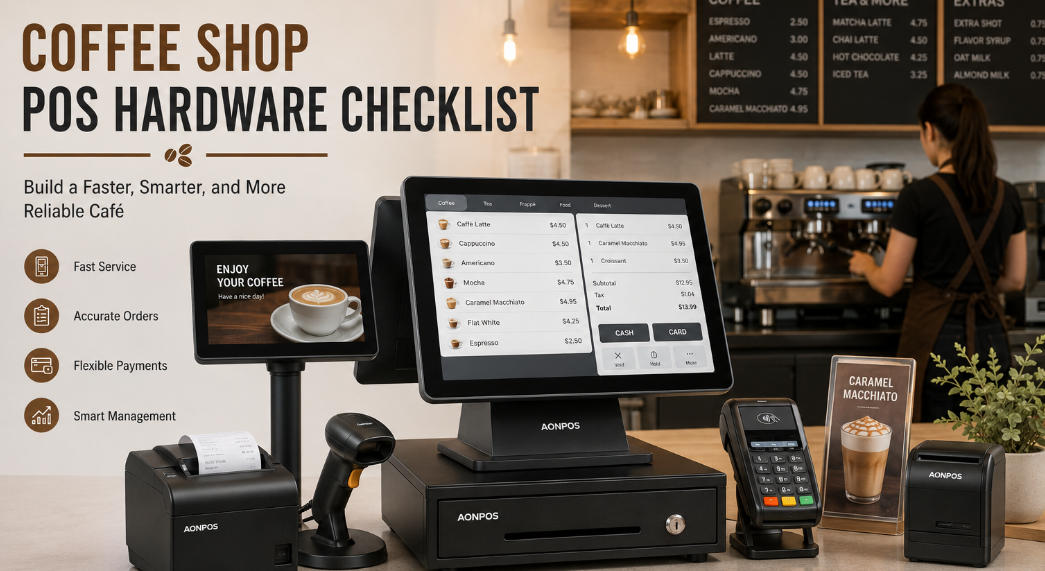
Coffee Shop POS Hardware Checklist: What You Need for a Faster and More Reliable Café
Jul 20, 2026
Running a coffee shop requires more than quality beans, skilled baristas, and an inviting atmosphere. Behind every smooth order is a collection of hardware that helps employees enter drinks, process payments, print tickets, manage cash, and communicate with customers.
Choosing the right coffee shop POS hardware can shorten queues, reduce order mistakes, simplify employee training, and support future growth. Choosing the wrong equipment, however, may lead to slow transactions, cluttered counters, connectivity problems, and unexpected maintenance costs.
Whether you are opening an independent café, upgrading an existing checkout station, or sourcing hardware for a multi-location coffee brand, this checklist explains the essential POS equipment you should evaluate.
Why Coffee Shop POS Hardware Matters
Coffee shops have a distinctive operating environment. Orders are often highly customized, transaction volumes can rise sharply during morning and lunchtime peaks, and counter space is usually limited.
A customer may order a latte with oat milk, an extra espresso shot, less syrup, and a specific cup size. The employee must enter every modifier accurately while continuing to serve the next customer. The POS hardware must therefore be responsive, easy to operate, and dependable during long daily shifts.
A well-planned coffee shop POS setup should help a café:
Process orders quickly during busy periods
Record drink modifiers accurately
Support card, cash, contactless, and mobile payments
Send clear order tickets to baristas
Display prices and order details to customers
Minimize the amount of equipment on the counter
Integrate with compatible café management software
Scale to additional counters, kiosks, or locations
The hardware itself does not replace POS software. Instead, it provides the physical platform on which ordering, payment, inventory, loyalty, and reporting applications operate.
1. Commercial Touchscreen POS Terminal
The touchscreen terminal is the central component of a coffee shop POS system. Employees use it to select menu items, add modifiers, apply discounts, accept payments, and manage transactions.
A consumer tablet may be adequate for a small pop-up coffee stand, but a busy café normally benefits from a commercial-grade terminal designed for continuous operation.
When comparing terminals, evaluate the following factors.
Screen Size
A 15-inch display is a practical choice for many coffee shops because it provides enough space for menu categories, drink sizes, modifiers, and payment buttons without occupying too much counter space.
Compact 12-inch models can work well in coffee carts, kiosks, and cafés with extremely limited checkout areas. Larger displays may suit businesses with extensive menus or applications that require more information on screen.
AONPOS offers a range of configurable all-in-one POS systems designed for restaurant and retail environments. An all-in-one design combines the display and computer in one enclosure, reducing the number of separate components around the checkout station.
Touch Technology
Capacitive touchscreens are generally well suited to modern cafés. They offer fast response, support intuitive gestures, and create a familiar smartphone-like user experience.
The touch panel should respond accurately even when employees are entering orders rapidly. Poor touch performance can cause missed selections, duplicated items, and delays during peak hours.
For a coffee shop environment, also consider a flat screen surface that is easy to wipe clean. Coffee splashes, syrup, milk residue, fingerprints, and dust can accumulate quickly around the counter.
Processor, Memory, and Storage
The necessary configuration depends on the POS software and operating system. A basic ordering application may have modest requirements, while a system running multiple integrations, cloud synchronization, delivery platforms, or customer-facing content may require more processing power.
Before purchasing hardware, confirm the software provider’s minimum and recommended specifications for:
Processor
RAM
Storage capacity
Display resolution
Operating system
Graphics requirements
Network connection
Selecting a slightly higher specification than the minimum requirement can provide additional room for software updates and future applications.
2. Operating System Compatibility
Coffee shop POS software may run on Windows, Android, Linux, or another specialized platform. Hardware and software compatibility should be confirmed before placing a bulk order.
Do not select a terminal based only on appearance or price. Ask the software provider whether the hardware drivers, ports, processor architecture, display resolution, and peripheral interfaces have been tested.
AONPOS focuses on POS hardware rather than locking buyers into one café management platform. This makes customizable hardware useful for software companies, system integrators, distributors, and coffee brands that already have a preferred software ecosystem.
For broader purchasing considerations, the AONPOS guide to restaurant POS hardware provides additional information about selecting equipment for food-service environments.
3. Customer-Facing Display
A customer-facing screen allows guests to review their order before payment. It may show product names, quantities, modifiers, taxes, discounts, totals, loyalty prompts, or promotional content, depending on the software.
This visibility can help customers identify mistakes before the transaction is completed. For example, a customer may notice that the cashier selected whole milk instead of almond milk or entered the wrong drink size.
There are two common configurations.
Small Customer Display
A compact secondary display is suitable when the goal is primarily to show transaction details. It takes up less space and can be attached to the main POS terminal.
Full-Size Second Screen
A larger screen offers more room for digital promotions, new drink announcements, seasonal menus, loyalty enrollment, QR codes, and branded content.
Coffee shops considering this configuration can review the differences between dual-screen and single-screen POS systems. The right choice depends on the counter layout, customer experience strategy, budget, and software capabilities.
4. Payment Terminal
Modern customers expect several payment options. A café may need to support chip cards, magnetic-stripe cards, NFC contactless payments, mobile wallets, and QR-based payment methods.
The payment terminal may be a separate device connected to the POS system or an integrated module supplied through the payment service provider.
Before selecting a payment device, verify:
Payment processor certification
Supported card and contactless standards
Connection method
Regional compliance requirements
Encryption and security features
Software integration
Placement and cable management
Customer accessibility
Payment regulations and processor requirements vary by country and service provider. Therefore, merchants should confirm compatibility directly with their payment partner rather than assuming that any card reader will work with any POS terminal.
5. Thermal Receipt Printer
Although digital receipts are becoming more common, printed receipts remain useful for customers, accounting, refunds, and order identification.
Thermal printers are commonly used at coffee shop counters because they print quickly and do not require ink cartridges. Important purchasing criteria include:
58 mm or 80 mm paper support
Printing speed
Auto-cutter durability
USB, Ethernet, serial, Bluetooth, or Wi-Fi connectivity
Driver compatibility
Easy paper loading
Print-head service life
Availability of replacement paper
An 80 mm printer provides more space for detailed receipts, logos, QR codes, and promotional messages. A compact 58 mm printer may be sufficient where counter space is limited and receipts contain only basic information.
AONPOS supplies POS hardware categories that include 58 mm and 80 mm thermal printer solutions, allowing buyers to create a more coordinated checkout hardware package.
6. Barista or Kitchen Ticket Printer
A customer receipt printer and a preparation-area printer serve different purposes.
The checkout printer produces a receipt for the customer. A barista printer produces an order ticket containing information such as:
Order number
Drink name
Cup size
Milk selection
Temperature
Syrup or flavor
Extra shots
Dine-in or takeaway status
Customer name
Order time
Some small cafés use one printer for both functions, while higher-volume stores may route drink tickets to the coffee station and food tickets to a separate preparation area.
If the printer will be placed near steam, heat, water, or food preparation, durability and installation location become especially important. The software must also support the required print routing.
7. Cash Drawer
Cash remains relevant in many markets, so a secure cash drawer may still be required.
Look for a drawer with:
Durable metal construction
Adjustable bill and coin compartments
Secure locking mechanism
Emergency key access
Printer-driven or direct POS connection
Removable cash tray
Suitable dimensions for the counter
Many cash drawers connect through the receipt printer and open automatically after an authorized cash transaction. Confirm the voltage and interface compatibility between the drawer and printer.
The drawer should also fit the workflow. A unit that is too large wastes valuable counter space, while a drawer that is too small may be inconvenient during busy periods.
8. Barcode or QR Code Scanner
A barcode scanner is not always essential for entering freshly prepared drinks, because baristas usually select these products from the touchscreen menu. However, it becomes valuable when a café sells packaged goods such as:
Coffee beans
Bottled beverages
Packaged snacks
Reusable cups
Brewing equipment
Gift cards
Branded merchandise
A 2D scanner can read both traditional product barcodes and QR codes. This may be useful for loyalty applications, digital coupons, employee identification, mobile orders, and customer membership programs.
Choose between a fixed countertop scanner and a handheld scanner based on the café’s product range and counter layout.
9. Network Equipment and Offline Planning
Cloud-based POS applications depend heavily on stable network connectivity. A café should plan its network infrastructure as carefully as its checkout hardware.
A reliable setup may include:
Business-grade router
Secure Wi-Fi network
Wired Ethernet connection for the main POS
Separate guest and operational networks
Backup internet connection
Uninterruptible power supply
Surge protection
Cable management
A wired Ethernet connection is often preferred for a fixed checkout station because it can provide greater consistency than Wi-Fi. Wireless connectivity remains useful for handheld devices, tablets, and flexible ordering stations.
Ask the POS software provider what happens when the internet connection fails. Some systems support limited offline ordering or payment queuing, while others may lose important functionality.
10. Handheld POS Terminal
A handheld terminal is optional, but it can expand how a coffee shop serves customers.
Employees may use a portable device to:
Take orders from customers waiting in line
Accept payments at outdoor tables
Support curbside pickup
Process orders at events
Operate a mobile coffee cart
Reduce congestion around the main counter
The AONPOS handheld POS terminal supports mobile transaction scenarios and multiple payment technologies. Before deployment, confirm that the selected café software is optimized for the device and screen size.
Handheld terminals should complement the main counter rather than add unnecessary complexity. They are most valuable when mobility clearly improves service speed or customer convenience.
11. Self-Service Ordering Kiosk
A self-ordering kiosk can be useful for high-volume cafés, food halls, airport locations, university campuses, and stores with extensive customization options.
Customers can browse the menu, configure drinks, select food, review the order, and proceed to payment without waiting for a cashier. This can give front-of-house employees more time to prepare drinks, assist customers, and maintain the service area.
A kiosk may include:
Large capacitive touchscreen
Industrial computer
Payment terminal
Receipt printer
QR or barcode scanner
NFC reader
Camera
Speaker
Floor, wall, or countertop mounting structure
AONPOS provides customizable self-service payment kiosk hardware in different screen sizes and installation formats. Buyers should verify software integration, payment certification, accessibility, menu design, and physical placement before deployment.
A kiosk should not automatically replace personal service. In many coffee shops, the best approach is a hybrid model that gives customers a choice between cashier ordering and self-service.
12. Ports and Peripheral Connectivity
A coffee shop POS terminal may need to connect to several devices simultaneously. Insufficient ports can force the operator to rely on adapters or hubs, creating a less reliable installation.
Check whether the terminal provides enough of the following interfaces:
USB
Serial or COM
RJ45 Ethernet
HDMI or VGA
Audio
Cash drawer interface
Wi-Fi
Bluetooth
Create a complete peripheral map before ordering. Include every current device and allow capacity for possible additions such as a second printer, customer display, scanner, weighing scale, or external payment terminal.
13. Counter Space and Cable Management
The best technical specification is not useful if the hardware does not fit the service counter.
Measure the available space and consider:
POS terminal footprint
Screen viewing angle
Cash drawer position
Printer paper access
Payment terminal reach
Customer display visibility
Ventilation
Cable routing
Cleaning access
Employee movement
An all-in-one terminal can simplify the counter by reducing separate computer components. VESA-compatible mounting and adjustable stands may provide additional flexibility.
Before final installation, simulate a complete transaction and confirm that employees can reach every device without twisting, crossing cables, or blocking the drink handoff area.
14. Durability and Maintenance
Coffee shops expose electronics to moisture, heat, steam, sugar, grease, and constant handling. Hardware should be selected for commercial use rather than occasional home use.
Ask suppliers about:
Enclosure materials
Touchscreen durability
Operating temperature
Cooling design
Dust resistance
Component availability
Warranty terms
Technical support
Replacement procedures
Product lifecycle
The front surface should be easy to clean, but cafés must follow the manufacturer’s cleaning instructions. Liquid should never be sprayed directly into ports, ventilation openings, printers, or payment devices.
Standardizing equipment across several locations can also simplify spare-parts management and employee training.
15. OEM and ODM Requirements for Coffee Shop Projects
Distributors, POS software companies, and international coffee chains may require more than an off-the-shelf terminal.
OEM and ODM requirements can include:
Custom logo
Enclosure color
Screen size
Processor configuration
RAM and storage
Port arrangement
Integrated customer display
Built-in printer or scanner
Packaging
Operating system image
Regional power adapter
Mounting structure
AONPOS is a Shenzhen-based POS hardware manufacturer established in 2012, with a product portfolio that includes all-in-one touch POS terminals, touch monitors, kiosks, printers, scanners, stands, and other checkout peripherals. Its OEM and ODM POS hardware capabilities are particularly relevant for distributors, integrators, and brands building a standardized coffee shop POS solution.
Final Coffee Shop POS Hardware Checklist
Before approving your coffee shop POS configuration, confirm that you have evaluated:
Commercial touchscreen POS terminal
Compatible operating system
Customer-facing display
Payment terminal
Customer receipt printer
Barista or kitchen ticket printer
Cash drawer
Barcode or QR scanner
Router and network equipment
Power protection
Optional handheld terminal
Optional self-service kiosk
Required ports and cables
Counter dimensions
Software and driver compatibility
Warranty and technical support
Spare equipment strategy
OEM or ODM customization requirements
Conclusion
A reliable coffee shop POS setup is not defined by one device. It is a coordinated hardware system built around the café’s menu, transaction volume, payment methods, counter layout, and service model.
Start with a responsive commercial touchscreen terminal, then add only the peripherals that support the actual workflow. Confirm software compatibility before purchasing, plan network and power protection, and consider future requirements such as customer displays, mobile ordering, and self-service kiosks.
For independent cafés, the priority may be simplicity and efficient use of space. For chains, distributors, and system integrators, consistency, serviceability, customization, and product lifecycle are equally important.
By treating POS hardware as long-term operational infrastructure rather than a collection of individual devices, coffee businesses can build a checkout environment that is faster, cleaner, easier to manage, and ready for future growth.